
 Need help?
Do you have a question about the JetBlack VOLT V2 and is the answer not in the manual?
Guide on replacing the pre-installed 11-speed cassette with other speed options.
Instructions for attaching your bicycle to the trainer, covering QR and thru-axle setups.
Steps to connect the trainer to the JetBlack Cycling mobile application for setup and updates.
Procedure for performing a spin down calibration for optimal trainer accuracy.
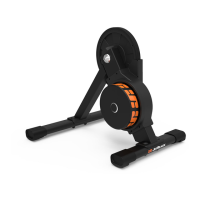
The JetBlack VOLT™ V2 is a smart trainer designed for indoor cycling, offering a realistic and immersive training experience. It is engineered to be exceptionally quiet, allowing users to focus on their workout without significant noise from the trainer itself. The design prioritizes a smooth and accurate ride feel, simulating real-world cycling conditions with a high degree of precision.
The VOLT™ V2 functions as a direct-drive smart trainer, meaning the bicycle's rear wheel is removed, and the bike is mounted directly onto the trainer's cassette. This setup provides a stable and efficient power transfer, contributing to the trainer's accuracy and quiet operation. The trainer features an electromagnetic braking system that provides resistance, allowing for a wide range of simulated grades and power outputs. It is designed to connect seamlessly with popular training applications, enabling interactive workouts, virtual rides, and structured training plans. The smart technology utilized by JetBlack allows the trainer to combine multiple Bluetooth signals, enhancing connectivity and data transmission.
The VOLT™ V2 comes pre-assembled with an 11-speed cassette, making it ready to ride almost immediately after unboxing. This eliminates the need for additional costs or setup time for most users. It is compatible with Shimano and SRAM drivetrains. The trainer is designed for quick and easy attachment of your bike, allowing users to connect and start their workout efficiently.
For optimal stability during intense workouts and rigorous sprints, the VOLT™ V2 is built with a rock-solid design and features rubber grip feet. The stabilization legs are attached using provided tools, with a short leg to the rear and a long leg to the front, ensuring optimal balance and supporting the drive side.
The trainer offers broad bike compatibility, accommodating most road and mountain bikes. It supports 130/135mm quick release axles and 12x142/148mm thru axles. Rear wheel sizes supported include 650C, 700C for road bikes, and 24", 26", 27.5", and 29" for mountain bikes. However, it may not be suitable for some single-speed, recumbent, and specific thru-axle configurations.
The VOLT™ V2 includes a connectivity light (LED) display that provides visual feedback on its status. When connected to a power source, flashing RED/BLUE/GREEN lights indicate the trainer is starting up. A blinking blue light signifies that the trainer is searching for a Bluetooth device, while a solid blue light indicates a successful Bluetooth connection and active signal transmission. For ANT+ connections, a blinking blue light indicates availability, and the app will show the connection.
The trainer is compatible with a wide range of devices and operating systems. For Apple iOS, it works with devices running iOS 11 and newer, utilizing the JetBlack Volt App. For Android, it supports most Bluetooth® compliant devices running Android version 5.1 or newer. It also works with popular Windows and Mac training apps that support Bluetooth and/or ANT+ capabilities. The JetBlack Volt App is crucial for firmware updates and is available on both iOS and Android mobile devices.
Connecting the trainer to the JetBlack Volt App involves ensuring all third-party apps are closed, attaching the bike, connecting to power, opening the app, activating Bluetooth or ANT+, and following the in-app setup wizard. Firmware updates are managed exclusively through the JetBlack Volt App, by navigating to settings and selecting 'Firmware Update'.
A spin-down calibration is recommended if the trainer has been moved or if there's been a significant temperature change, ensuring optimal calibration. This process involves warming up the trainer for 10 minutes, then using the JetBlack Cycling App to navigate to settings, select 'Spin Down Calibration', and follow the instructions.
For connecting to third-party training applications, it's important to ensure the VOLT™ V2 is disconnected from all devices within the JetBlack App. A blue flashing light indicates the trainer is available for connection, and a solid blue light confirms a successful connection.
The VOLT™ V2 is designed for minimal maintenance, but regular care is recommended to ensure its longevity and optimal performance. Human sweat is highly corrosive, so using a sweat towel during training is advised to prevent sweat from reaching the trainer. Periodically wiping down the trainer with a moist cloth helps maintain the quality of its surfaces.
Moving parts, such as the cassette body, can dry out over time. Occasional application of grease will help maintain a silent ride and benefit performance. It is crucial to avoid using degreasers or petroleum-based lubricants and to keep corrosive substances away from the VOLT™ V2.
Regularly checking the trainer, especially the mounting system, for any signs of damage is important. If damage is suspected, the trainer should not be used, and the supplier should be contacted. Using an indoor training fan is also recommended to help manage heat during workouts.
Users must read and follow all instructions regarding the VOLT™ V2 setup and bicycle installation. Failure to securely attach the bicycle can lead to serious injury. The quick release skewer must be tightened firmly, with the lever leaving a clear imprint on the palm of your hand when closed. Users should check their bicycle's manual to confirm compatibility with indoor trainers.
Always exercise caution to prevent children or pets from getting too close to the trainer. The VOLT™ V2 is intended for single-rider bicycles only. Before each workout, verify that the bicycle is securely attached. The trainer must always be used on a flat surface.
Avoid using the VOLT™ V2 in wet conditions, as this can damage the electronics. Do not place fingers, feet, or dangling objects near moving parts. Do not attempt to dismount until all moving parts have stopped. Modifying the trainer or manually stopping the resistance unit or flywheel is not advised. The resistance unit housing can become hot, so avoid touching it until it has cooled down.
Before starting any exercise program, consult a physician. If you experience illness, dizziness, light-headedness, or nausea while riding, stop immediately and seek medical attention.
 General
| Resistance Type | Magnetic |
|---|---|
| Connectivity | Bluetooth |
| Power Meter | Yes |
| Resistance Levels | 100 |
| Display | LCD |
| Dimensions | 120 cm |
| Warranty | 2 years |

 To Next Page