1 3
Troubleshooting
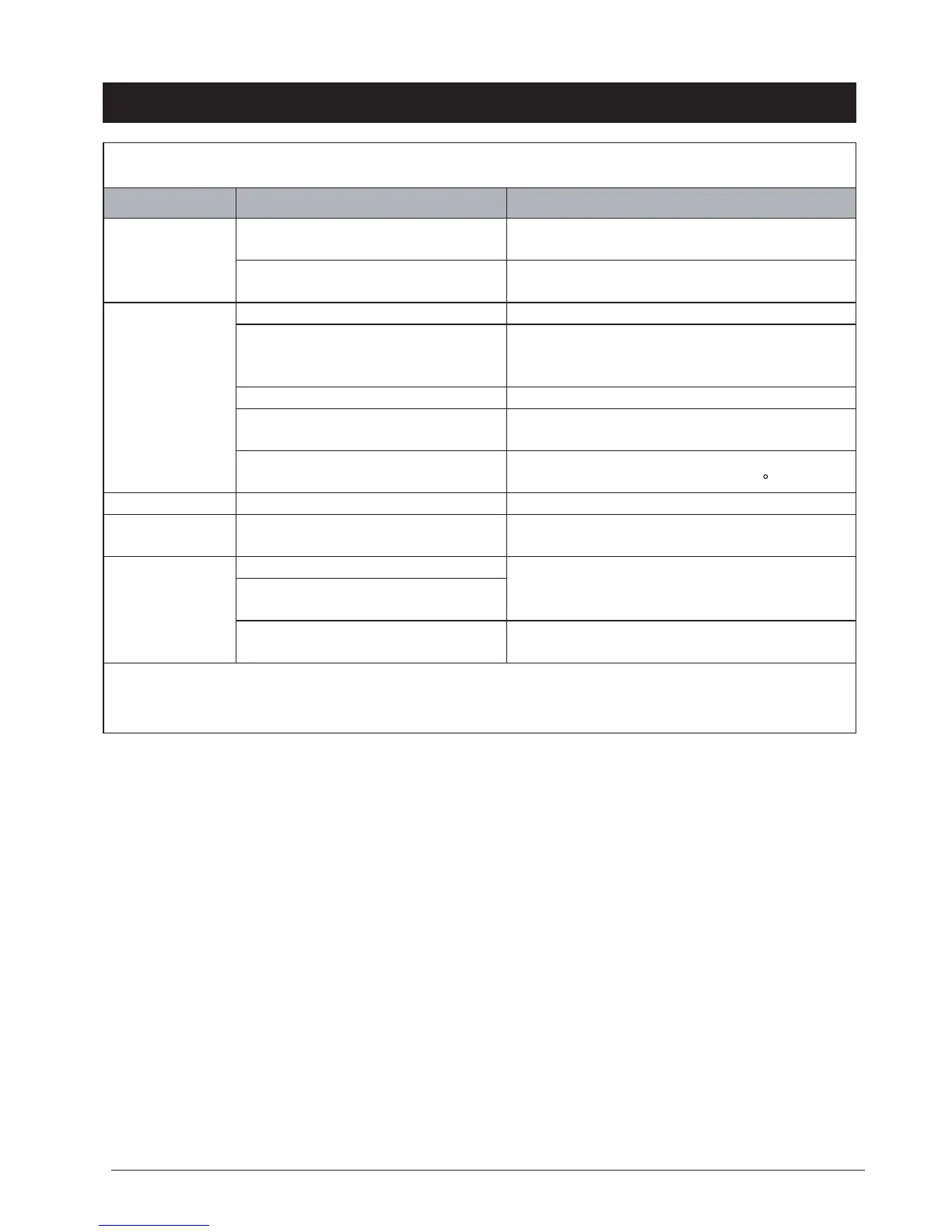
Never try to repair or dismantle the air condition yourself.
Incompetent repairs result in loss of warranty and can endanger the user and the property.
noituloSesuaCmelborP
The air
conditioner does
not function.
*
No power supply. Make sure the
green light on the plug is lit.
Connect to a functioning outlet and switch on.
See below for Plug and Reset button application.
Is the power light ashing?
Is the water full LED lit?
Empty the water container .
The air
conditioner does
not seem to
perform.
The unit is in direct sunlight. Close curtains/shades
Windows or doors open, many
people or a heat source in the room.
Close doors and windows. Unit is not made to
cool server rooms, sun rooms, or any rooms
generating a constant high levels of heat.
The filter is dirty. Clean the filter .
Air inlet or air outlet blocked.
Power off the unit and unplug from outlet.
Remove blockage.
Room temperature lower than the
selected value.
Change temperature selection.
Set at the lowest possible setting: 16 C .
The unit is noisy. Unit stands uneven. Place on an even, solid surface (less vibrations).
The compressor
does not work.
The overheat protection may be
activated.
Wait 30 minutes until the temperature has
decreased, then turn on the unit again.
The remote
control does not
function.
Distance too great.
Make sure the remote control is correctly aimed
at the control panel.
Remote control signal not detected
by the control panel.
The batteries are drained. Check batteries on the remote control.
Note: When abnormal situations occur, turn off machine and pull out plug, then contact
with professional electrician for help
*
Make sure unit is plugged directly into a dedicated electrical source/outlet.
Do not use any extension cords. See electrical specications listed on
page 3 and make sure the electrical source can accommodate the unit’s
energy consumption.


 To Previous Page