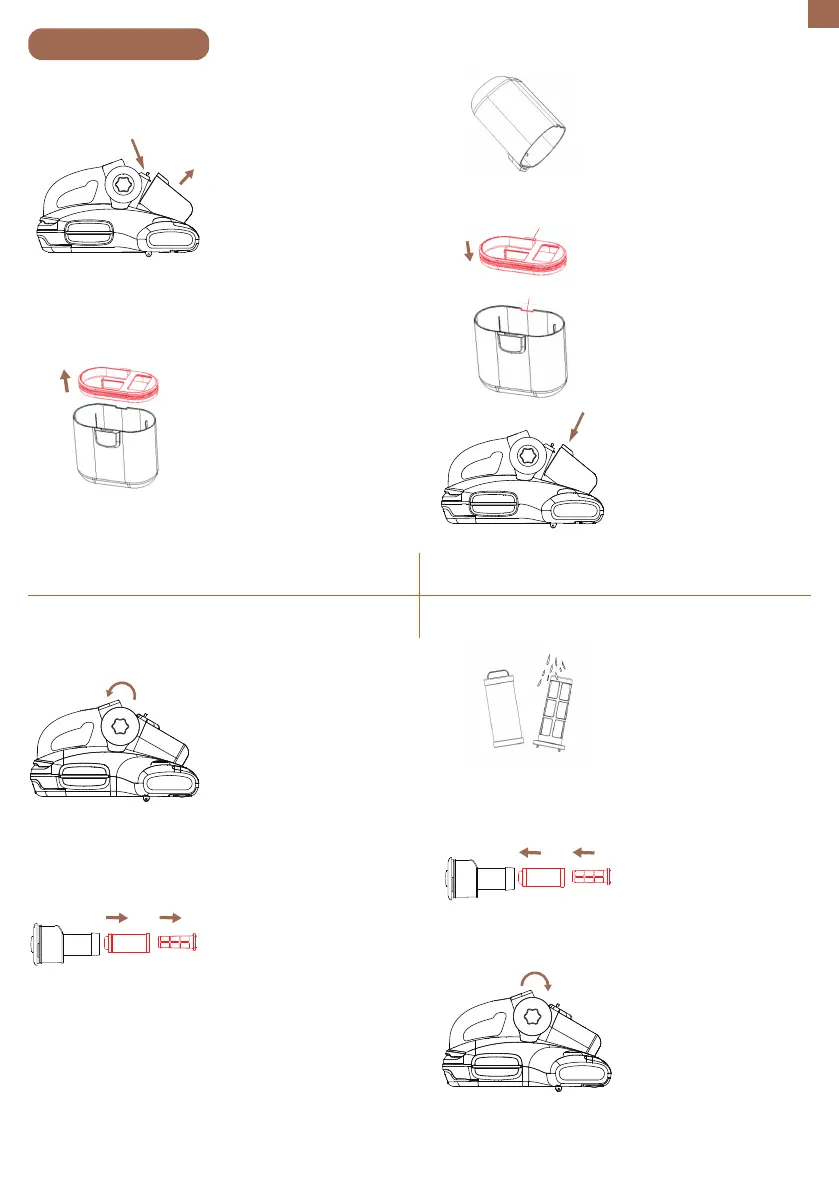
1. Rotate the right lid of the
cyclone cup counterclock-
wise to open it and remove
the filter from the cyclone
cup.
2. Remove the support of
the filter sponge from the
filter and take out the filter
sponge from its support.
Maintenance
Dust cup cleaning
Cyclone cup cleaning
EN
03
1. Push the dust cup release
button and remove the
dust cup.
2. Remove the lid of the
dust cup.
3. Empty the dust cup.
4. Align the bump on the lid
with the hollow on the dust
cup and close the lid tightly.
5. Install the dust cup.
3. Clean the filter and
sponge. The sponge can be
washed with water. (The
filter and sponge should
be completely dry before
putting them back into the
dust cup.)
4. Put the filter sponge
back into the support and
then place the support
back into the filter.
5. Place the filter back into
the cyclone cup and rotate
the lid of the cyclone cup
clockwise to secure the lid.
Bump
Hollow


 To Next Page