EN
05
Specifications
Note
Technical Parameters
Failure
The machine
does not
work
The suction
force
becomes
smaller
The UV lamp
does not
work
Possible causes
• The power plug is not
inserted tightly.
• There is no electricity
at ths power socket.
• The power switch is
not pressed.
• The suction port is
blocked.
• There are too many
foreign objects in the
filter sponge.
• There are many foreign
objects in the cyclone.
• The two rollers under
the machine do not
touch the surface of
the object at the same
time.
• The two rollers under
the machine are stuck
and can't move freely.
• The UV lamp is
damaged.
Solutions
• Check whether the
power plug is inserted
tightly.
• Check the socket.
• Press the power
switch.
• Clean the suction
port.
• Clean the dust barrel
and filter sponge.
• Clean up foreign
objects in the cyclone.
• Place the machine flat
on the object and
ensure that both
rollers are
compressed.
• Clean the rollers to
ensure that the two
rollers can move up
and down freely or
contact after-sales
service.
• Contact after-sales
service to replace the
UV lamp.
Model
Rated voltage
Rated current
Dust collection volume
Attention:
If any other failures occur and you can not find any solution
from the chart above, please contact the after-sales service.
Any other maintenance and repair that need to be done by
using professional tools and techniques, should be performed
by a qualified mechanic designated by the manufacturer or
maintenance center.
Failure
The machine
suddenly
stops working
The roller
brush
suddenly
stops working
Possible causes
• The dust barrel is full.
• The suction port of the
machine is blocked.
• The cyclone is blocked
by foreign matter.
• The machine is
damaged.
• The roller brush is
wrapped by foreign
objects.
• The belt falls off or
breaks.
Solutions
• A safety mechanism
has been added to
prevent overheating. If
this happens, please
stop using, clean up
the blockage, and
pause for two hours
before using again.
• Contact after-sales
service.
• Take out the roller
brush as required and
clean it before using.
• Contact after-sales
service to replace the
belt.
• This product is an electric appliance, do not
let it run unattended.
• If you do not use this product for a long time,
please turn off the power and unplug the
machine.
• Unplug the machine with dry hands to avoid
electric shock.
• Disconnect the power supply when cleaning,
servicing or when the machine is not in use for
a while.
• Do not let the power cord pass through sharp
objects and avoid dragging the cord to move
the machine as this may damage the cord.
• Do not use the machine to absorb hot
objects such as carbon, cigarette butts, and
sharp objects such as broken glass, corrosive
T600
120V 60Hz
4A
0.5L
Troubleshooting
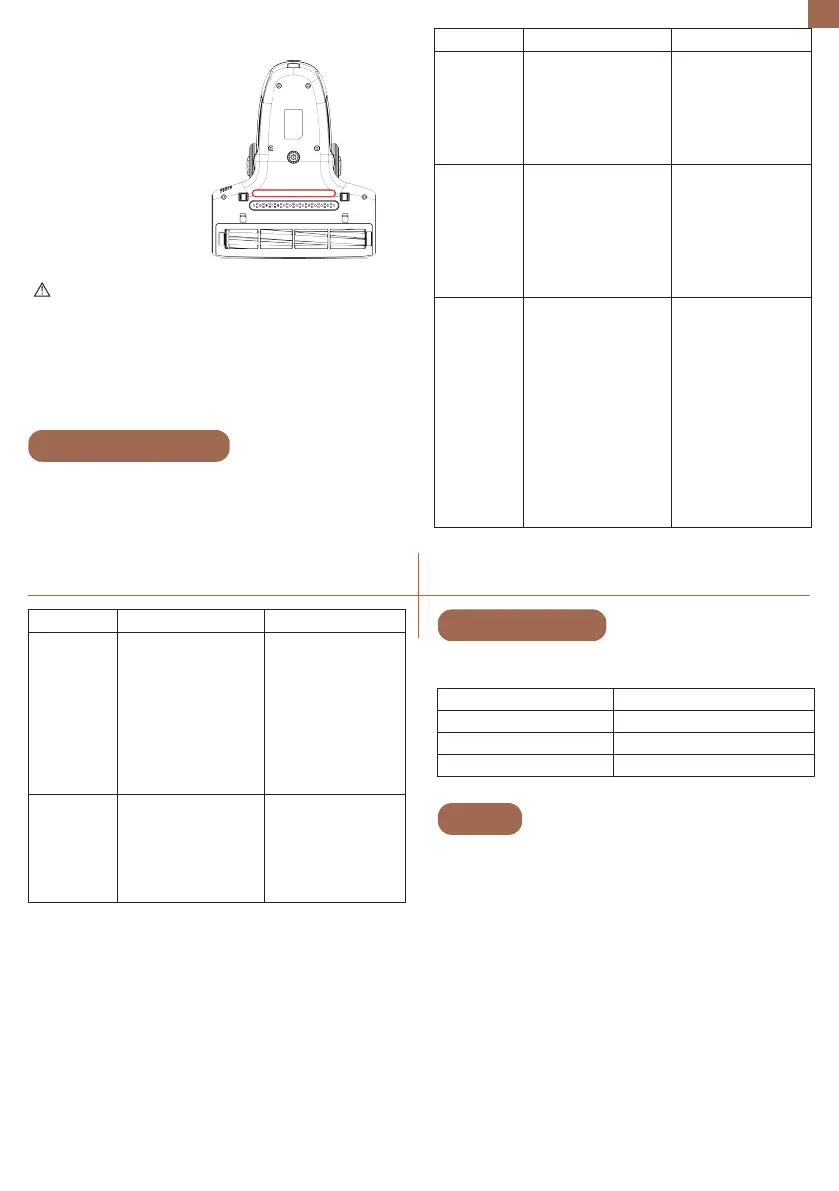
UV lamp cover cleaning
UV lamp cover
(transparent)
Note:
• Please wipe the transparent cover of the UV lamp before use to
ensure the best sterilization effect;
• Cut off the power when cleaning, repairing or temporarily not
using the machine.
• Don't look directly into the UV ray.
• Keep the UV ray away from your skin.
Please check the following issues and
solutions before sending the product to
designated repair offices.


 To Next Page
 Loading...