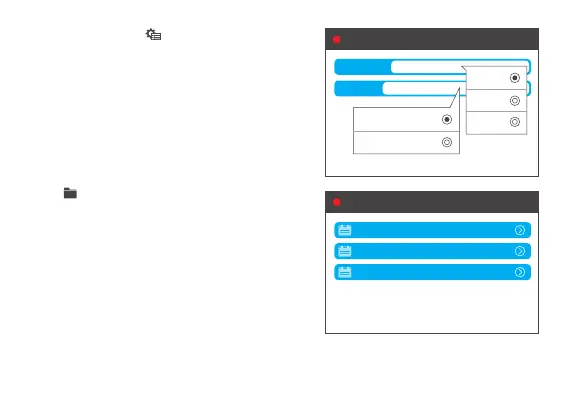
3. Tap the left screen to set the storage space
and recording resolution for video record. When
TF card is available, video will be recorded into
TF card as default, when there is no TF card or
the space of TF card is running full, video will be
saved into internal storage automatically.
4. Tap to review video records, event videos, etc.
4.1 Default recording resolution is 720P. 3 minutes
recordingthelewillbearound75MB.Videole
will be saved every 3 minutes under folder “GENERAL”.
Old record will be overrun by the new when space
is running out.
4.2. G-Sensor. During accident or sudden brake,
videole(15seconds)willbesavedinaseparate
folder “EVENT” and will not be overrun until the
“EVENT” folder is full(500MB).
Set
Memory Space
Video Fomat
2G
16:9 1280*720(720P)
REC
File listREC
GENERAL
EVENT
SHARE
2G
4G
8G
16:9 1280*720(720P)
16:9 1920*1080(1080P)


 To Next Page