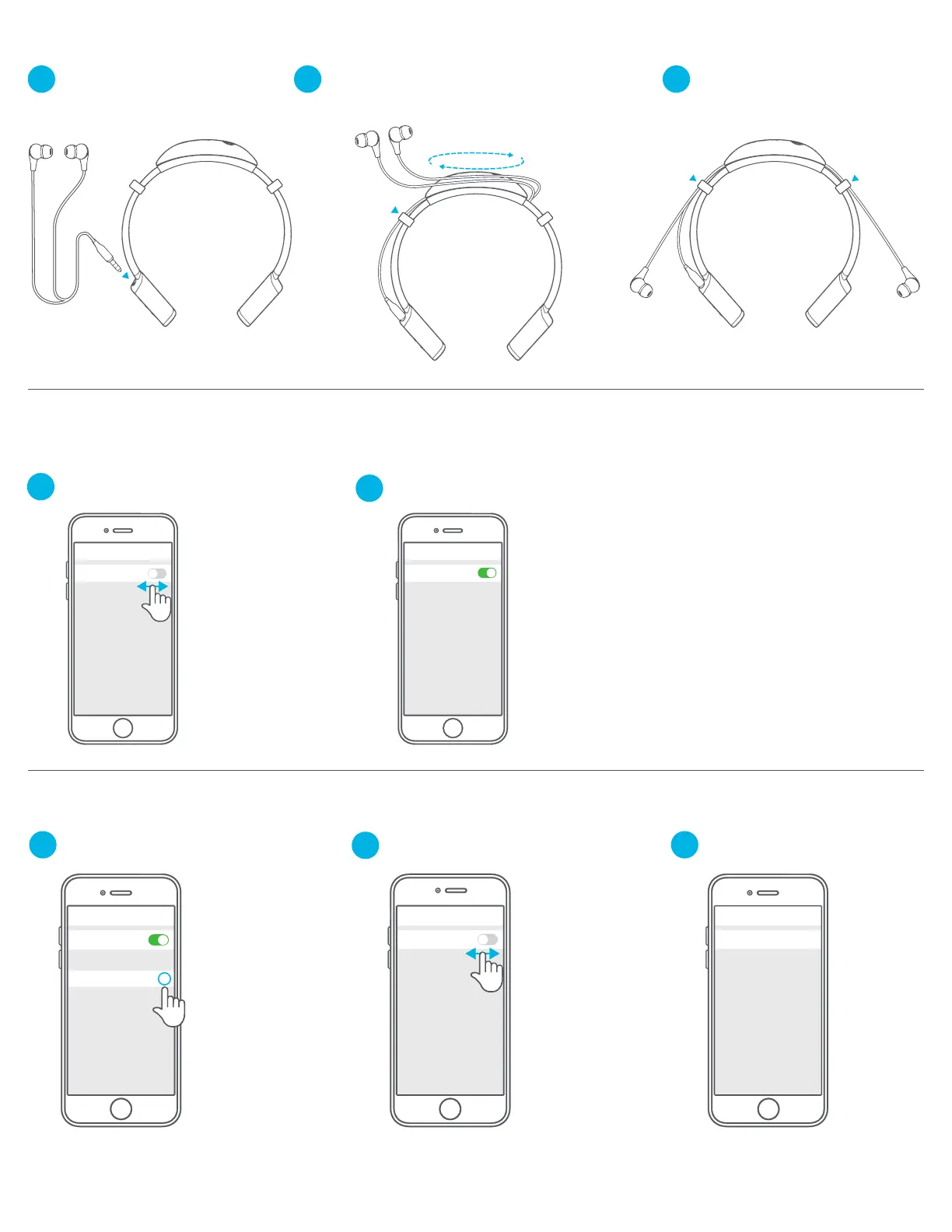
Turn Bluetooth off and then
back on in device settings.
In device settings,
forget the JLab Gravity.
Turn Bluetooth off then
back on in device settings.
Repeat FIRST TIME SETUP:
BLUETOOTH PAIRING directions.
If you still do not see JLab Gravity,
repeat FIRST TIME SETUP: BLUETOOTH PAIRING directions.
Bluetooth
Settings
CONNECTION TROUBLESHOOTING
I DO NOT SEE JLAB GRAVITY IN MY DEVICE
Bluetooth
Settings
1
2
Bluetooth
Settings
1
JLAB GRAVITY DOES NOT RECONNECT TO MY DEVICE AFTER POWERING ON
Bluetooth
JLab Gravity
Settings
i
Bluetooth
Settings
2
3
1 2 3
CABLE MANAGEMENT SYSTEM
Insert earbuds into earbud jack. Wrap cord around Cable Management System. Adjust cord to desired length.




 To Next Page