EasyManua.ls Logo

JLab Audio JBUDS 2 - User Manual

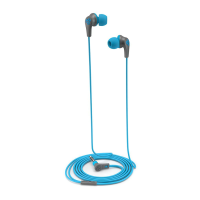
JLab Audio JBUDS 2
1 page
Print Icon
Loading...
INSTRUCTIONS FOR USE
1 Lower the volume on your audio device.
2 Gently insert the earbuds into your ears.
3 Gradually raise the volume to a comfortable level.
4 In order to block outside noise, position the earbuds so they form a seal inside your ear.
5 Test the various gel tip options to find the best fit.
ADJUSTABLE TIP PLACEMENT
POSITION 1:
Snug,
Deeper Fit
POSITION 2:
Relaxed,
Shallow Fit
Choose your tip size Adjust the position
JLABAUDIO.COM
JBUDS 2
EARBUDS
2
1
C
U
S
T
O
M
E
R
S
U
P
P
O
R
T
U
.
S
.
B
A
S
E
D
We love that you are rocking JLab Audio!
We take pride in our products and fully stand behind them.
YOUR WARRANTY
All warranty claims are subject to JLab Audio
authorization and at our sole discretion. Retain your
proof of purchase to ensure warranty coverage.
CONTACT US
Reach out to us at support@jlabaudio.com
or visit jlabaudio.com/contact
REGISTER TODAY
jlabaudio.com/register
Product updates | How-to tips
FAQs & more
CAUTIONS
• Avoid getting moisture or liquids into the tip of the earbuds.
• Avoid extreme heat, cold, and humidity.
• Avoid dropping or crushing the earbuds, stressing the cable by rapid pulling or extreme force, or bending the cable at a sharp angle.
• Wax may build up in the earbud tips, lowering the sound quality. Carefully remove the wax with a cotton swab or other small tool to
improve the sound quality.
• If you experience discomfort or pain, try lowering the volume or discontinuing use temporarily.
• If you experience regular discomfort while using this product, discontinue use and consult your physician.
• We recommend you treat your earbuds as you would a nice pair of sunglasses and keep them in safe location when not in use.
Shop products | Product alerts | Burn-in your headphones
JLab Audio + Burn-in Tool
Question and Answer IconNeed help?

Do you have a question about the JLab Audio JBUDS 2 and is the answer not in the manual?

Overview

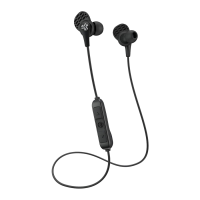
This document describes the JBuds 2 earbuds from JLab Audio, focusing on their features, usage, and maintenance.

Function Description:

The JBuds 2 are a pair of earbuds designed for audio playback. Their primary function is to deliver sound from an audio device to the user's ears. A key design aspect is their ability to block outside noise, which is achieved by ensuring a proper seal within the ear canal. The earbuds are intended for general audio listening and are accompanied by a "Burn-in Tool" (available via an app) which suggests a method to optimize their sound performance over time.

Important Technical Specifications:

While specific technical specifications like frequency response, impedance, or driver size are not explicitly detailed in this document, the inclusion of "gel tip options" and "adjustable tip placement" indicates that the earbuds are designed with user comfort and fit as a priority, which indirectly impacts sound quality and noise isolation. The "Burn-in Tool" implies a focus on audio fidelity and the potential for sound improvement through a conditioning process. The mention of "JLab Audio + Burn-in Tool" suggests a software component that complements the hardware.

Usage Features:

The JBuds 2 offer several user-friendly features:

  • Easy Setup: The instructions outline a straightforward process for initial use:
    1. Lower the volume on the audio device.
    2. Gently insert the earbuds into the ears.
    3. Gradually raise the volume to a comfortable level.
  • Noise Isolation: To effectively block outside noise, users are instructed to position the earbuds to form a seal inside their ear. This highlights a key performance aspect of the JBuds 2.
  • Customizable Fit: The earbuds come with various gel tip options, allowing users to find the best fit for their ears. This is crucial for both comfort and optimal sound performance, especially for noise isolation.
  • Adjustable Tip Placement: The document details two distinct positions for the earbud tips:
    • Position 1 (Snug, Deeper Fit): This position is likely intended for maximum noise isolation and a more secure fit, ideal for active use or environments where external noise is a concern.
    • Position 2 (Relaxed, Shallow Fit): This position offers a more relaxed fit, which might be preferred for extended listening sessions or by users who find a deeper fit uncomfortable.
  • Warranty and Support: JLab Audio provides a "Limited Lifetime Warranty" and "U.S. Based Customer Support." Warranty claims are subject to JLab Audio authorization and discretion, requiring proof of purchase. Users can contact support via email (support@jlabaudio.com) or by visiting jlabaudio.com/contact.
  • Product Registration and Resources: Users are encouraged to register their product at jlabaudio.com/register. This provides access to product updates, how-to tips, and FAQs, enhancing the user experience and providing ongoing support.
  • Burn-in Tool: The availability of a "Burn-in Tool" via the App Store and Google Play suggests a feature aimed at optimizing the sound quality of the headphones over time, a common practice among audiophiles.

Maintenance Features:

Proper maintenance is crucial for the longevity and performance of the JBuds 2. The document provides several cautions and recommendations:

  • Protection from Elements:
    • Avoid getting moisture or liquids into the tip of the earbuds.
    • Avoid extreme heat, cold, and humidity.
  • Physical Care:
    • Avoid dropping or crushing the earbuds.
    • Avoid stressing the cable by rapid pulling or extreme force.
    • Avoid bending the cable at a sharp angle.
  • Cleaning: Wax buildup in the earbud tips can lower sound quality. Users are advised to carefully remove wax with a cotton swab or other small tool to improve sound quality.
  • Comfort and Health:
    • If discomfort or pain is experienced, users should try lowering the volume or discontinuing use temporarily.
    • For regular discomfort, users should discontinue use and consult a physician.
  • Storage: It is recommended to treat the earbuds like a pair of sunglasses and keep them in a safe location when not in use, protecting them from damage and loss.

In summary, the JBuds 2 are designed as user-friendly earbuds with a focus on customizable fit, noise isolation, and sound quality, supported by a comprehensive warranty and maintenance guidelines.

JLab Audio JBUDS 2 Specifications

General IconGeneral
BrandJLab Audio
ModelJBUDS 2
CategoryHeadphone
LanguageEnglish

Related product manuals