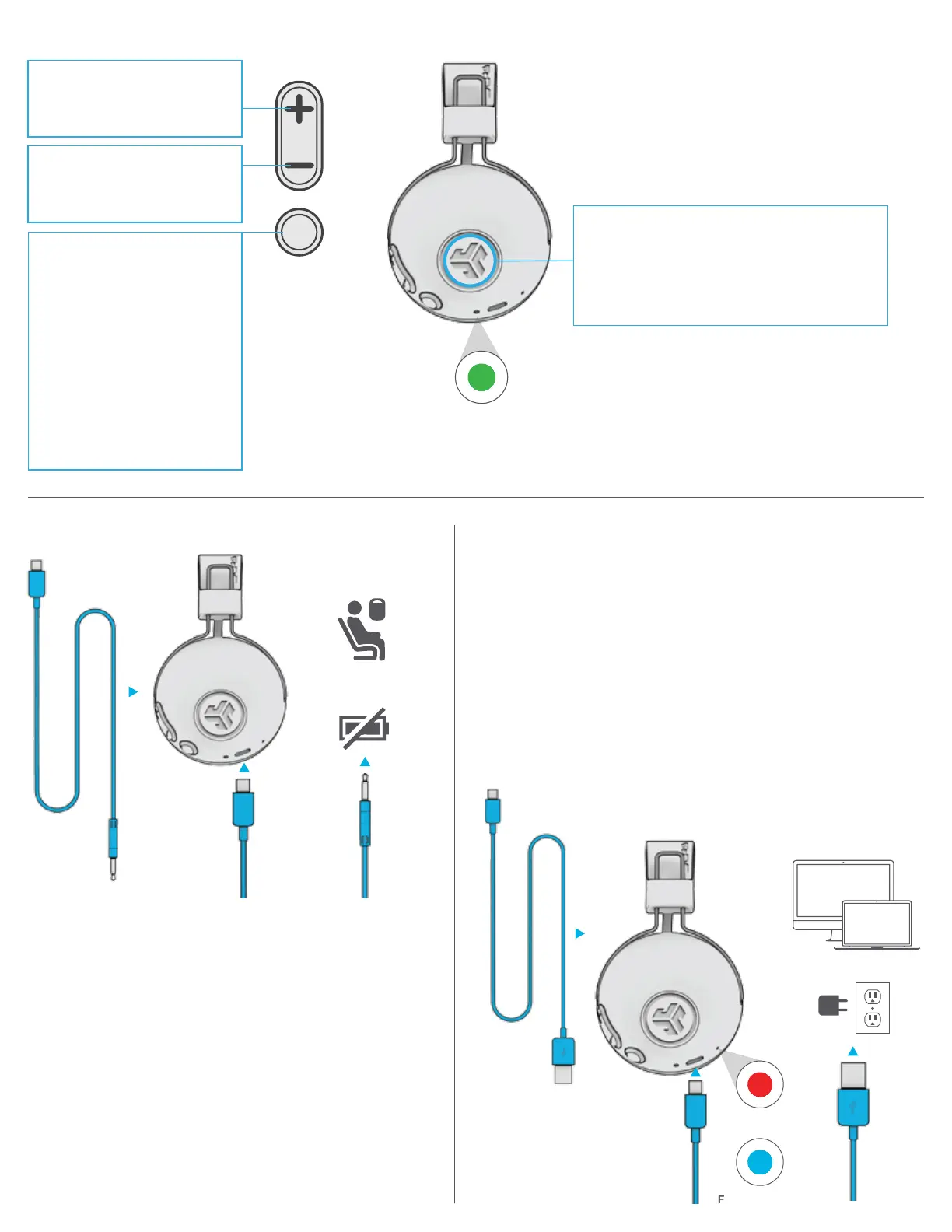
CHARGING
Note: For optimum performance, charge overnight with Micro
USB cable prior to using. Allow about 3 hours to fully charge.
Connect the Micro USB (included) to the headphone and connect
the USB into a computer or AC adaptor (not included).
Make sure the USB connection has a power output source.
Solid red light indicates the headphone is charging.
Solid blue light indicates charging is complete.
Note: Studio ANC can still be used while charging.
Power on and connect to device after charging occurs.
BUTTON FUNCTIONS
AUX INPUT
POWER ON / OFF:
Press & hold 2+ seconds
PLAY / PAUSE / ANSWER /
HANG UP CALLS: Press once.
REJECT INCOMING CALL:
Press & hold 1 second
ACTIVATE SIRI (iOS) OR
“OK GOOGLE” (ANDROID):
Press twice
BLUETOOTH PAIRING:
See FIRST TIME SETUP
VOLUME UP: Press once
TRACK FORWARD:
Press & hold 2+ seconds
VOLUME DOWN: Press once
TRACK BACKWARD:
Press & hold 2+ seconds
CHARGING
CABLE
FULLY CHARGED
CHARGING
OR
ANC ON
CONNECTED TO BLUETOOTH:
Press once to Power ON/OFF.
ON: 2 Beeps OFF: 1 Beep
CONNECTED TO AUX:
Press and hold 2+ seconds to power ON/OFF.
ON: 2 Beeps OFF: 1 Beep
ACTIVE NOISE CANCELING
NOTE:
• The ANC function can work when connected with AUX INPUT.
Press and hold 2+ seconds the ANC button to Power ON/OFF.
• The AUX IPUT will override your Bluetooth device connection.
Unplug to revert back to Bluetooth.
• The button functions for your Bluetooth device will not work
when AUX INPUT is connected.
• The volume will be dependent on your AUX device settings.
Adjust accordingly.
AUX INPUT
CABLE
Plug into in-flight
media entertainment
or play without
battery power




 To Next Page