EasyManua.ls Logo

Joerns Dolphin Fluid Immersion Simulation System - User Manual

Joerns Dolphin Fluid Immersion Simulation System
20 pages
Print Icon
To Next Page IconTo Next Page
Loading...
User-Service Manual
Joerns
®
Advanced Surfaces
Dolphin Fluid Immersion Simulation® System,
Dolphin Pediatric Fluid Immersion
Simulation® System
To avoid injury, read user’s manual before using.
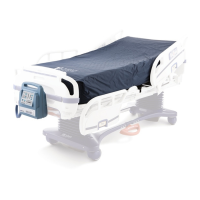
*Representative image of the Dolphin Fluid Immersion Simulation System.
Question and Answer IconNeed help?

Do you have a question about the Joerns Dolphin Fluid Immersion Simulation System and is the answer not in the manual?

Summary

Important Precautions

General Safety Warnings

Covers explosion, shock, burn, fire, and injury hazards with usage instructions.

Entrapment Risk and Patient Assessment

Warns about entrapment due to bed frame gaps and stresses patient assessment for safety.

Bed System Entrapment Information

Creating a Safer Care Environment

Discusses guidelines for healthcare settings, particularly long-term care, regarding entrapment risks.

Joerns Compliance Solutions

Assisting with Compliance Options

Explains how Joerns assists customers in selecting compliant accessories for their specific bed model.

Introduction to the Dolphin FIS System

System Overview and Benefits

Introduces the FIS system, its therapy, and benefits like reduced shear and improved outcomes.

Patient Suitability and System Operation

Details patient suitability, weight capacities, ease of use, and self-monitoring features.

Weight Capacities and System Components

Lists weight capacities for various system components and their key features.

Shear and Friction Reduction

Understanding Shear and Friction Forces

Explains friction and shear injury and how the system's fabric protects the patient's skin.

Indications for Use

Conditions Requiring Pressure Redistribution and Pain Management

Lists patient conditions like spinal cord injury, amputations, burns, and pain for which the system is indicated.

System Features and Controls

Therapy Control Unit Features

Highlights the user-friendly interface, modes, and automatic adjustment capabilities of the control unit.

Therapy Mattress and Specialty Surface Features

Advanced Surface Capabilities

Details pressure redistribution, customization, conformance, and weight capacities.

Specialty Features and Safety Cells

Mentions CPR deflation, safety cells for power failure, and CairEdge feature.

Therapy Pad Features

Pad Fabric Properties and Benefits

Describes the pad's fabric for skin protection, moisture management, and breathability.

Additional Features and Warnings

Fire Hazard Warning with Oxygen Equipment

Warns about fire hazards when using oxygen equipment and advises on placement.

CPR and Battery Back-up

CPR Deflation Procedure

Explains how to perform CPR deflation on the therapy mattress, including specific models.

Battery Back-up Functionality

Describes the rechargeable battery's role in providing power during AC interruptions.

Transport and Keyboard Functions

Patient Transport Guidelines

Provides instructions for transporting the patient, including cord storage and battery power.

Patient Positioning and Safety Cautions

Advises on proper patient positioning and safety for both general and pediatric use.

Control Unit Operation Modes

Storage Switch and Power Button

Explains the function and location of the Storage Switch and Power button.

Mode Selection for Bed and Specialty Surfaces

Instructs on setting the Mode to 'Bed' for mattresses and 'Chair/Stretcher' for specialty surfaces.

Alarm and Lock Functions

Alarm System and Fault Conditions

Explains the alarm system, fault triggers, and temporary beeper disabling.

Control Panel Lock Feature

Details the Lock function to prevent unauthorized adjustments to the control panel.

Battery Indicators and Immersion Profile

Understanding Battery Indicators

Describes the Battery and Battery Low indicators and their meanings.

Interpreting the Immersion Profile Window

Explains the Immersion Profile window and the meaning of its LED indicators.

Comfort Controls and Autofirm

Autofirm Mode Usage and Warnings

Describes Autofirm mode for transfers, warning against prolonged use with patients.

Autofirm and Comfort Adjust

Autofirm Functionality and Reset

Explains the Autofirm button's function for maximum inflation and its automatic reset.

Manual Comfort Adjustment Guidelines

Recommends system control but allows manual adjustment with specific guidelines.

Auto Feedback Indicator

Interpreting Auto Feedback LEDs

Describes the Auto Feedback scale and normal behavior during patient transition.

Grounding Instructions

Importance of Proper Grounding

Warns about the necessity of a grounded outlet and risks of improper grounding.

Checking Outlet Grounding

Provides methods for checking outlet grounding using testers or an electrician.

Setup Procedures

Therapy Mattress Setup

Provides step-by-step instructions for setting up the therapy mattress.

Wheelchair Cushion Setup

Provides step-by-step instructions for setting up the wheelchair cushion.

Manual Hand Check for Inflation

Details how to perform a manual hand check to ensure proper mattress inflation and comfort.

Stretcher Pad Setup and Troubleshooting

Stretcher Pad Setup Instructions

Provides step-by-step instructions for setting up the stretcher pad.

Support Surface Inflation Troubleshooting

Offers troubleshooting steps for when the support surface fails to inflate.

Adjusting Mode and Comfort Control Issues

Provides solutions for issues with changing therapy modes or comfort controls, including the lock function.

Nursing Procedures

Recommended Linens and Pad Changes

Advises on recommended linens and provides instructions for changing the therapy pad.

Patient Positioning and Safety

General Repositioning and Sitting Position

Guidance on patient repositioning, using Autofirm, and minimizing shear during elevation.

Incontinence Management and Skin Care

Explains incontinence impact on skin and emphasizes regular skin monitoring.

Patient Migration and Traction Safety

Warns about patient migration risks and advises on managing traction equipment.

Bed Height Adjustment and Cleaning Precautions

Recommends lowering bed height for safety and outlines cleaning precautions for the control unit.

Cleaning Procedures

General Cleaning of Mattress and Surfaces

Recommends cleaning the mattress and surface with mild detergent and warm water.

Disinfecting the System Components

Recommends disinfecting with tuberculocidal disinfectant and using protective equipment.

Therapy Pad Cleaning and Steam Cleaning Warning

Provides cleaning instructions for the therapy pad and warns against steam cleaning.

Maintenance and Warranty Considerations

Preventative Maintenance by Authorized Personnel

Warns that only authorized, trained personnel should perform maintenance to avoid voiding warranty.

Storage and Care Instructions

Proper Storage of Control Unit and Surfaces

Provides instructions for storing the control unit and therapy mattress/surfaces.

System Specifications Overview

Weight and Safe Working Load Capacities

Lists the weight of components and their safe working load capacities.

Dimensions and Electrical Specifications

Details the dimensions of system components and electrical requirements.

Environmental and Classification Details

Outlines environmental conditions and control unit certifications (UL, CSA, IEC).

Electromagnetic Compatibility (EMC) Information

EMC Precautions for AutoVector Simulator

Introduces EMC information and precautions for the AutoVector Fluid Immersion Simulator.

Manufacturers Declaration: Electromagnetic Emissions

Details compliance and guidance for RF emissions, harmonic emissions, and voltage fluctuations.

Electromagnetic Immunity Guidance

Immunity Test Standards and Compliance

Provides guidance and compliance levels for ESD, transient, surge, and voltage variation immunity.

Power Frequency Magnetic Field Immunity

Details guidance on power frequency magnetic field immunity according to IEC 61000-4-8.

Electromagnetic Immunity and RF Guidelines

Conducted and Radiated RF Immunity

Provides guidance and compliance levels for conducted and radiated RF immunity.

RF Separation Distance Calculations

Explains the formula for recommended separation distance for RF communications equipment.

RF Communications Equipment Separation Distances

Maintaining Minimum RF Separation Distances

Explains how users can help prevent interference by maintaining minimum separation distances.

Estimating Separation Distance for Transmitters

Explains how to estimate separation distance for transmitters not listed in the table.

Joerns Healthcare Warranty Program

Warranty Coverage and Exclusions

Details warranty coverage for surfaces and components, and lists exclusions like improper use.

Unauthorized Modifications and Damage Exclusions

States that unauthorized modifications void the warranty and excludes damage from unsuitable conditions or abuse.

Parts and Service Information

Replacement Parts and Service Handling

Explains warranty obligation for parts and how service requests are handled.

Expedited Parts Shipping and Technician Dispatch

Informs about expedited parts shipping and Joerns dispatching technicians at their discretion.

Overview

The Joerns® Advanced Surfaces Dolphin Fluid Immersion Simulation® System is a medical device designed for pressure redistribution and pain management, suitable for use in various healthcare settings. It is available in both adult and pediatric versions.

Function Description

The Dolphin Fluid Immersion Simulation (FIS) System is a mattress replacement system that utilizes state-of-the-art pressure redistribution technology to alleviate vertical shear forces. It creates a neutrally buoyant, 3D support environment by automatically adjusting to the patient's body weight and profile, requiring no manual data input. The system continuously monitors the surface more than 100 times per second for any patient movement, ensuring optimal support.

The system is comprised of two main components: a therapy control unit and a therapy mattress system or specialty surface (which can include a wheelchair cushion or stretcher pad). The exterior surface of the therapy pad is constructed from a smooth nylon fabric with low friction and low shear properties to protect the patient's skin. This fabric is also breathable and moisture vapor permeable, allowing air to circulate and wick away excess moisture to prevent skin maceration.

Important Technical Specifications

  • Weight Capacity:
    • Therapy Mattresses: Up to 1000 lbs (454.5 Kg)
    • Pediatric Therapy Mattress: 5 lbs to 300 lbs (2.3 kg to 136 kg)
    • Stretcher Pad: Up to 700 lbs (318.1 Kg)
    • Wheelchair Cushion: Up to 250 lbs (113.6 Kg)
    • Minimum weight capacity for Pediatric System: 5 lbs (2.3 Kg)
  • Dimensions:
    • Control Unit: 11.5" (29.2 cm) W x 12.5" (31.8 cm) H x 6" (15.2 cm) D
    • Standard Therapy Mattress: Available in 35" (89 cm), 42" (107 cm), and 48" (122 cm) widths, all 82" (208 cm) L x 10" (25 cm) D.
    • Low Profile Therapy Mattress: Available in 35" (89 cm), 42" (107 cm), and 48" (122 cm) widths, all 82" (208 cm) L x 8" (20 cm) D.
    • Step-Deck (Dolphin V-Matt): 35" (89 cm) W x 88" (224 cm) L x 10" (25 cm) D.
    • Crib Therapy Mattress: US: 29.5" (75 cm) W x 57" (145 cm) L x 5" (13 cm) D; Int'l: 28" (71 cm) W x 50" (128 cm) L x 4" (10 cm) D.
    • Wheelchair Cushion: 17" (43 cm) W x 17" (43 cm) L x 4" (10 cm) D.
    • Stretcher Pad: 36" (91 cm) x 76" (193 cm) x 5" (13 cm).
  • Electrical Specifications: 90/240 VAC, 50/60 Hz.
  • Environmental Conditions:
    • Operating: Ambient Temperature: +10°C to +40°C, Relative Humidity: 30% to 75% Non-Condensing.
    • Storage and Shipping: Ambient Temperature: 10°C to +40°C, Relative Humidity: 10% to 100%.
  • Control Unit Classifications:
    • North America: UL 60601-1, CAN/CSA C22.2 No. 601.1.
    • Europe: Conforms to IEC/EN 60601-1 and IEC/EN 60601-1-2 CE.

Usage Features

  • Intuitive Control Unit: Features easy-to-read graphics for straightforward setup and therapy control.
  • Bed/Chair/Stretcher Modes: The "Bed" position is for traditional healthcare beds. The "Chair/Stretcher" position is for smaller specialty surfaces like the Dolphin Wheelchair Cushion, with adjusted timing cycles.
  • Automatic Adjustment: The system automatically adjusts to the patient's body weight and profile, eliminating the need for manual data input.
  • Comfort Adjust: Allows caregivers to manually adjust comfort settings to accommodate individual patient preferences, though it is recommended to minimize manual adjustments and let the system control the optimal profile.
  • Autofirm Mode: Quickly inflates the surface to maximum firmness for patient transfers and other care procedures. The system automatically returns to the previous setting after approximately 15 minutes. This mode is not for therapy.
  • Alarm System: A beeper and LED illuminate in the event of a fault condition (e.g., pressure too hard/soft, differential error). The beeper can be manually disabled for up to 30 minutes.
  • Lock Function: A "Lock" button and LED allow the control panel to be locked to prevent unintended adjustments.
  • Battery Back-up: A sealed 12 VDC rechargeable battery provides approximately 12 hours of alternate power during power outages or disconnections, allowing patient transport without interruption of therapy. The battery recharges automatically when AC power is restored, provided the "Storage Switch" is in the "Battery On" position.
  • CPR Deflation: A quick CPR deflation valve on the therapy mattress allows for rapid deflation. For V-Matt models, a red CPR flag is twisted to deflate, while a safety cell remains inflated.
  • Entrapment Prevention: Designed as a mattress replacement system, it's crucial to ensure proper fit on bed frames to avoid gaps that could lead to patient entrapment. The system adheres to FDA recommended guidelines for entrapment zones.
  • Patient Positioning: Patients should always be positioned properly within the confines of the bed or specialty item, with no extremities protruding over the side or between bed rails.
  • Linen Recommendations: Special linens are not required. A therapy pad should cover the cells at all times. Draw sheets, incontinence barrier pads, top sheets, and blankets can be used as needed. Excessive padding between the patient and the surface should be avoided to maintain optimal performance.
  • Grounding Instructions: Requires a properly grounded AC outlet. Users should verify proper grounding with a circuit tester or qualified electrician.

Maintenance Features

  • General Cleaning: For visible soilage or between patients, disinfect the unit and therapy mattress or specialty surface with a tuberculocidal disinfectant registered with the Environmental Protection Agency (EPA). For general cleaning without visible soilage, a mild detergent and warm water can be used.
  • Control Unit Cleaning: Wipe off dust. Clean the housing exterior with a disinfectant solution or mild detergent and a damp cloth, then wipe dry.
  • Therapy Pad Cleaning: Can be wiped down with a disinfectant solution or mild detergent. If heavily soiled, it can be laundered in a washer and dryer with warm water (no more than 120°F/48.9°C) using a non-bleach detergent sparingly.
  • Steam Cleaning: Not recommended for the unit, as excessive moisture can damage internal mechanisms.
  • Storage: When not in use, the power cord should be stored properly. The unit should be wrapped in a plastic bag for dust resistance and stored in an area appropriate for an electronic medical device. The "Storage Switch" should be set to "Storage Mode." Therapy mattresses and specialty surfaces should be gently rolled up to expel residual air, wrapped in plastic, and stored.
  • Preventative Maintenance: Only facility-authorized personnel trained by Joerns Healthcare should perform preventative maintenance. Unauthorized maintenance will invalidate the warranty.
  • Service: Most service requests can be handled by the facility Maintenance Department with assistance from the Joerns Healthcare Product Service Department. Replacement parts can be shipped next day air. Joerns Healthcare dispatches authorized technicians for required service.

Joerns Dolphin Fluid Immersion Simulation System Specifications

General IconGeneral
BrandJoerns
ModelDolphin Fluid Immersion Simulation System
CategoryMedical Equipment
LanguageEnglish

Related product manuals