8
Joerns® Bed Frames
EasyCare®
© 2017 Joerns Healthcare • 6110158 RevD • 17-2540
IV Sockets
Joerns
®
EasyCare
®
bed has four IV sockets as
standard equipment. There are two sockets at head
end of bed and two at foot end (Figures 11 and 12).
The IV sockets are compatible with Joerns IV poles
and most ½" IV poles.
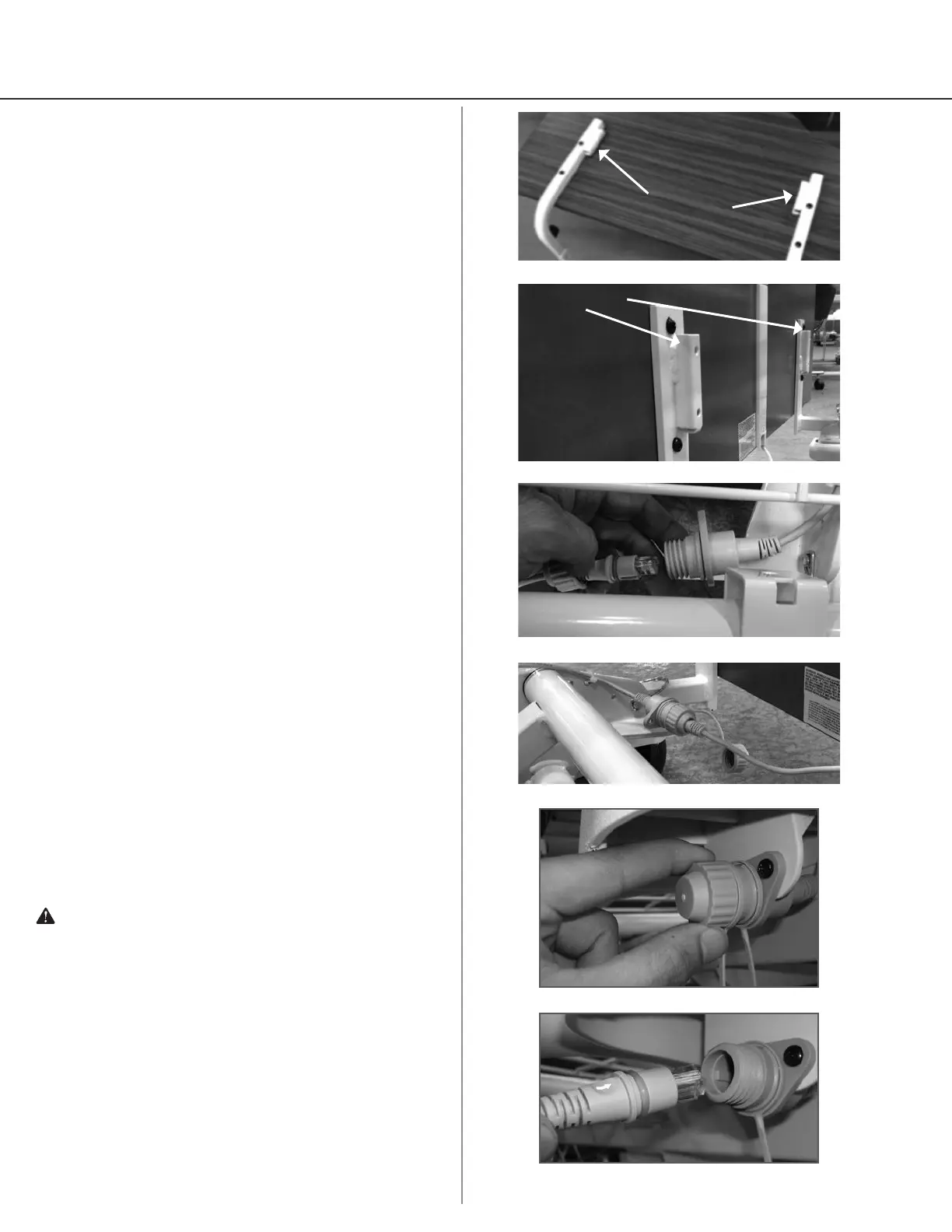
Installation of Sta Control Panel
(Optional)
1. Mount the foot panel on the bed as indicated in
previous instructions.
2. Align and insert the staff control cable plug into the
cable jack, located on the bed (Figure 13).
3. Ensure that the cable plug is fully inserted into the
cable jack.
4. To secure tighten the union nut on both cables
(Figure 14).
Operation
The pendant allows the patient/resident to operate
the bed. Lockouts will light up if a function has been
locked out by the caregiver.
Pendant Operation
Your EasyCare bed comes standard with one of the
pendants shown in Figures 19 and 20 on page 9. The
pendant plugs into a jack under either side of the seat
pan.
1. Unscrew the union nut (Figure 15) and insert
the cable plug, with the arrow facing up into jack
(Figure 16).
2. Ensure that the cable plug is fully inserted into the
jack (Figure 17, page 9).
3. Screw on the union nut from the cable to secure
cable (Figure 18, page 9).
4. The pendant has raised, high-contrast buttons and
graphics.
Warning: Possible Injury or Death. This bed should
not be operated (control the movements of the bed
through the control interfaces) by persons who do not
have the cognitive skills to understand the information
in the owner’s manual or can understand and perform
the proper operation of the bed. This bed should not
be used or operated by children.
Figure 12
IV Socket
Figure 11
IV Socket
Figure 13
Figure 14
Figure 15
Figure 16




 To Next Page