©2009Johnson Level & Tool 13
(d) Detection
1. Coarse detection
• Aim the receiving window at the
rotating laser. Loosen the clamp bolt
and move the detector up and down
to receive the laser scanning signals
transmitted by the rotating laser.
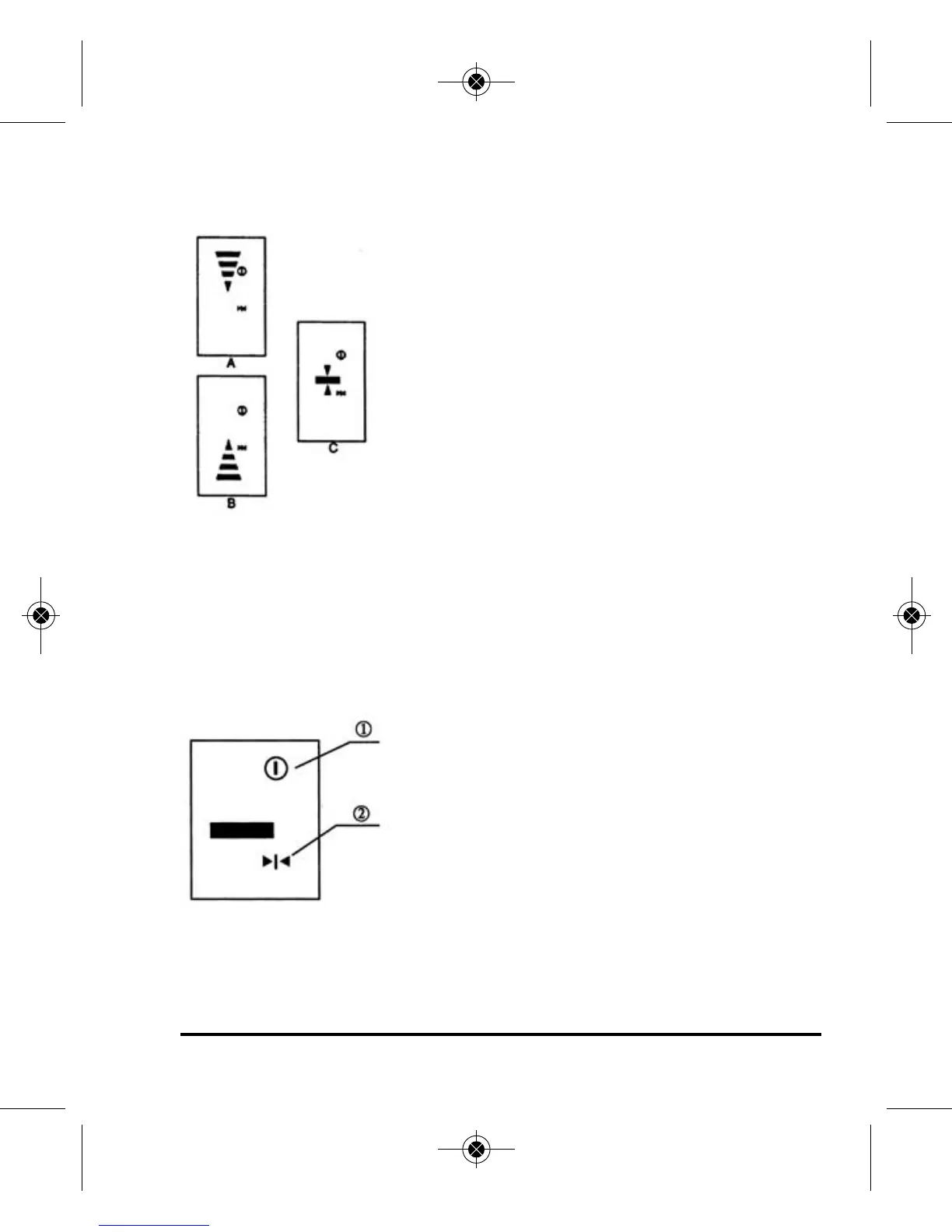
• When the detector displays like Fig. (A),
move the detector slightly down as
indicated by the arrow. When it displays
like Fig. (B), move it slightly up as
indicated by the arrow.
• When Fig. (C) is displayed, the detector is level with the rotating
laser beam.
• Tighten the clamp bolt and note the position on the grade rod by the
rabbet. This mark will be the horizontal reference in the coarse mode.
2. Fine detection
1. power symbol
2. fine detection symbol
• Press coarse/fine detection button. The
detector is ready for fine detection.
• Move the detector slightly up and down
like the coarse detection procedure.
• When the detector displays like Fig 6, it is
level with the rotating laser beam.
• Tighten the clamp bolt and note the position on the grade rod by the
rabbet. This mark will be the horizontal reference in the fine detection.
Figure 6
3515H_Manuals 6/2/10 9:00 AM Page 13


 To Next Page