enable “Uploading by
Vibration”
Vibration awaken, the device will go
to sleep in 10 minutes from last
vibration. Both GSM and GPS
module works properly in working
period, but both are closed in
sleeping period. The device works
only 10 minutes in every awaken, so
the interval for data uploading
should be set less than 10 minutes,
otherwise the data cannot be
uploaded properly.
Fixed time
point
uploading
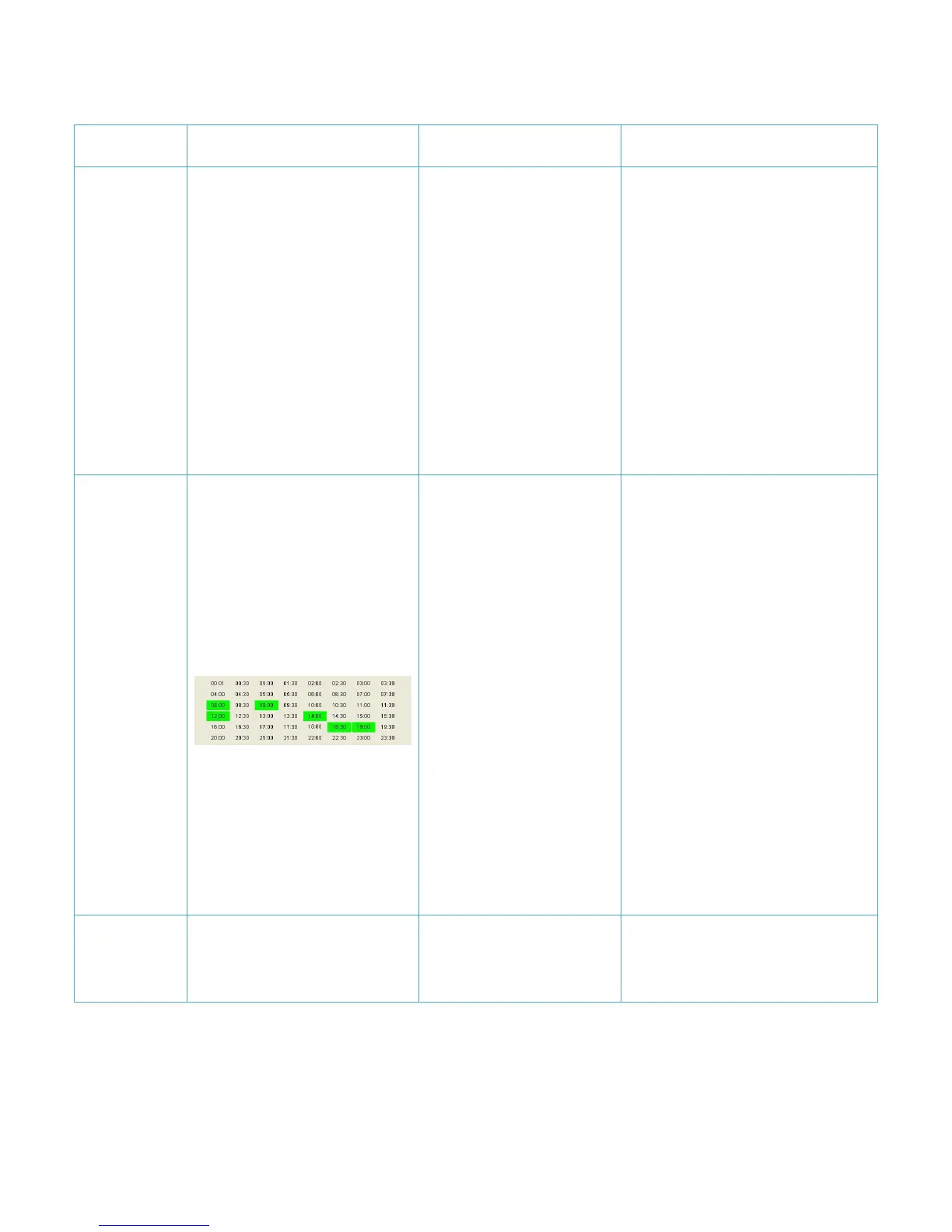
enable “Fixed time point
uploading” And Click the
time label to choose the
time points.
JT600 will wake up when
the time at 8:00,9:00,12:00,
14:00,18:30,19:30.
Note:
1)You need adjust the time
difference to local time.
2)JT600 must locate
position at the first time.
Preset the time point, the device will
wake automatically at this preset
time, and works for 10 minutes
before getting into the sleep mode.
The device supports 48 time points
in maximum, but the interval
between each two points should be
above 30 minutes. GSM and GPS
module work properly at the
working period, and both are closed
in the sleeping period. The device
works only 10 minutes in every
awaken, so the interval for data
uploading should be set less than 10
minutes, otherwise the data cannot
be uploaded properly.
Data transmission mode
SMS
Uploading location Short message to
SMS primary number.


 To Next Page