Jotron AS| TR7750C: Operators Manual Installation
P/N: 84748 (G)
4.6.2 Audio in/out and Line loop keying
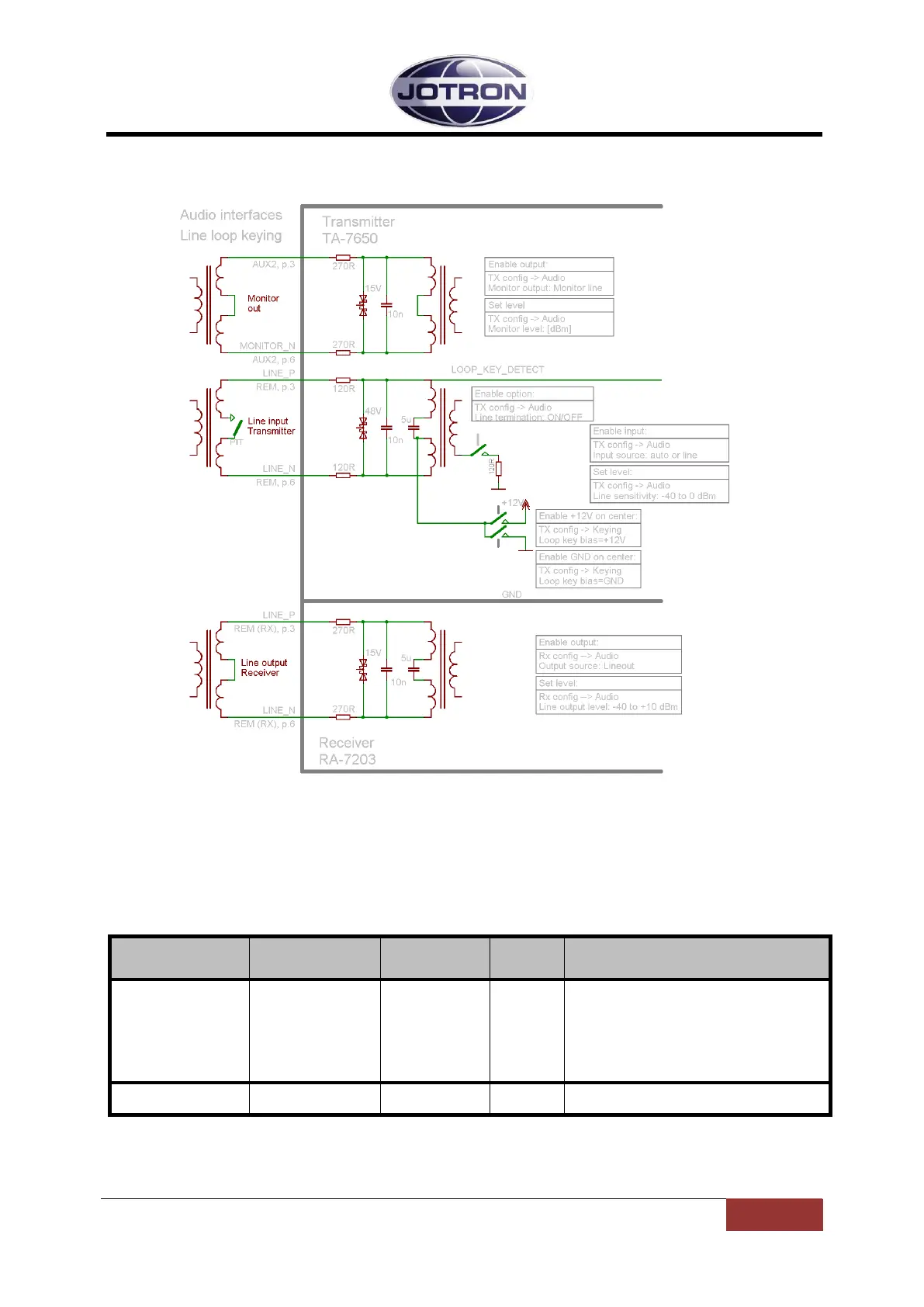
Figure 4.6-1, Audio interfaces on the transmitter and receiver units
With reference to
Figure 4.6-1, the following audio remote signals are available on the rear connectors:
Monitor out: Monitor signal, usually connected to a recording unit.
Set where the monitor output signal and the
received audio (if a receiver is connected) is
routed.
Can be set to the headset connector, the 600
ohm monitor line output or both.
The monitor signal is the demodulated signal
detected on the output of the transmitter.
Set the relative output level of the monitor
signal. 10dB = max output, -80dB=minimum
Table 4.6-3, Settings associated with MONITOR OUTPUT (TA – AUX1)


 To Next Page