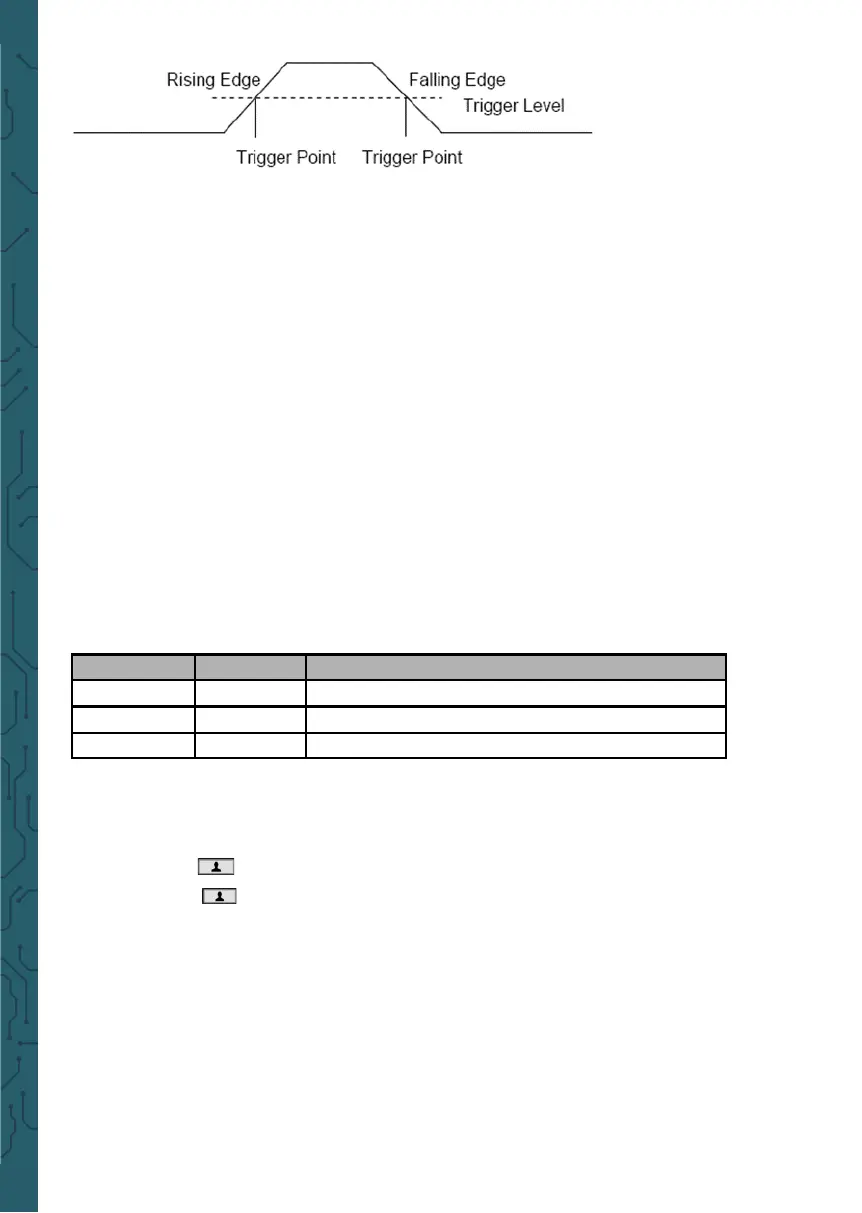
Slope: Select the
trigger slope to rising,
falling, rising &
falling.
Trigger Mode: You can select the Auto or Normal mode to define how the oscil-
loscope acquires data when it does not detect a trigger condition. Auto Mode per-
forms the acquisition freely in absence of valid trigger. It allows the generation of
untriggered waveforms with the time base set to 100ms/div or slower. Normal Mode
updates the displayed waveforms only when the oscilloscope detects a valid trigger
condition. Before this update, the oscilloscope still displays the old waveforms. This
mode shall be used when you only want to view the eectively triggered wave-
forms. In this mode, the oscilloscope displays waveforms only aer the first trigger.
To perform single trigger acquisition, the trigger mode can be set to "single". When
triggered, a single waveform is acquired and then stop.
Force Trigger: Used to complete an acquisition regardless of an adequate trigger
signal. This button becomes useless if the acquisition is already stopped.
Trigger Level: It sets the amplitude level the signal must cross to cause an acquisiti-
on when using the Edge or Pulse Width trigger. Press Trig button to enter, and press
Up or Down direction keys to change the trigger level.
• Save Waveforms
Press Menu button to enter, and select Save to enter store waveform menu. The
waveform can be saved to the oscilloscope inside, also can be recalled to view.
The Save Menu Table:
To save the waveform, follow these steps:
1. Press F1 to select the storage position of the waveform.
2. Press F2 to save the waveform data to the specified position. Also, users can long
press button to enter, and select F4->F2 (Data Save) as shortcut keys.
Press button one time to save the current waveform data.
3. Press F3, to recall the saved waveform. The waveform can be enlarged or reduced
in the Channel or Time menu by using the direction keys.
Attention:
1. Waveform storage can not only save the waveform of the current channel, but
also save the current state settings at the same time.
2. Users can permanently store 6 waveforms in the oscilloscope memory and rewrite
them at any time.
Menu Setting Description
Position 1,2,3,4,5,6 Select the internal storage position.
Save Save waveform data.
Recall
Recall the waveform.


 To Next Page