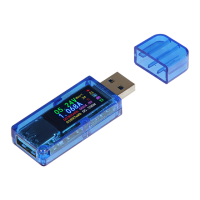
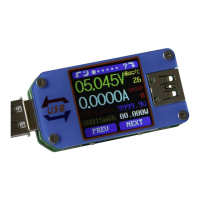
The JT-TC66C is a low-cost USB 3.0 Volt- and Amperemeter designed for measuring and monitoring USB-C power delivery. It can be simply plugged into a USB-C interface and is immediately ready for use.
Function Description:
The JT-TC66C serves as a versatile measuring device for USB-C power. It can display various parameters such as measured voltage, current, charge, energy, load impedance, power, and temperature. It also features QuickCharge recognition and protocol detection, as well as a protocol trigger function. The device can operate with its internal power supply or an autonomous power supply unit via a Micro-USB port for high-precision and low-voltage measurements.
Important Technical Specifications:
The device measures voltage, current, charge, energy, load impedance, power, and temperature. It supports various QuickCharge modes including QC2.0, QC3.0, APPLE 2.4A/2.1A/1A/0.5A, Android DCP, and Samsung. For QuickCharge protocol detection, it can identify QC2.0, QC3.0, Huawei FCP, Huawei SCP, Samsung AFC, and Type-C PD. The device includes a recording function that can store data at intervals from 1-60 seconds. It also features a display illumination time setting, backlight adjustment, temperature unit selection, USB and BT wireless connection options, screen rotation, CC Pin Pulldown, and language settings. Firmware version and serial number are also displayed in the system information.
Usage Features:
The device is operated via two keys, K1 and K2, and two switches, PWR and PD.
- K1 (Key 1): Switches between displayed values or opens the menu. When in a menu, it selects functions.
- K2 (Key 2): A long press opens or leaves the menu. A short press switches between menu options. When in a menu, it navigates through functions.
- PWR (Power Switch): When activated (ON), the device uses the system's power supply. When deactivated (OFF), an autonomous power supply unit can be used via the Micro-USB port for voltage supply, which is recommended for high-precision and low-voltage measurements.
- PD (PD-Switch): Set to OFF when measuring a device that is being charged. Set to ON to activate the trigger function.
- Micro-USB Port (5): Used for independent power supply and for connection to PC software.
The device offers eight different menus:
- Main Menu: Displays measured voltage, current, charge, energy, load impedance, power, temperature, selected data group, and current flow direction. Press and hold K1 to delete the current data group value. Press and hold K2 to change the data group. Data group 1 stores charge and energy values continuously, even after restart. Data group 0 stores and displays values upon restart, but they flash, and if a charge of 1mAh is exceeded, the data resets to 1mAh.
- Record Menu: Allows recording of data. Settings are accessed by pressing and holding K2. A small triangle indicates the settable function. K2 switches between functions, and K1 selects them. A red recording status icon indicates interruption, while green indicates active recording. Recording data can be reset under "CE." The recording interval can be set from 1-60 seconds, but only when recording is paused and the recording time is reset. Press and hold K2 to exit settings. Recording is interrupted if the device is switched off.
- QuickCharge Recognition: Automatically detects and displays the current quick charge mode, including D+ signal voltage, D- signal voltage, and current charging mode. The displayed values are references, not absolute.
- QuickCharge Protocol Detection: Automatically detects the QuickCharge protocol in use. ATTENTION: This function increases the output voltage of the USB-C port. Ensure connected load compatibility. Press and hold K2 until "Dangerous" appears, then use K1 to start detection. Supported protocols are shown in green, unsupported in red.
- Protocol Trigger: Initiates a quick charge protocol even if the load does not have this function. ATTENTION: This function increases the output voltage of the USB-C port. Ensure connected load compatibility. Press and hold K2 to enter the menu. K2 navigates, K1 enters submenus. K1 and K2 trigger the protocol and adjust voltage. Press and hold K2 to return.
- PD-Trigger (Submenu): Navigate to "USB-C PD" in the protocol trigger menu and press K1. Displays current PD mode, PPS voltages, actual output voltage, current voltage (green), and supported voltages (white). Disconnect and reconnect power supply. Use K1/K2 to adjust PD voltage. Press and hold K1 to change PPS voltage step size. Press and hold K2 to exit.
- System Settings: Allows configuration of display illumination time, backlight, temperature unit, USB connection, BT wireless connection, screen rotation, CC Pin Pulldown, language, and factory settings. Use K2 to navigate and K1 to select.
- System Information: Displays serial number, number of starts, time since device was switched on, and firmware version.
- Simplified Measurement Overview: Shows current voltage, actual current, actual power, and current flow direction.
Maintenance Features:
The manual provides information on return obligations according to the Electrical and Electronic Equipment Act (ElektroG), indicating that the device should not be disposed of with household waste but at a collection point. Old appliances can be returned free of charge when purchasing a new device. Small appliances (external dimensions < 25 cm) can be returned in normal household quantities regardless of a new purchase. Returns can be made to Simac GmbH during opening hours or by requesting a parcel stamp via email or phone. Information on suitable packaging material is also available upon request.
For support, users can contact service@joy-it.net, use the ticket system at http://support.joy-it.net, or call +49 (0)2845 98469 – 66 (10 - 17 Uhr). Further information is available on www.joy-it.net.

 Need help?
 General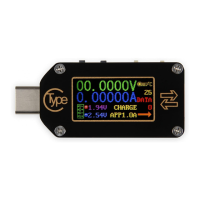

 To Next Page