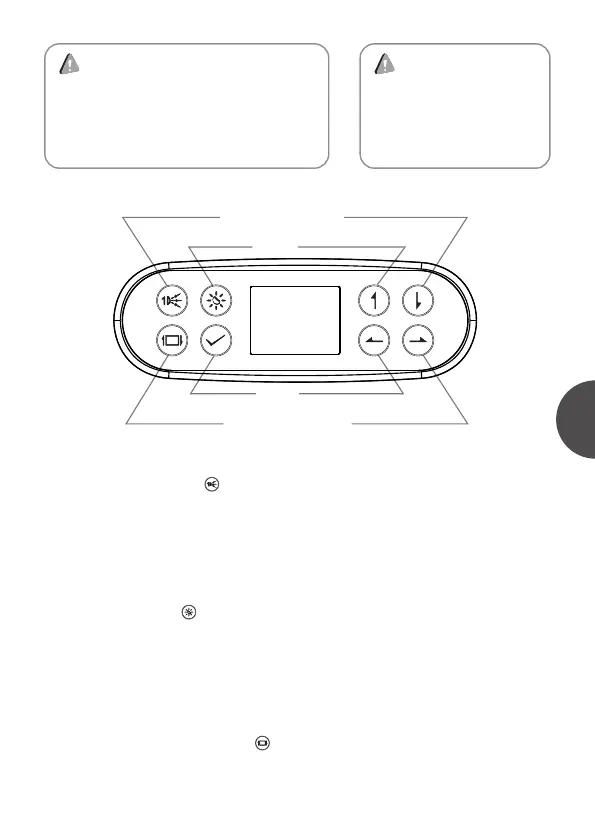
If pump 1 is single speed pump, then the key will be used to control the on and
off of pump 1. If pump 1 is double speed, then keep pressing the key, it will
switch from low speed pump, high speed pump to off. The sequence is low speed
pump-> high speed pump-> off.
Short-cut key pump 1:
Light has two modes. In on/off mode, pressing the key can turn on and off the
light. In RGB mode, it has 9 statuses of auto color change, red, green, yellow,
blue, purple, cyan, white and off. User can switch among these statues by
pressing the key.
Shortcut key light:
Press this key to turn the main interface upside down. And the direction of
navigation key will be changed accordingly.
Short-cut key ofScreen Invert:
WARNING
1. Please connect power strictly accoding
to the SPA power data plate.
2. Please do not turn the SPA power on
until the water reaches water level line
inside the tub.
WARNING
Please set time and date
before using the SPA
control system.
(pump) jet 1
light
navigation key (down)
navigation key (up)
navigation key (left)
navigation key (right)
confirm
Screen Invert
1


 To Next Page