INSTRUCTION MANUAL CODE 80243 REV A January/11 (It can be modied without notice) Page: 45
J.P. SELECTA s.a. Ctra. NII Km 585.1 Abrera 08630 (Barcelona) España Tel 34 93 770 08 77 Fax 34 93 770 23 62
e-mail: selecta@jpselecta.es - website: http://www.jpselecta.es
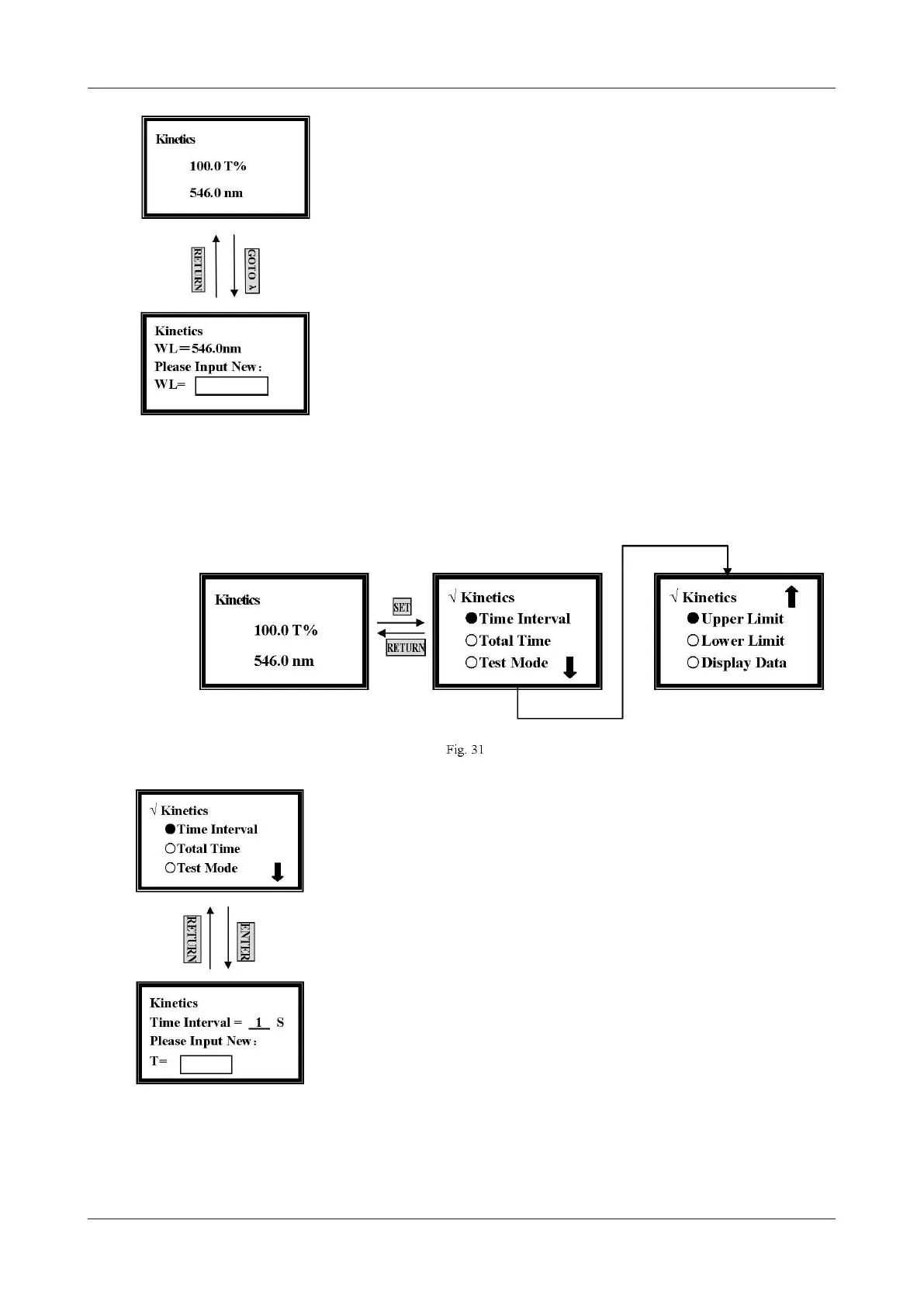
Set Wavelength
Press [GOTO] in the kinetics pre-testing screen, and input the testing wavelength
by pressing the numeric keypad (Fig.30).
Set Parameters
Press [SET] in the kinetics pre-testing screen, and 5 parameters should be set before
testing. (Fig. 31)
Set Time Interval
Move the cursor on Time Interval by pressing [»] and [«], followed by [ENTER].
(Fig.32)
Input the new interval time by pressing the numeric keypad followed by
[ENTER], and it will return the kinetics setting screen.
Note:
1. The range of time interval is 1-200, other value is invalid.
2. If you don’t want to change the value, press [RETURN] directly.
Set Total Time
Figure 32
Figure 30


 To Next Page