MANUAL DE INSTRUCCIONES CODIGO 80243 REV A Enero /11 (Sujetas a modicaciones sin previo aviso) Pag.: 50
J.P. SELECTA s.a. Ctra. NII Km 585.1 Abrera 08630 (Barcelona) España Tel 34 93 770 08 77 Fax 34 93 770 23 62
e-mail: selecta@jpselecta.es - website: http://www.jpselecta.es
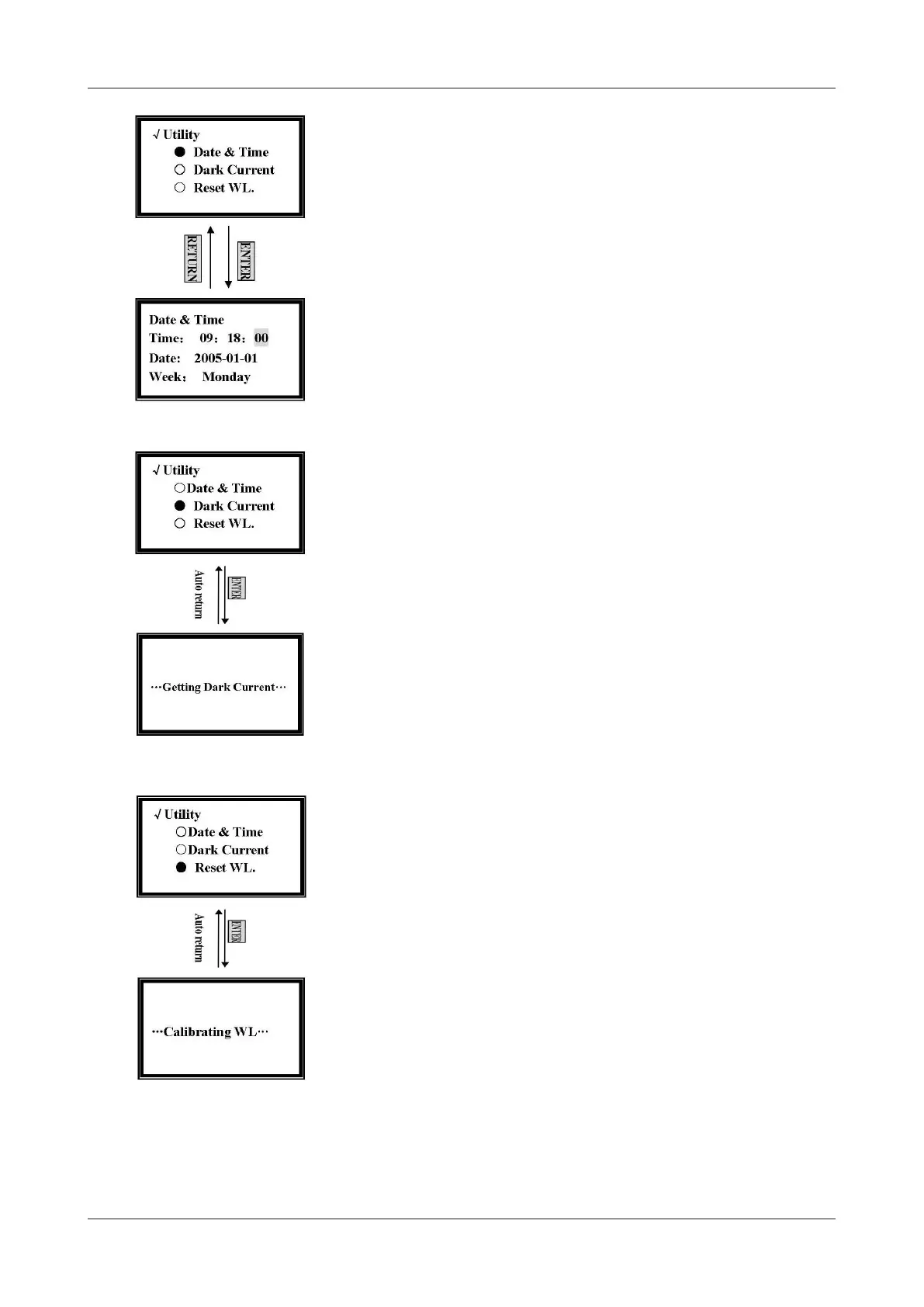
In the time and date setting screen, press [»] and [«] to move the cursor. You can
set them by pressing the numeric keypad followed by [ENTER].
The range of year is 0 - 99, month is 0 - 12, day is 1 - 31, hour is 0 - 24, minute is
0 - 59, week is 1 - 7, other number is invalid.
7.5 Get Dark current
When the ambient circumstances changed, those such as temperature, voltage or
environment lightness, you should get dark current before testing.
Move the cursor onto Dark Current by pressing [»] and [«] in utility setting screen,
and then press [ENTER] to get dark current. (Fig. 47)
It will return to the utility setting screen when the dark current gets nished.
7.6 Reset WL
Please, perform this operation if you suspect that wavelengths selected by the user
do not coincide with the ones selected by the equipment in the monochromator.
Move the cursor onto Reset WL. by pressing [»] and [«] in the utility setting screen,
and then press [ENTER] to reset wavelength. (Fig. 48)
The calibrating time is about 1.5 minutes.
7.7 Lamp Life Management
Move the cursor onto Lamp Life by pressing [»] and [«] in the utility setting screen,
and then press [ENTER]. (Fig. 49)
Move the cursor onto Display Lamp Life by pressing [»] and [«] in the lamp life
setting screen, and then press [ENTER]. You’ll nd the used time of D2 and W
Figure 48
Figure 46
Figure 47


 To Next Page