INSTRUCTION MANUAL CODE 80247 REV A March/2011 (It can be modied without notice) Page: 24
J.P. SELECTA s.a. Autovía A2 Km 585.1 Abrera 08630 (Barcelona) España Tel 34 93 770 08 77 Fax 34 93 770 23 62
e-mail: selecta@jpselecta.es - website: http://www.jpselecta.es
5.3.2 Blank
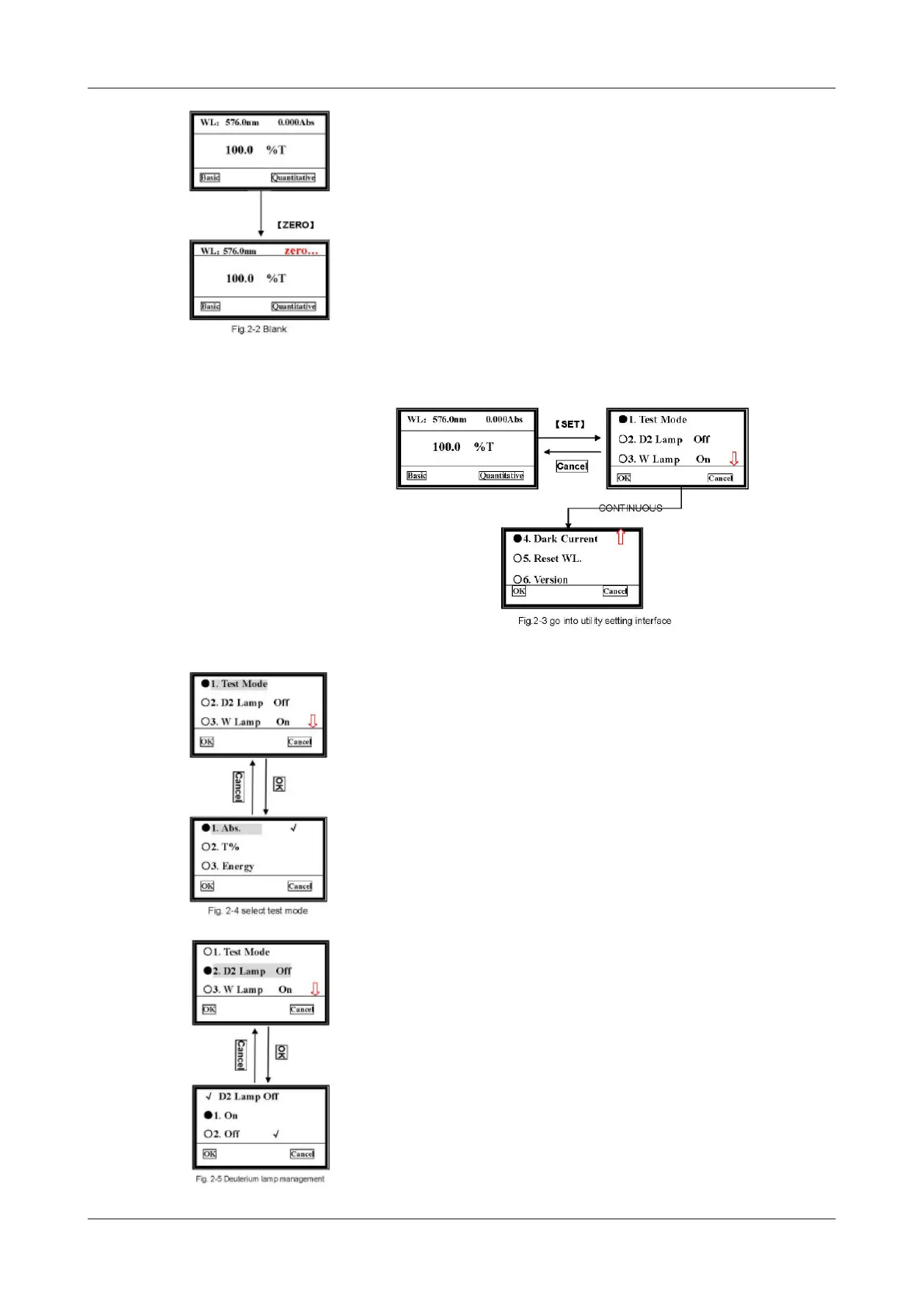
Pull the reference cuvette into the light path, press [ZERO] to blank (Fig.2-2).
5.3.3 Utility
Press [SET] to go into system functions screen, use [»] [«] to select, then press
OK to go into the corresponding item (Fig. 2-3).
5.3.3.1 Test Mode
Move the cursor on to «Test Mode», and press OK, then it will go into the mode
selection screen (Fig. 2-4).
Then, move the cursor on the photometric mode you want by pressing [»] [«] and
then press OK («-» left key) to conrm. Once the symbol appears at the end of
the item, you can press Cancel («-» right key) to return to the upper screen.
5.3.3.2 D2 Lamp Management
Move the cursor on «D2 Lamp On», press OK, it will go into another screen.
Choose the D2 lamp condition you want, press OK to conrm, then press Cancel to
return to upper screen.


 To Next Page