MANUAL DE INSTRUCCIONES CODIGO 80247 REV A Marzo/2011 (Sujetas a modicaciones sin previo aviso) Pag.: 25
J.P. SELECTA s.a. Autovía A2 Km 585.1 Abrera 08630 (Barcelona) España Tel 34 93 770 08 77 Fax 34 93 770 23 62
e-mail: selecta@jpselecta.es - website: http://www.jpselecta.es
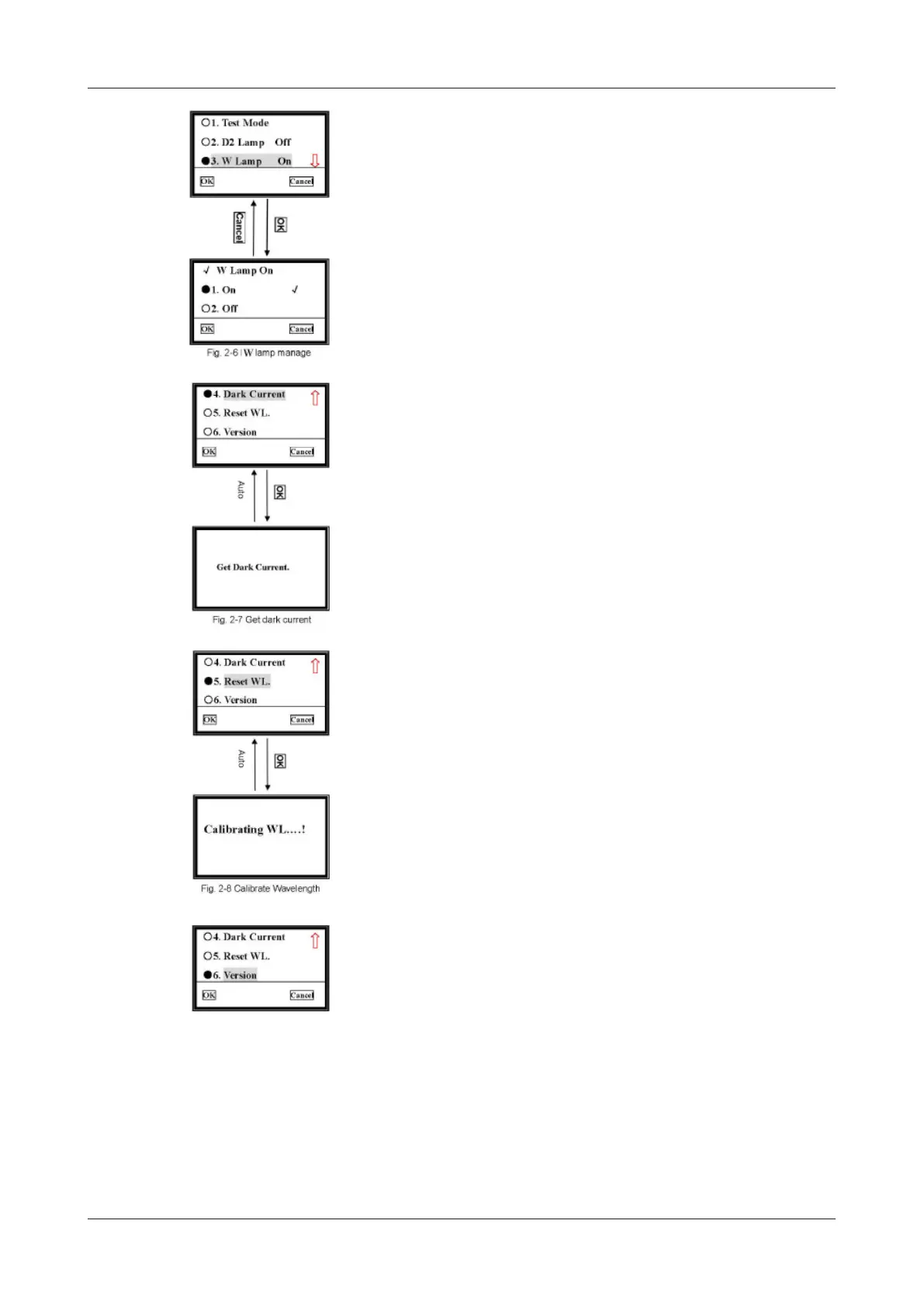
5.3.3.3 W Lamp Management
Move the cursor on «W Lamp On», press ok, it will go into another screen.
Choose the W lamp condition you want, press ok to conrm, then press Cancel to
return to upper screen.
5.3.3.4 Dark Current
Move the cursor on «Dark Current», followed with ok pressed to get dark current.
Once the environment changed, such as temperature, instrument’s station, etc, you
should go to this operation.
5.3.3.5 Reset WL
Move the cursor on «Reset WL.», then press OK, system begins to reset wave-
length.
5.3.3.6 See the version
Move the cursor on «Version», then press OK, you’ll nd the version of this
instrument’s hardware and software. Press any key to return.


 To Next Page