INSTRUCTION MANUAL CODE 80247 REV A March/2011 (It can be modied without notice) Page: 26
J.P. SELECTA s.a. Autovía A2 Km 585.1 Abrera 08630 (Barcelona) España Tel 34 93 770 08 77 Fax 34 93 770 23 62
e-mail: selecta@jpselecta.es - website: http://www.jpselecta.es
6 ANALYZE SAMPLE
Before measurement, make a blank reference solution by lling a clean cuvette half
full with distilled or de-ionized water or other specied solvent. Wipe the cuvette with
tissue to remove ngerprints and droplets of liquid. Fit the blank cuvette into the 4-cell
linear changer and place the cuvette into the nearest slot. Push the changer so that
the cuvette is in the light path (push the rod in). Close the lid.
6.1 Photometry
Firstly, set the wavelength you need.
6.1.1 Basic mode
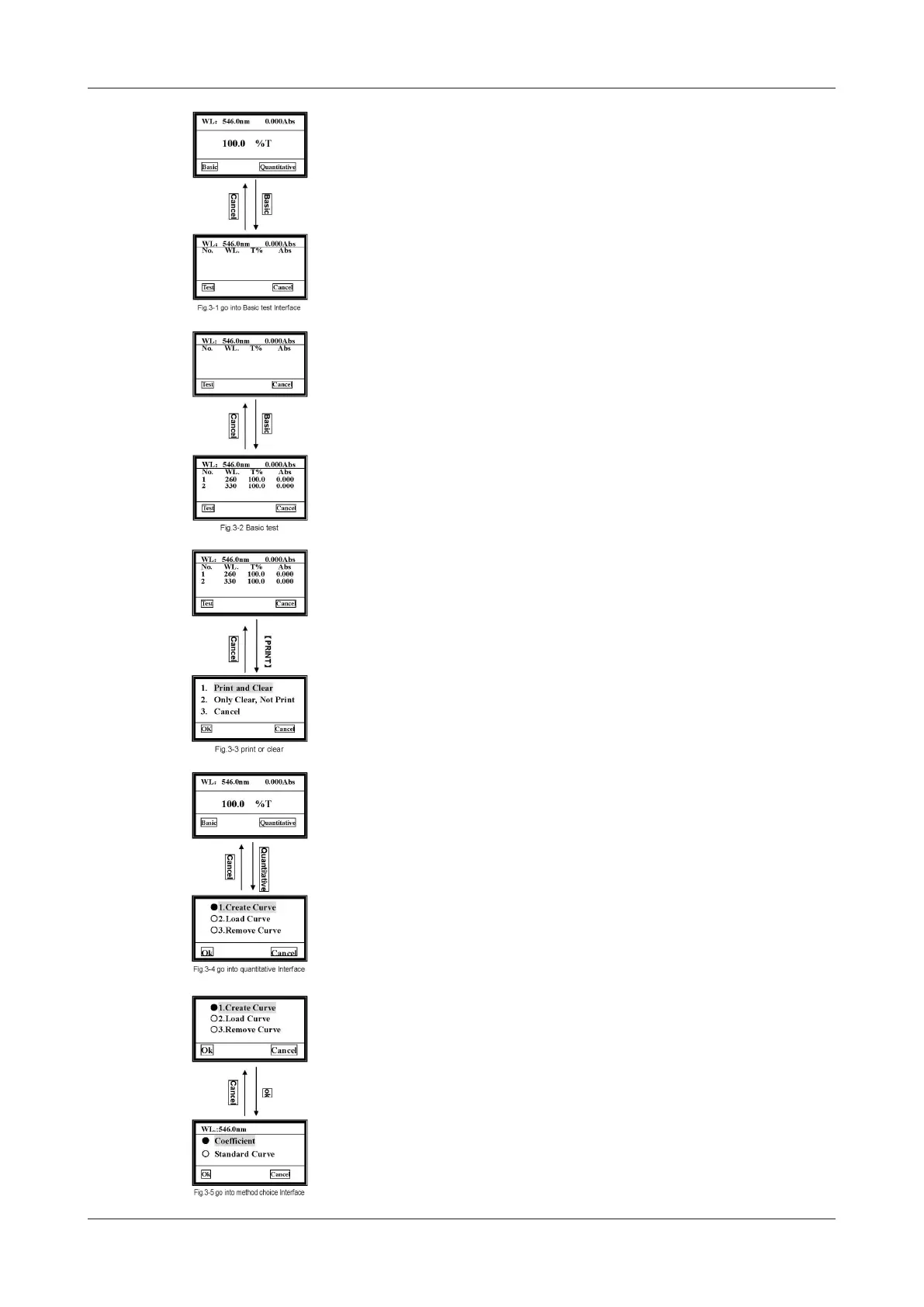
Pull the blank cuvette into the light path, then press Basic. After automatic blanking,
it will go into Basic test interface.
6.1.2 Begin to test
Pull the sample into the light path, then press Test to measure. The test result is
displayed on the screen. And it will be numbered automatically.
Repeat this step to measure other samples, the results will be numbered orderly. It
can be saved to a total of 200 groups of test data in the RAM, 3 groups per screen.
Use [»] [«] keys to scroll.
Press Cancel to return to the main menu.
6.1.3 Clear or Print out the data
Press the [PRINT] key as shown.
Move the cursor on the item you want to select and then press Ok to conrm.
Item 1 means all the data will be deleted after printing.
Item 2 means all the data will be deleted from screen and RAM without printing.
Item 3 means returning to upper interface without any choice, also you can press
Cancel to return.
Note: You can also Set wavelength and Blank by pressing [GOTO] and
[ZERO] individually in the Basic Test interface.
6.2 Quantitative
Press Quantitative to go into quantitative test main menu. Three items are under
your choice. You can create, load and delete curves.
6.2.1 Create curve
Use [»] [«] to move the cursor on the rst item, then press OK to conrm. You
have two methods to choose.
If you know a curve’s equation, you can choose «Coefcient» method. Input all the
coefcients to complete the equation, then to measure unknown samples.
If you don’t know the equation, you’ll have to create a standard curve by standard
samples. At most 9 samples can be used.


 To Next Page