EasyManua.ls Logo

JRC JMA-9922-9XA - Page 361

JRC JMA-9922-9XA
407 pages
Print Icon
To Next Page IconTo Next Page
To Previous Page IconTo Previous Page
Loading...
oaaaaoa
aaaaaaoaoaaaaaaaaaaaaaaataaooooa
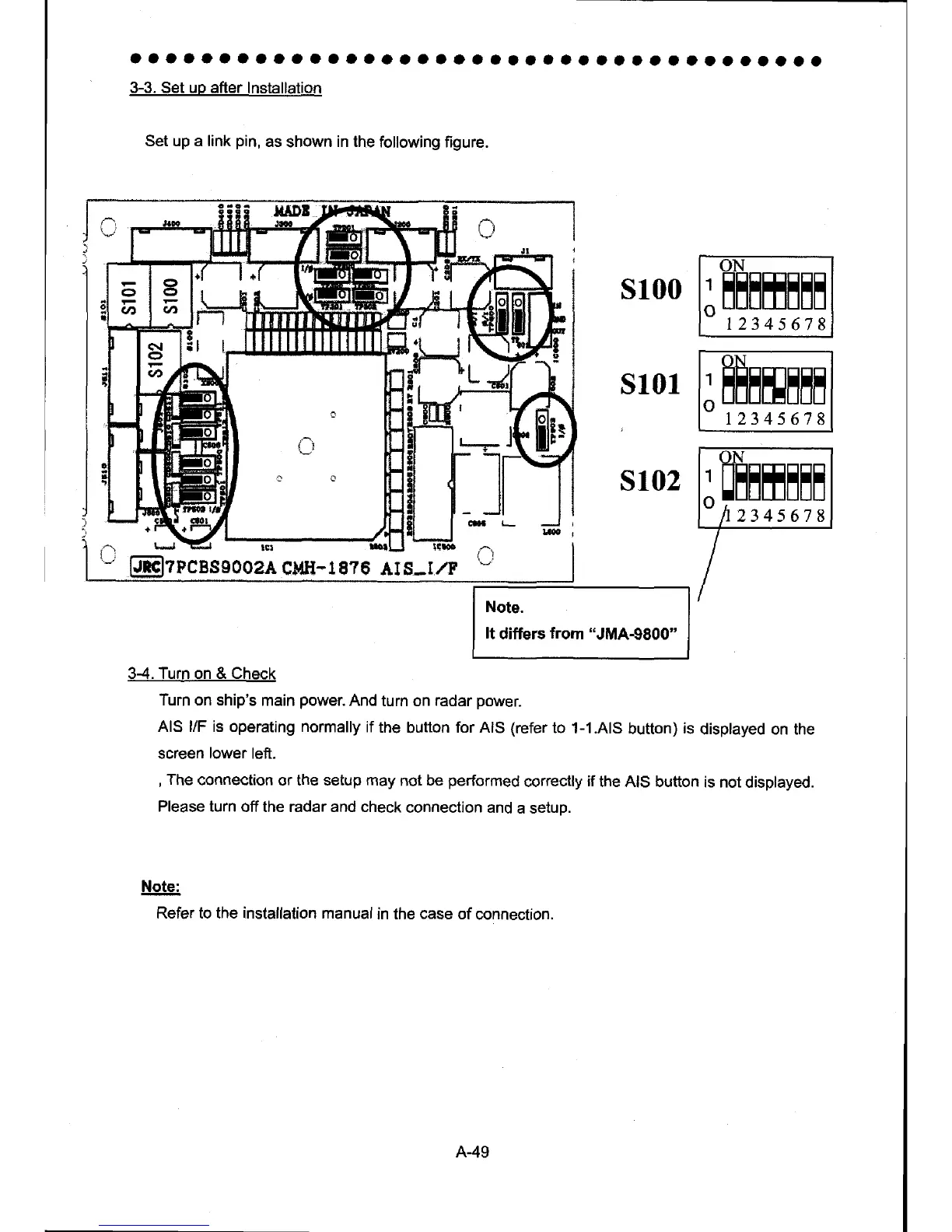
3-3. Set up after
Installation
Set up a link
pin,
as
shown
in the
following figure.
s100
:HHETEEE
12345678
s102
?pcBssoozA
cMH-1 8?6
Ai S_r./F
Note.
It
diffurs
from
"JMA-9800"
3-4. Turn on & Check
Turn on ship's
main
power.
And
turn on
radar
power.
AIS l/F is operating normally
if
the
button
forAlS (referto
1-1 .AlS
bufton)
is
displayed on the
screen
lower
leff.
,
The
connection
or the setup may
not
be
performed
correctly
if
the AIS button
is not
displayed.
Please turn
off the radar and check
connection and
a setup.
Note:
Refer to the installation manual
in the
case
of
connection.
12345678
2345678
A-49

Table of Contents

Other manuals for JRC JMA-9922-9XA

Related product manuals