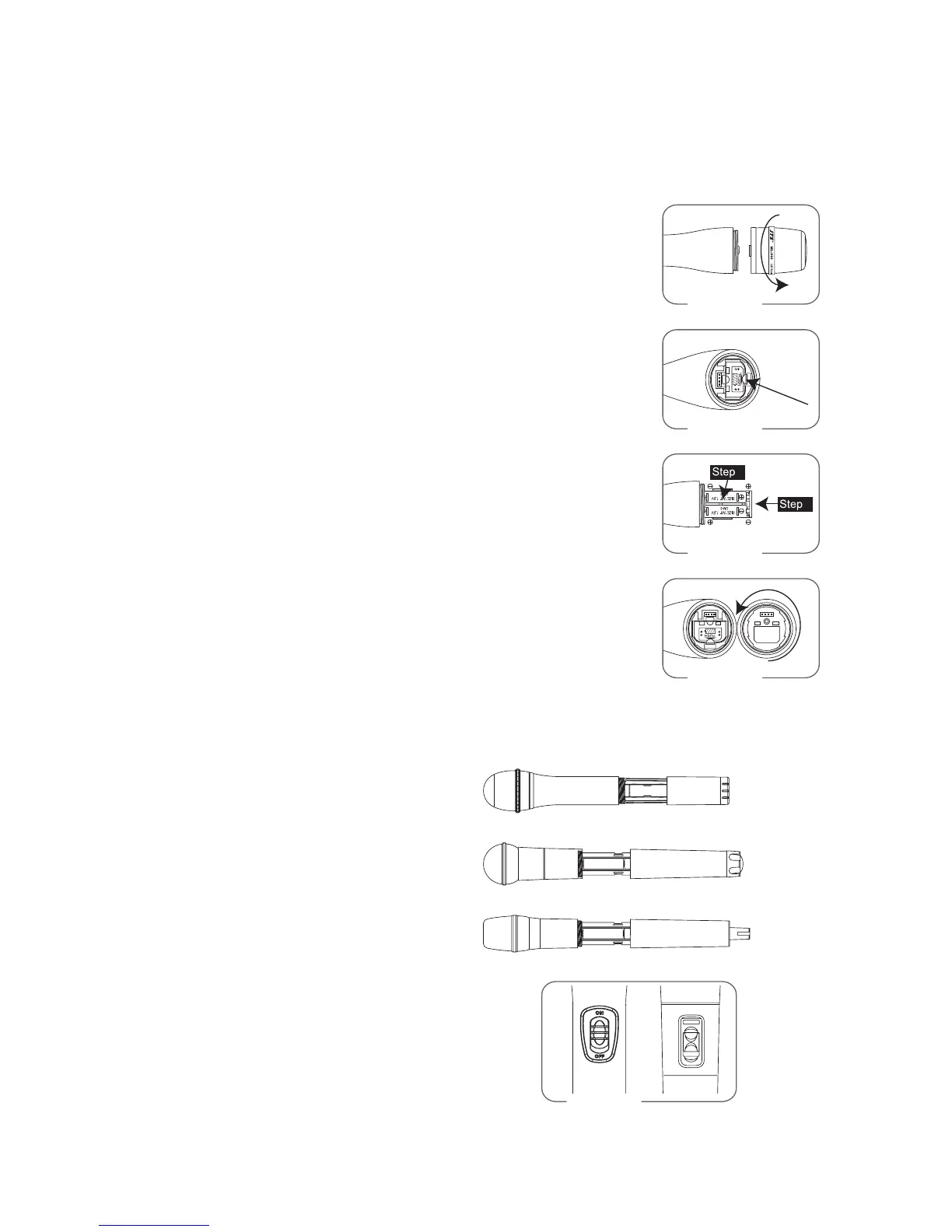
(1) Turning the transmier on/o
e on/o switch is located on the boom of the microphone.
(2) Inserting and changing the baery
1. Loosen the microphone head counter-clockwise. (Figure 1)
2. Hold on to both baery tray buons to release it. (Figure 2)
3. Insert 2 pieces of UM-3 1. 5 V baeries, remember to match
correct polarity. (step1 of Figure3)
4. Directly push the baery tray back. (step2 of Figure3)
5. Aim the connectors exactly for screwing on the microphone
head clockwise. (Figure 4)
(1) Loosen the baery cover and put the two
1.5V baeries into the baery tray.
(2) Aer puing into the baery, switch on
the power on/o on the boom side of
microphone. (Figure 5)
5-2 Handheld Transmitter //
Mh-900 / Mh-910 / Mh-800 / Mh-700
Mh-8000 / Mh-8000i / Mh-D8 / Mh-860
Figure 1
Fig
2
1
Fig
Figure 4
Mh-8000(i)
Mh-860
Mh-D8
ON
Figure 5
ure 2
ure 3


 To Next Page