16
4-2 Miniature Transmitter
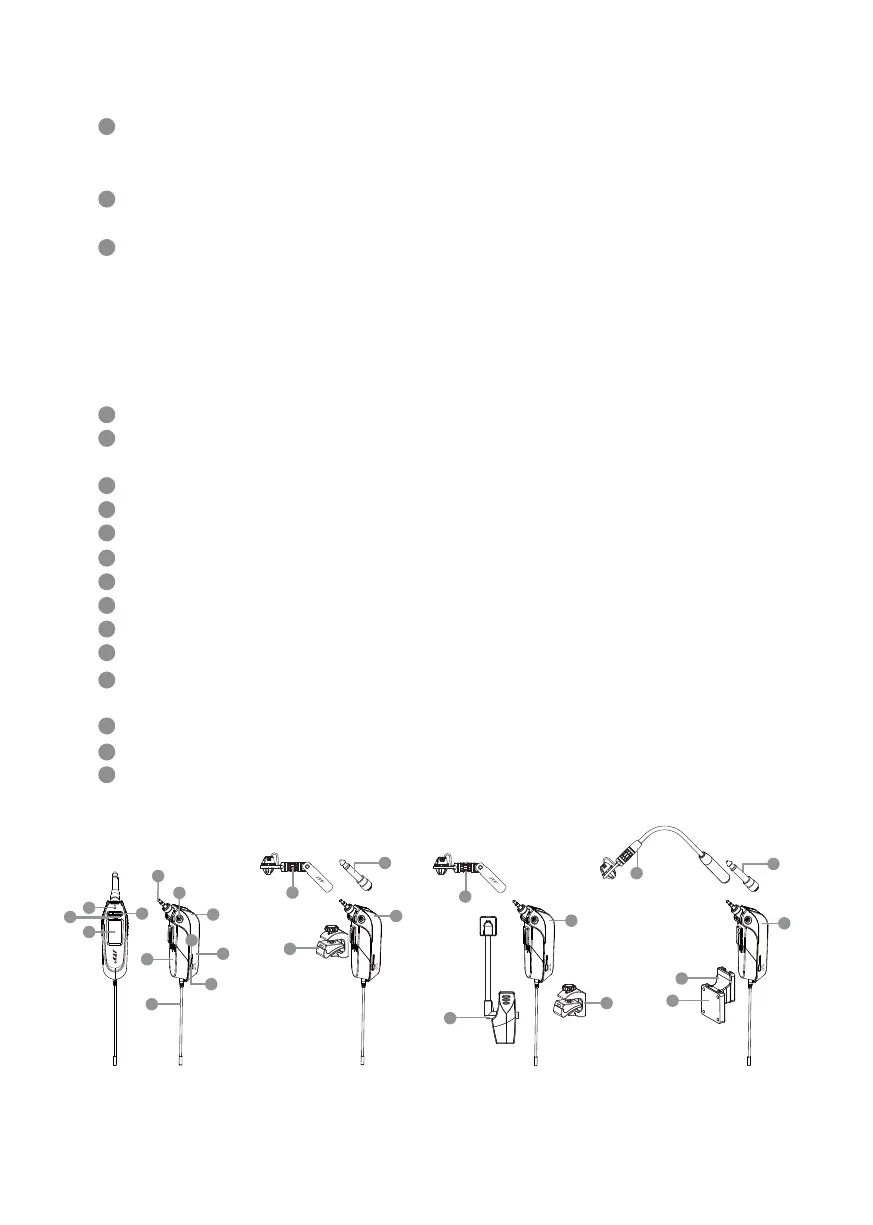
Power button/mute button:
On: Press the button to turn on the power and press it again for the mute mode
O: Press the power button for 2 seconds until the screen shows power o
Ultrasound receiving hole: receiving binding signals from the ultrasound trans-
mitting unit of the receiver.
LED status indicator light:
(1) Green: full battery >1V
(2) Green ash: transmitter in mute mode
(3) Red: low battery ≦1V
(4) Alternating ashing red and green: microphone in mute mode (low battery)
(5)Blue: ashing for 3 seconds indicates success in binding alignment
(6)Blue ash: error receiving data
LED display: displaying the relevant content and parameters of the transmitter
Set key: setting content parameters, including: frequency, group, channel, sensi-
tivity, digital audio code, key lock
Up/Down key: Using the “SET” key to change parameter setting
Audio plug: ψ3.5mm (6.35mm Adapter)
Battery cell: supporting AM4, AAA 1.5V*1 alkaline or rechargeable batteries
Antenna: RF antenna
Input sensitivity adjustment
UT-16GT transmitter
Battery cover (color) trim cover: green/gray
6.3GT plug: plug
516GT: accordion microphone module
508GT: microphone module for wind instruments
16GT Clip: Wind instrument clamp
516 Bracket
CLP-UT
10
2
11
3
12
4
13
14
15
16
17
5
6
7
8
9
1
Accordion/Guitar Pack Winds/Brass Pack
11
14
15
17
11
13
14
15
16
Guitar/Winds Pack
11
13
14
15
SET
Guitar Pack
11
1
8
6
2
4
12
5
10
7
3
9


 To Next Page