18 19
JBP-RC-MANUAL |
©
2021 JUICED BIKESJBP-RC-MANUAL |
©
2021 JUICED BIKES
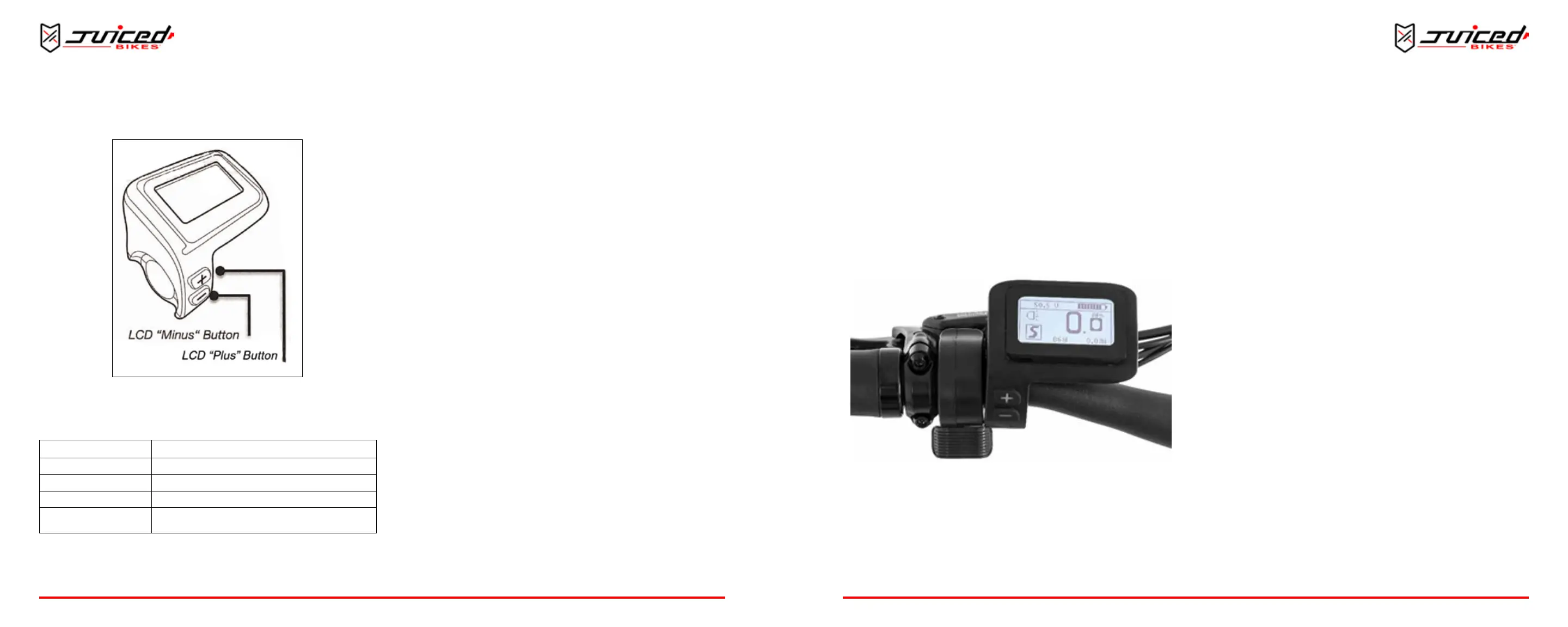
3. Use the “+” or “–” buons to select the desired pedal assist
level.
Fig. 18 - Selecng Pedal Assist Level
The levels are between:
0 Throttle Operation Only
ECO Battery Efciency
1, 2, 3 Speed Ranges
S Sport
R
Race Track Mode
(Refer to local laws & regulaons before using)
The LCD will indicate the pedal assist level that you select.
Once you start pedaling, the controller will make the motor turn
accordingly. Use the ECO mode for your rst test ride to get
used to your e-bike.
The e-bike will now maintain a constant pedal assist unl:
• The brakes are applied
• The “+” or “-” buons are pressed to adjust the pedal
assist level
• You stop pedaling
• The baery pack runs down completely
NOTE: If the baery pack level is low, we recommend selecng
a lower assist level. Keep in mind that the baery management
system can deacvate the pedal assist support to protect the
baery pack level from geng too low. Be sure to charge the
baery pack fully before each ride.
4. To turn the headlight on or o, press and hold the “+”
buon for 3 seconds.
5. Press and hold the controller power buon to turn o the
controller.
6. Turn o the baery power buon aer each ride to avoid
draining the baery pack.
THROTTLE OPERATION
Use the throle and pedal assist at the same me or you can
just use the throle feature to ride the e-bike. The throle
control is located on the right-side handlebar next to the LCD
screen.
To use the throle feature:
OPERATION
1. Turn on the baery and the controller. See “Using the Pedal
Assist Control System” on page 17.
2. Set the LCD to the desired seng. If you select “0,” the
pedal assist control system is unavailable.
3. Rotate the throle control to increase the e-bike speed.
READING THE BATTERY PACK LEVEL
The LCD display indicates the baery pack’s voltage. The
voltage can vary greatly depending on a variety of condions.
Fig. 19 - Baery Level Indicator
The voltage will decrease temporarily when using the throle
and/or pedal assist. The voltage may drop when going uphill
regardless of the charge state. This is normal operaon. The
voltage will be lower if the baery pack has been in a cold
environment.
To more accurately read the baery pack’s charge state, let o
the throle. The display lights will stabilize aer 1 second to
indicate the baery pack’s level.
When the baery pack level is low and it reaches:
• 2 Bars - Recharge baery pack soon. Select a lower pedal
assist level.
• 1 Bar - Stop using the throle; recharge the baery pack.
UNDERSTANDING THE BATTERY PACK RANGE
All electric bicycles have a riding range that can vary greatly
depending on riding style, terrain, re pressure, temperature,
payload and wind. Aer a few rides, you will get a sense of the
electric bicycle’s range capability.
FACTORS THAT WILL DECREASE YOUR RANGE
• Rapid acceleraons using the motor
• Uphill riding
• Heavy payloads
• Headwinds
• Underinated res
• Extreme hot or cold weather
HOW TO INCREASE YOUR RANGE
• Start by pedaling instead of only using the motor.
• Avoid rapidly accelerang using the throle.
OPERATION


 To Next Page