22 23
JBP-RC-MANUAL |
©
2021 JUICED BIKESJBP-RC-MANUAL |
©
2021 JUICED BIKES
TURNING THE E-BIKE ON AND OFF
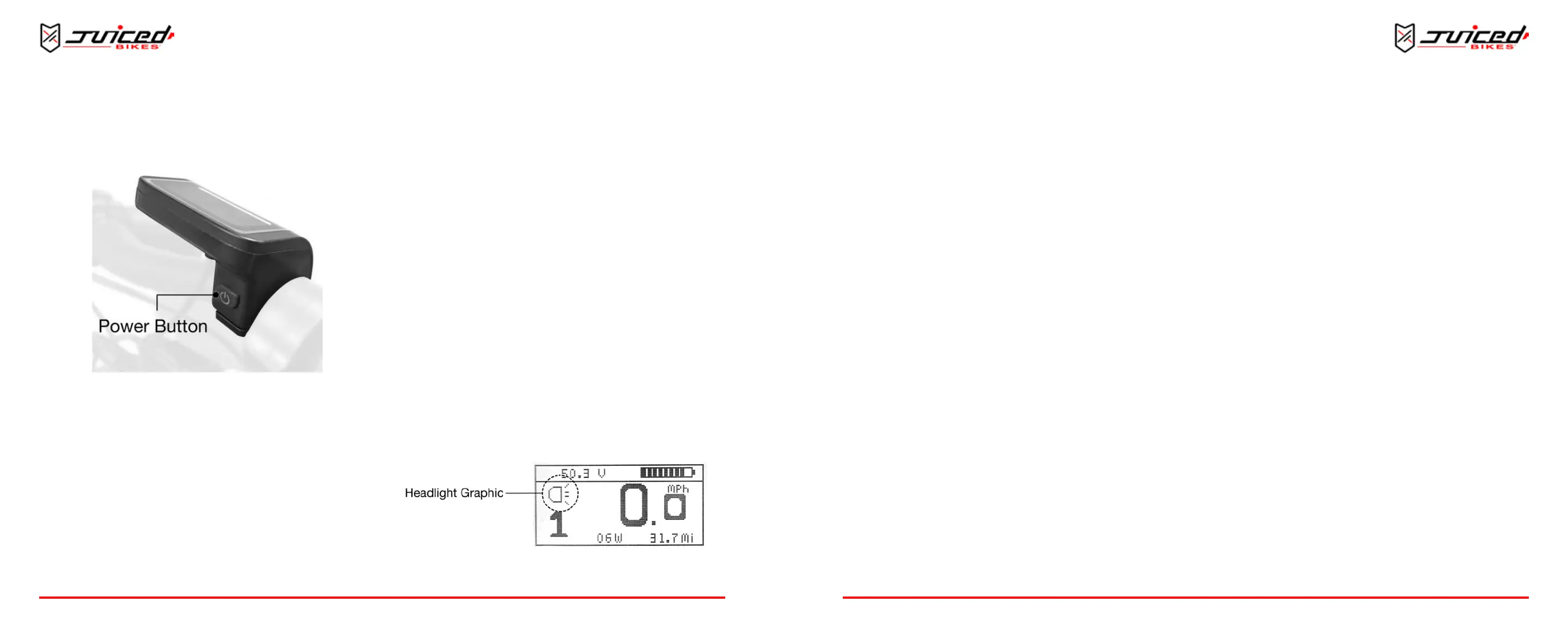
Fig. 22 - Power Buon
HOW TO TURN THE E-BIKE ON
Securely install the baery pack and press the power buon.
Then, push and hold the power buon on the back of the LCD
for 3 seconds when the bike is o. The LCD will illuminate and
the bike will power up.
HOW TO TURN THE E-BIKE OFF
Push and hold the power buon for 3 seconds when the bike is
on. The LCD display will power down and the bike will shut o.
Then press the power buon on the baery pack.
AUTOMATIC SHUTOFF
The electronic system will also automacally shut down aer a
preset period of me. This duraon can be adjusted in the
setup menu.
ADJUSTING THE ASSIST LEVELS
HOW TO INCREASE THE ASSIST LEVELS
When the bike is on, push and release the “assist up” buon.
The assist will advance by one level unl SPORT mode is
reached.
HOW TO DECREASE THE ASSIST LEVELS
To decrease the assist level, push and release the “assist down”
buon. The assist will decrease by one level unl ECO mode is
reached.
The default assist seng is assist level 1. This will appear each
me the e-bike is turned o and back on.
ACTIVATING THE LED HEADLIGHT AND DISPLAY
BACKLIGHT
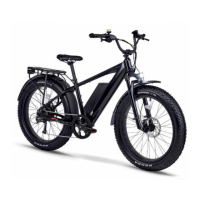
Fig. 23 - Headlight Graphic on the Main Display
OPERATION
TO TURN ON THE LED LIGHT
Push and hold the “assist up” buon for 2 seconds. The front
LED headlight and the display’s backlight will illuminate. A
headlight status icon will appear on the screen.
TO TURN OFF THE LED LIGHT
Push and hold the “assist up” buon for 2 seconds and the LED
headlight will turn o.
ACTIVATING THE WALK MODE
When pushing the bike uphill, use the WALK mode. This mode
will turn the motor at walking speed to assist you in moving the
bike.
TO ACTIVATE THE WALK MODE
To acvate the WALK mode, push and hold the “assist down”
buon. Aer 2 seconds the motor will begin to turn at
walking speed.
TO STOP USING THE WALK MODE
To stop using the WALK mode, release the “assist down” buon.
The motor will stop turning and resume normal operaon. Using
either brake lever will also stop the WALK mode.
ACTIVATING THE CRUISE CONTROL FUNCTION
Use the cruise control feature to maintain a desired speed
without using the throle or pedal assist.
TO ACTIVATE THE CRUISE CONTROL FUNCTION
Use the throle or pedal assist to reach your desired speed.
Push and hold the “assist down” buon for 2 seconds. When the
“C” graphic appears, release the “assist down” buon and the
current speed will be maintained without the need to pedal or
use the throle. In CRUISE mode, the throle is automacally
modulated so that the desired speed is maintained.
To disconnue the use of the cruise control funcon, choose
one of the following acons:
1. Use the brakes by squeezing the brake lever
2. Use the throle
3. Push the “assist up” or “assist down” buon
IMPORTANT NOTES ABOUT THE CRUISE CONTROL FUNCTION
• The cruise is considered a type of throle and the
maximum cruise controllable speed is 20 mph in
accordance with regulaons.
• If you set the cruise control speed above 20 mph, the
cruise control speed will default to 20 mph. The speed will
decrease unl it reaches 20 mph.
• The pedal assist is sll available when the cruise control
is acve. It may be possible to pedal the e-bike faster
than the preset cruise speed. However, the cruise will
automacally resume if the speed decreases to the preset
cruise-controlled speed.
• If you need more power to achieve a preset speed (for
example, when encountering resistance such as a hill or
headwind) more power will automacally go to the motor
to help maintain the preset speed.
• If the resistance is too much for the system to retain the
preset speed, the resulng speed will be limited by the
OPERATION


 To Next Page