ENGLISH
38
Make sure that the pool heat pump is positioned on a strong and stable base.
The base where the pool heat pump is positioned must be flat, as it is to be installed horizontally.
The pool heat pump’s location must be suitable for cable routing and pipe connections.
OPERATING SETTING
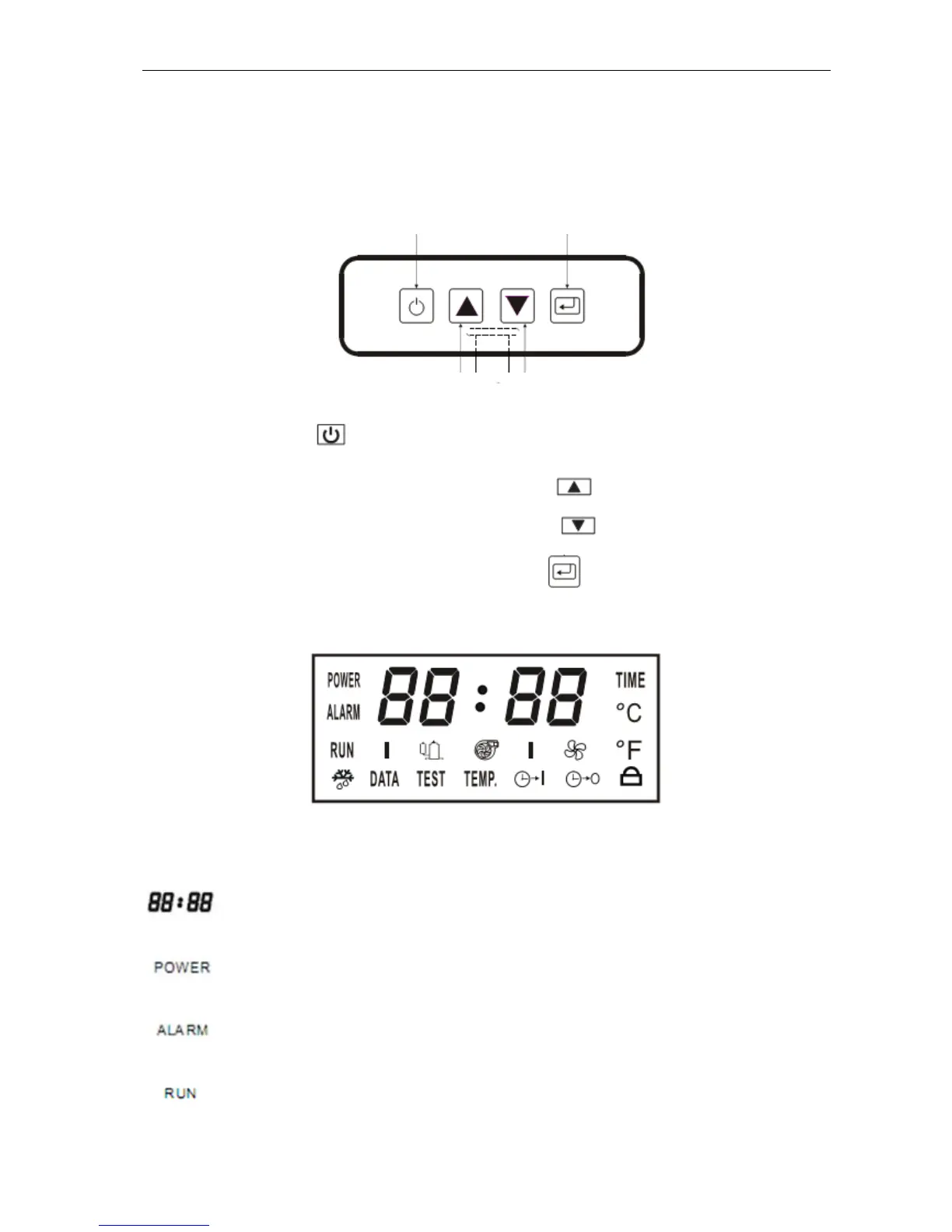
Control panel
Start the unit by pressing
and Press again to stop the unit.
To increase the temperature, time or parameter one unit, press
.
To decrease the temperature, time or parameter one unit, press
.
To activate the operating settings or to confirm settings, press
.
LCD Display
Symbol Description
Function
Display
Shows temperature, parameters, error
codes, etc.
Voltage indication
Shows when the unit is connected to
voltage.
Indicates error code
Indicates faults together with error codes
shown on the display.
Device is operational
Lights when the unit is switched on and
operational.
INCREASE
DECREASE
ON/OFF SET


 To Next Page