MA
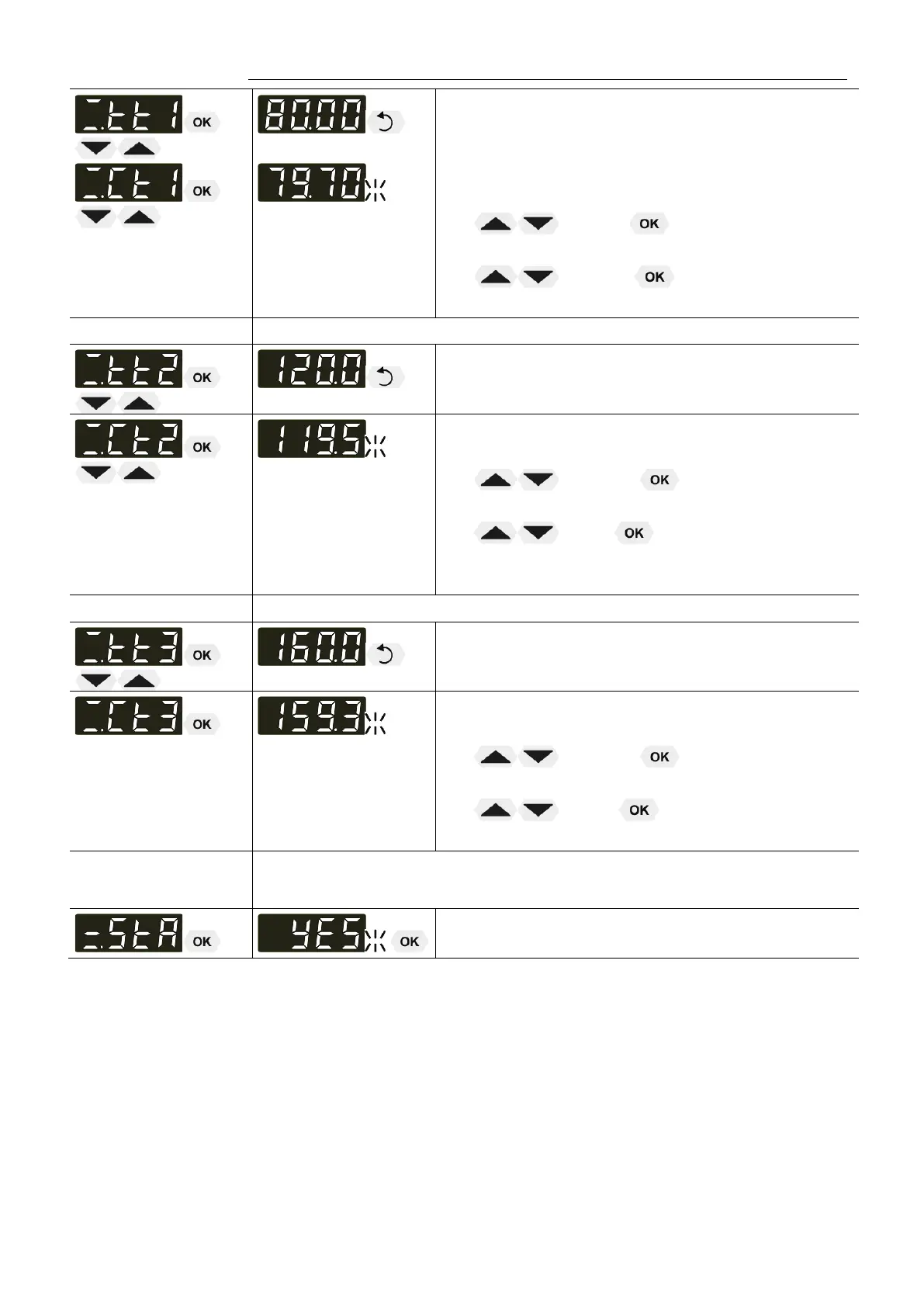
The value >tt1< is only indicated
Setting >Ct 1< by using the keys.
• Integer digits flash, set by pressing
(79) +
• Decimal digits flash, set by pressing
(70) +
The first of 3 points is calibrated.
Return to 1. Set working temperature value: 120.00 °C
The value >tt2< is only indicated
Setting >Ct 2< by using the keys.
• Integer digits flash, set by pressing
(119) +
• Decimal digits flash, set by pressing
(5) +
The second of 3 points is calibrated.
Return to 1. Set working temperature value: 160.00 °C
The value >tt3< is only indicated
Setting >Ct 3< by using the keys.
• Integer digits flash, set by pressing
(159) +
• Decimal digits flash, set by pressing
(3) +
The 3-point calibration is completed
4. Return to standard operation
• Set >YES< after calibration.
39


 To Next Page