Menu functions
32
Level 2 Parameter level
oer
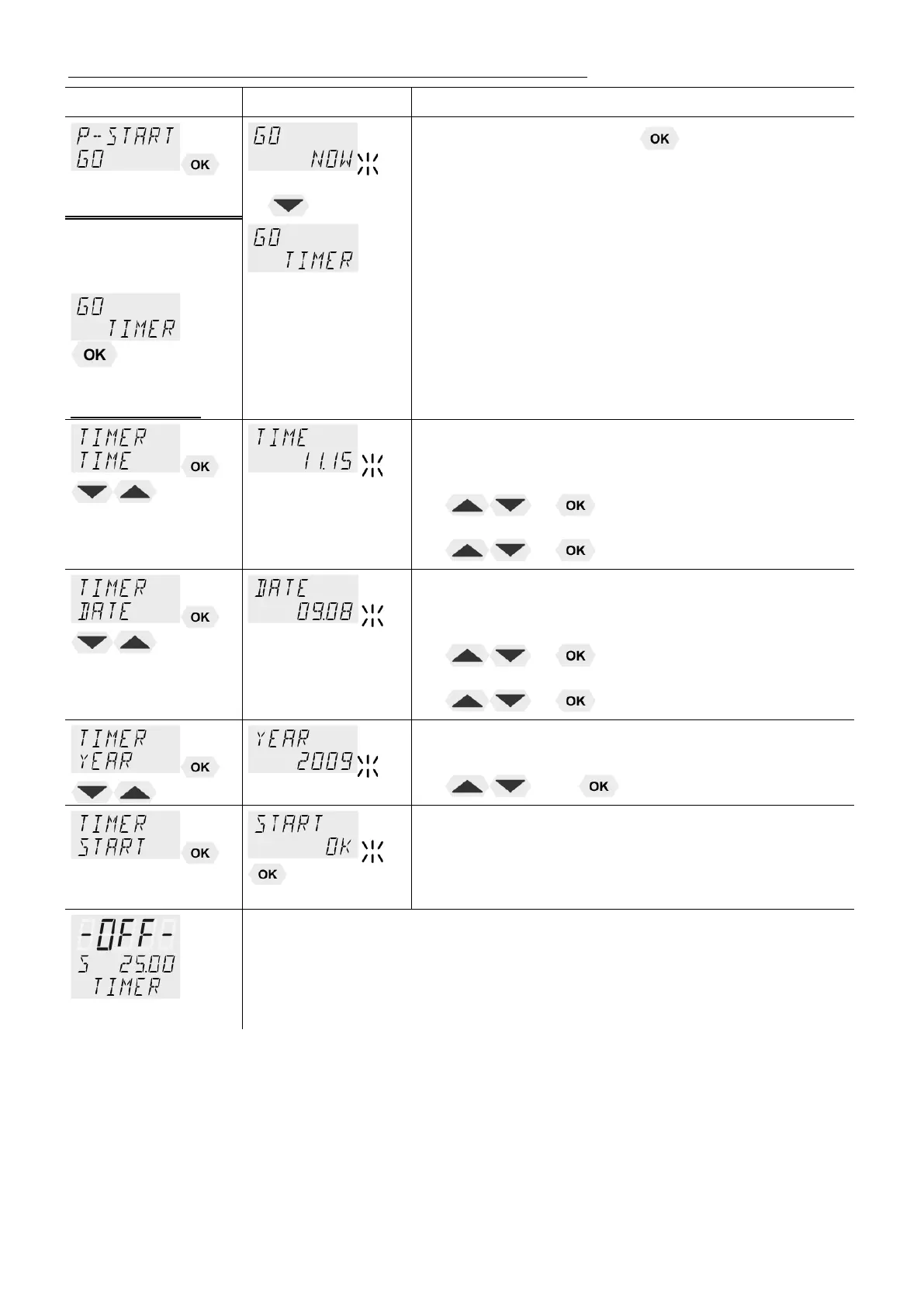
• Confirm >NOW< with the key and the program
will start immediately
or
start at the set time under parameter (TIMER ).
Set time in the example below:
09. August 2009, 11:15 hrs
Parameter level
set the time for the start of the program in the
submenu >TIMER<.
>TIME< hours/minutes (hh:mm), set both values one
after the other and confirm
• hours flash, set by pressing
+
minutes flash, set by pressing
+
>DATE< day/months (TT/MM), set both values one after
the other and confirm.
• day flashes, set by pressing
+
month flashes, set by pressing
+
>YEAR< year
• Set the year with
and .
The program starts at the set time.
Display of time until start:
In line 3 the notice >TIMER< and the set values for „TIME“ and
„DATE/YEAR“ are alternately indicated
Check the correct setting of the internal real time clock if required
(see MENU CONFIG)


 To Next Page