5352
5.2 Countdown timer
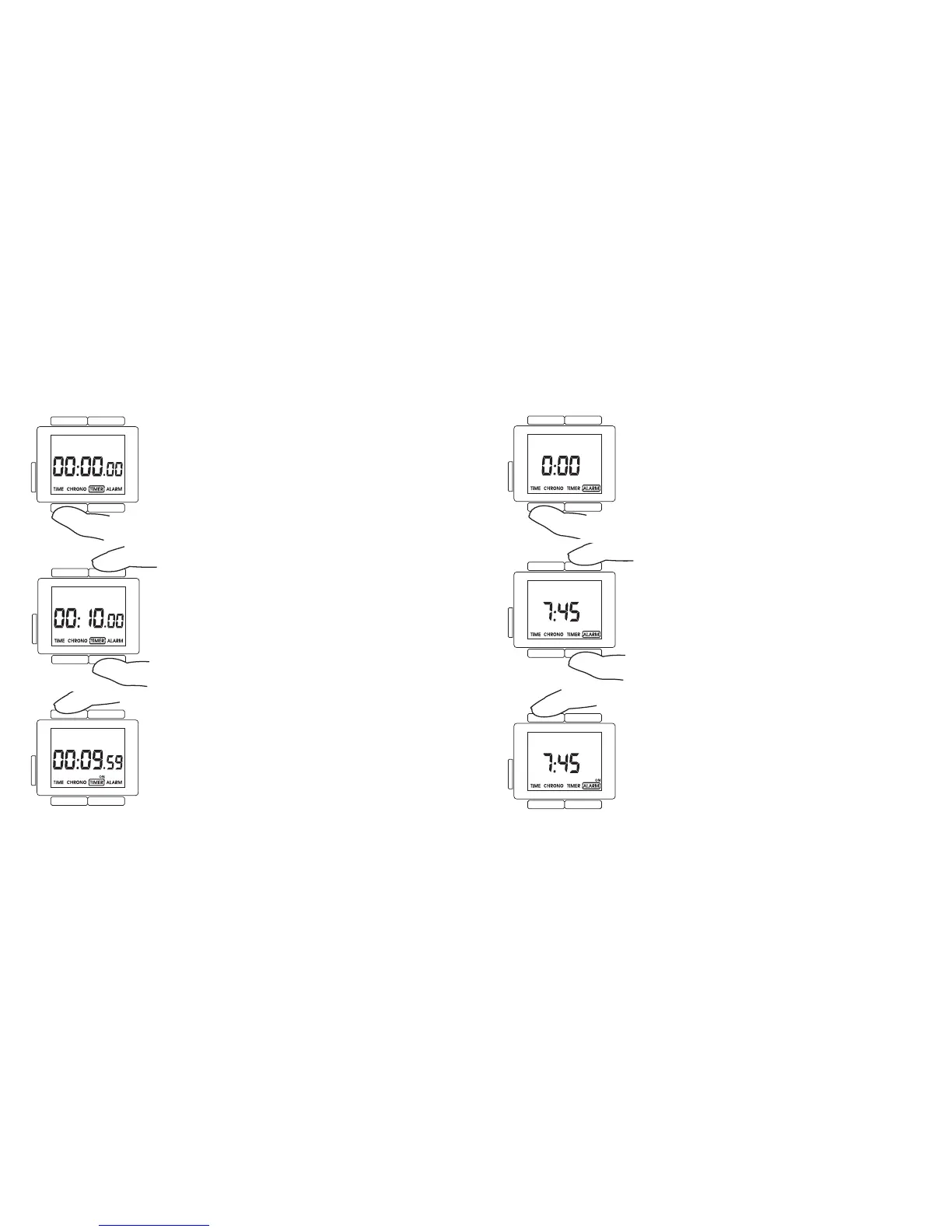
Press T3 until TIMER mode is selected.
The timer is set using T1 (set+) and T2 (set–). Press
the button briefly to adjust the time by the second. If
you hold the button down the time changes quickly.
The countdown timer is started/stopped with the T4
button. When the countdown timer is running the
tag ”ON” appears above the TIMER menu item in the
display.
When the countdown timer reaches 00:00:00 an
acoustic signal sounds.
5.3 Alarm
Press T3 until ALARM mode is selected.
The alarm time is set using T1 (set+) and T2 (set–).
When the buttons are pressed briefly the time chan-
ges by the minute, but if the button is held down the
time changes quickly.
When the alarm time is adjusted the alarm is auto-
matically activated. The tag ”ON” appears in the
display.
The alarm is activated or deactivated using the T4
button. When the alarm is active the tag ”ON” appe-
ars above the ALARM menu item in the display.
When the time that the alarm is set to is reached an
acoustic signal sounds.













 To Next Page