Rev A Page 15
JA94-N01A Dual Audio Controller - NVG
SECTION 3 – OPERATION
3.1 Introduction
This section contains the operating instructions for the JA94-N01A.
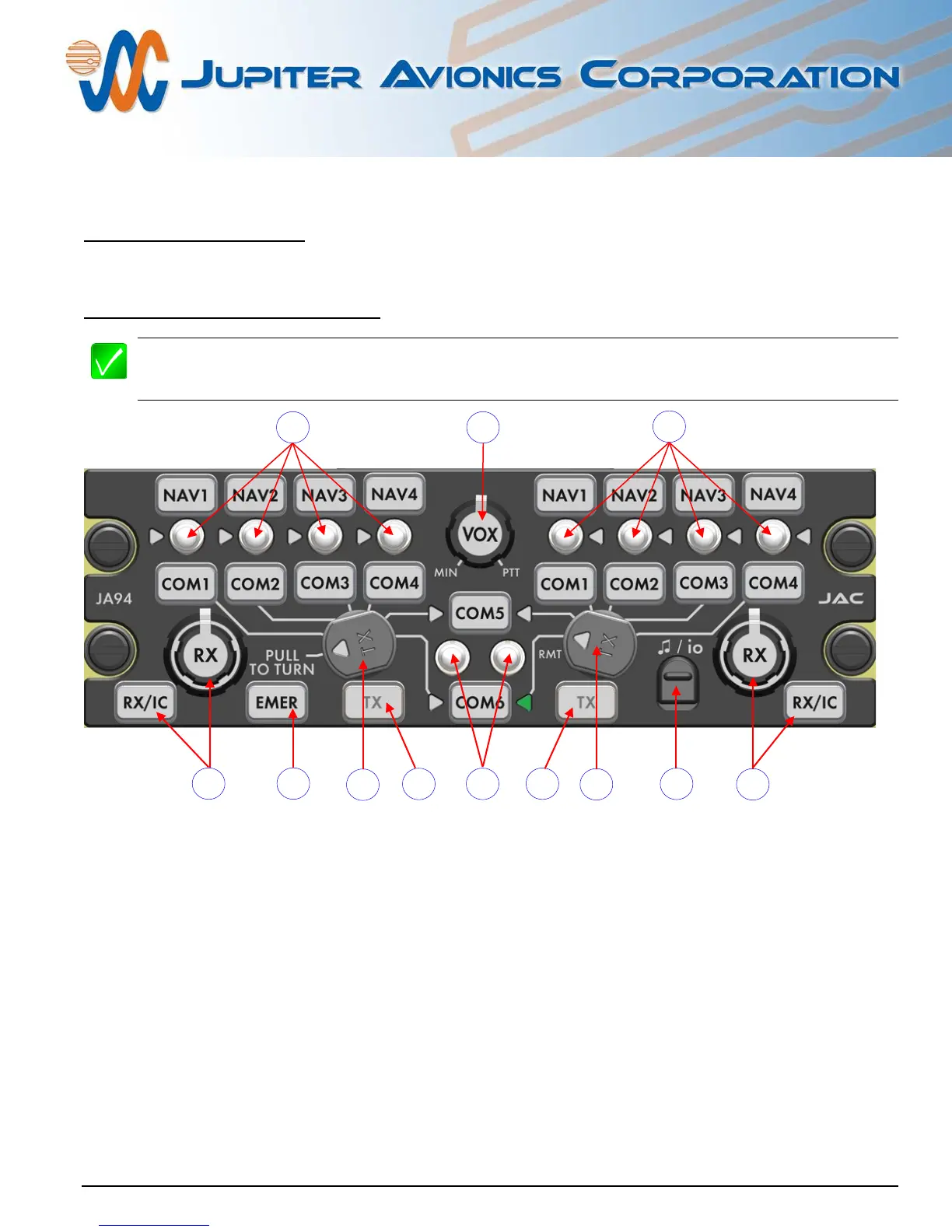
3.2 Front Panel Controls
Note: The 21 legends and 2 deadfront annunciators are removable and may be replaced with custom
ordered parts. For the purpose of this manual the controls will be referred to by the default legend and
annunciator names as shown below.
1. Left User Receive select switches, TX select annunciators and associated legends
2. Right User Receive select switches, TX select annunciators and associated legends
3. Left and Right User COM5/COM6 receive select switches, TX select annunciators and
associated legends
4. VOX threshold control
5. Left User Transmit Selector Switch and Emergency Switch
6. EMER (Emergency) Legend
7. Left User ICS/RX Volume control and legend
8. Right User Transmit Selector Switch
9. Music/configuration input connector cover (
/io)
10. Left User ICS/RX Volume control and legend
11. Left User Transmit Deadfront Annunciator
12. Right User Transmit Deadfront Annunciator



 To Next Page