Page 9 of 13
Standard Connections
+
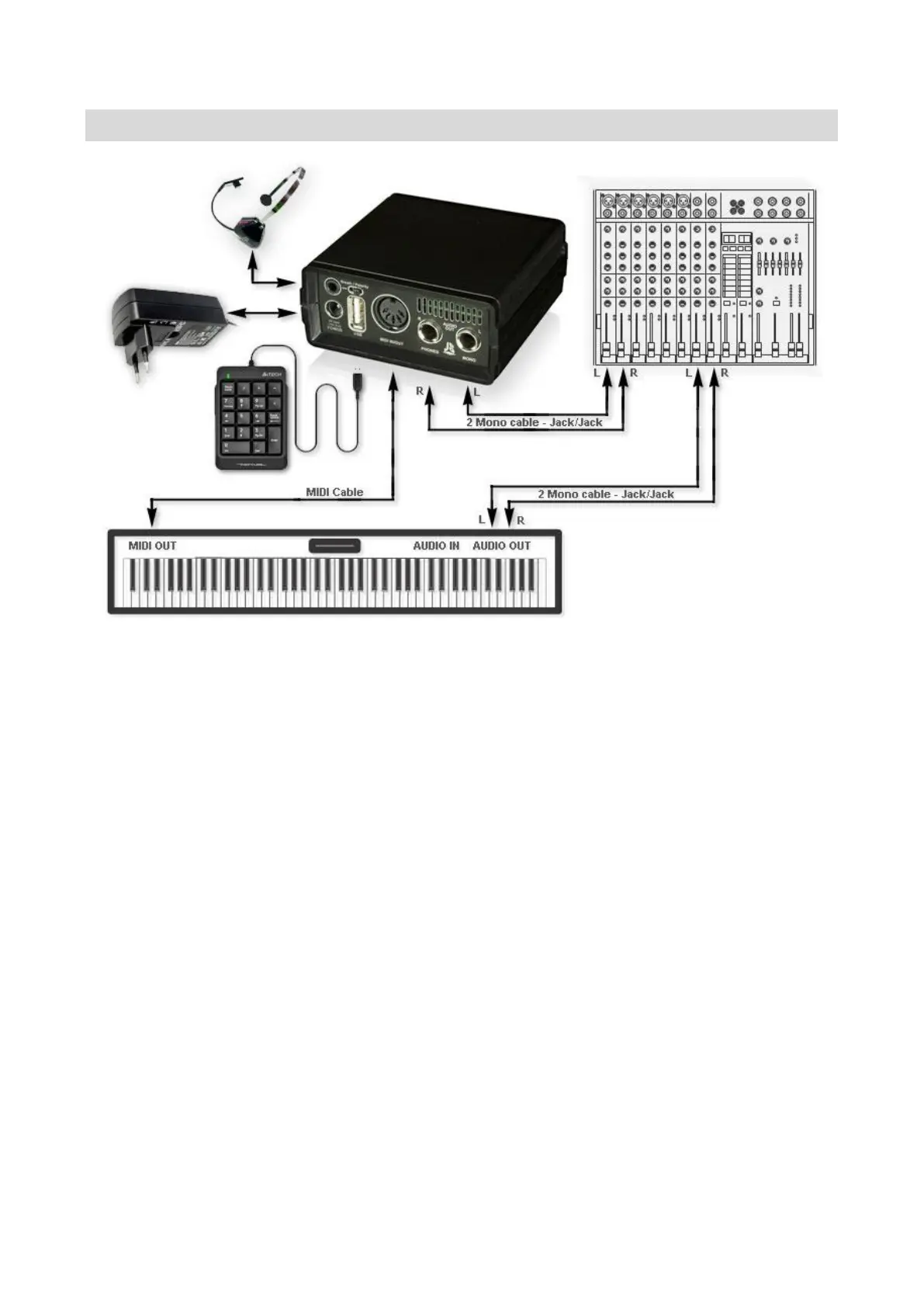
Connect Power Adapter to Power Input of sampler.
WARNING!!! Use only an original AC/AC adapter supplied by Juzisound! Using the
wrong adapter can damage your sampler!!!
Connect Breath Controller Headset to the Breath Input of the sampler. If not use Breath
Controller, skip this step.
Connect USB Numpad Keyboard to the USB Input of the sampler. If not use USB keyboard,
skip this step.
Connect MIDI OUT of the synthesizer or MIDI keyboard, which is master to the sampler to
the MIDI IN of the sampler. You can do this connection by MIDI cable (included).
Connect AUDIO Out L and Audio Out R of the sampler to 2 separate MONO input
channels of you MIXER or to one STEREO input channel. To to this, you need 2 mono
audio cables with Jack\Jack connectors (not included). If use 2 separate MONO channels
of you mixer, set PAN of both channels to max L/R position to listen STEREO sound.


 To Next Page