33
TV Continued...
Edit Channel
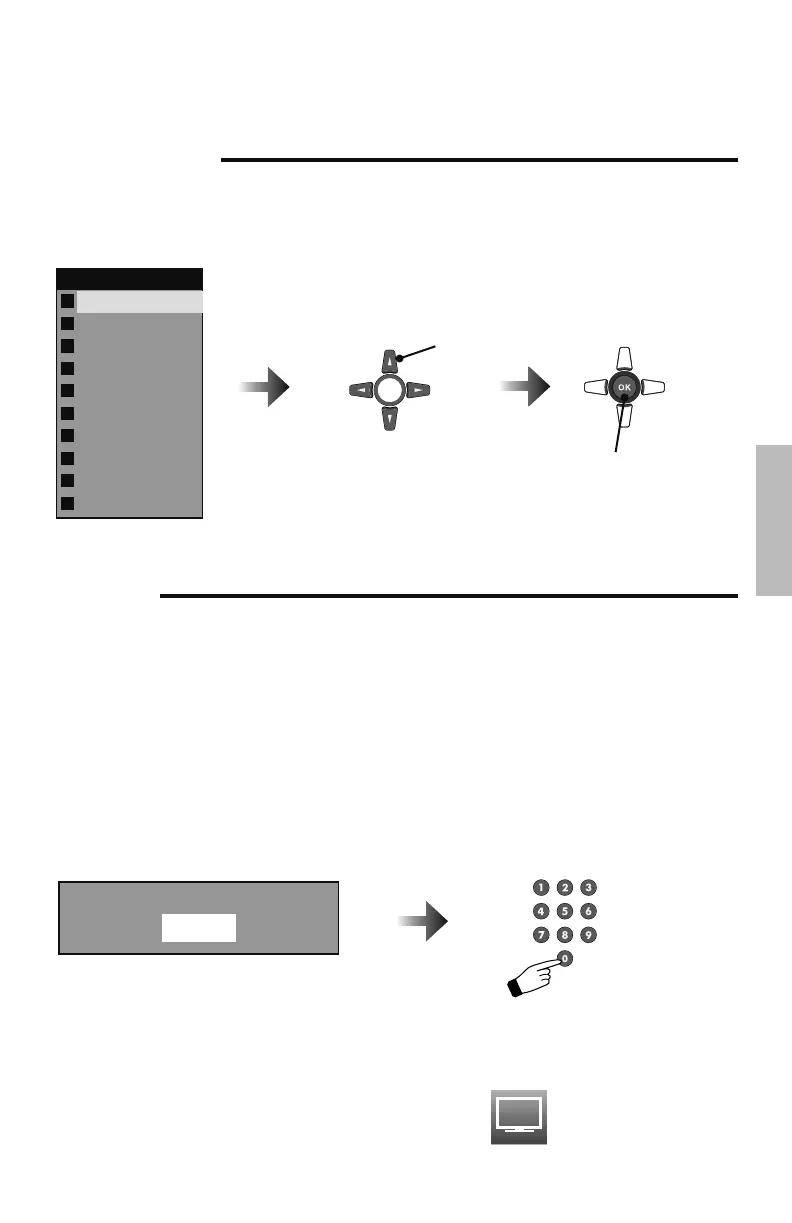
Allows you to skip channels when using the + CH – button. “✔” means don’t skip, “ ” means
to skip. You can still access those skipped channels manually using the number buttons on the
remote.
Main Channel List
3-2
3-3
5-0
6-0
6-0
11-0
14-0
22-1
36-0
63-0
CH-2
CH-3
CH-1
Select
Select to skip or not to skip.
Also, select the channel.
V-Chip
Allows you to block channels or content that you deem inappropriate for children.
Notes:
• V-CHIP will not work with video signals from VCRs, DVD players, Blu-ray or camcorders
connected to the TV.
• (For Canadian viewers only) V-CHIP is designed specifically for the US and may not work
properly in Canada.
– When entering the password –
When you try and access the V-Chip menu, “Please input password” will appear. Press the
“0” button four times on your remote to access the V-Chip menu for the first time.
Please input password:
Advanced
LCT2520-001A-A.indd 33LCT2520-001A-A.indd 33 1/16/09 9:46:55 AM1/16/09 9:46:55 AM



 To Next Page
 Loading...