49
Etc.
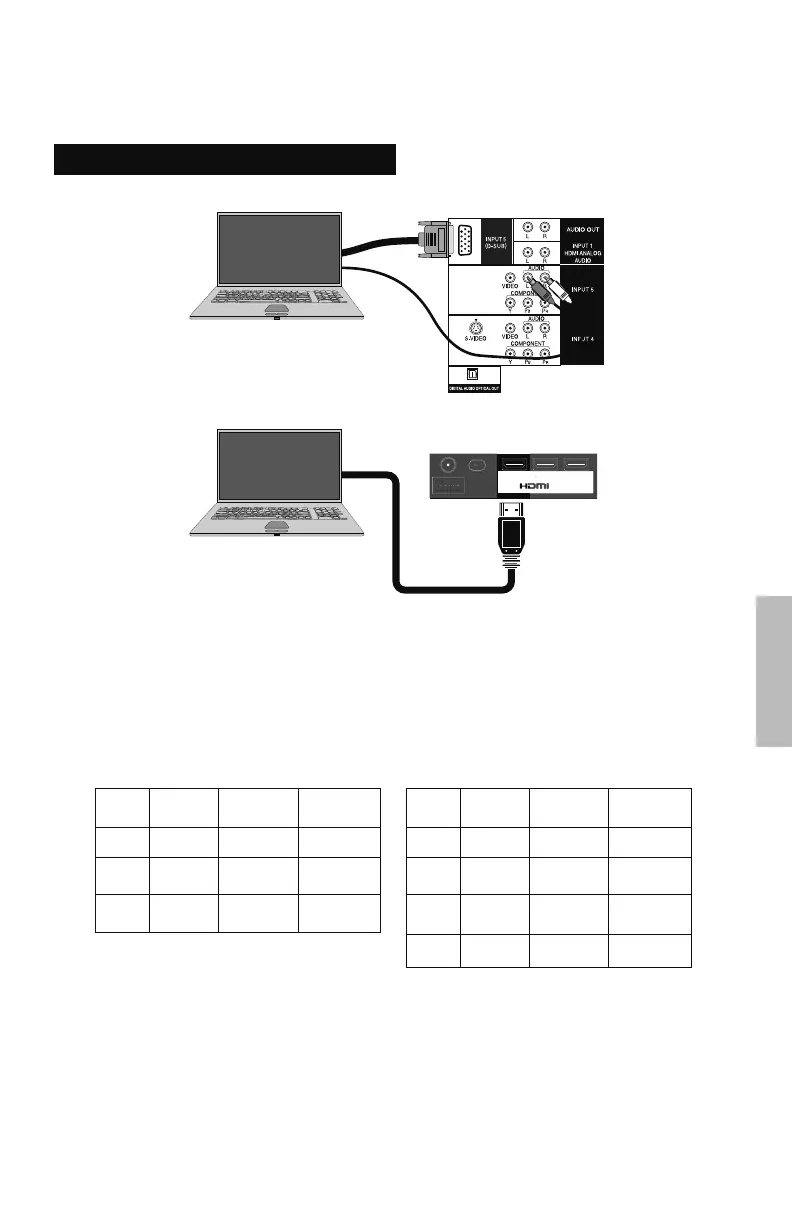
TV Rear Panel
PC
Connect a Computer
Notes:
• Make sure your TV is displaying INPUT 1, INPUT 2, INPUT 3 or INPUT 5 by pressing the V1,
V2, V3 or V5 button on your remote control.
• When you connect a PC using HDMI-DVI cable, connect an audio cable to INPUT 1 HDMI
ANALOG AUDIO on the TV.
• Use a D-SUB cable with ferrite cores and no longer than 3 meters to avoid electromagnetic
disturbances.
• Refer to your computer’s manual for more information.
Resolution
640 x 480
800 x 600
1024 x 768
V. Frequency
(Hz)
60
60
60
H. Frequency
(kHz)
31.5
37.9
48.4
Format
VGA
SVGA
XGA
D-SUB
Resolution
640 x 480
800 x 600
1024 x 768
1920 x 1080
V. Frequency
(Hz)
60
60
60
60
H. Frequency
(kHz)
31.5
37.9
48.4
67.4
Format
VGA
SVGA
XGA
FHD
HDMI
Notes:
• Depending on signal quality, some pictures may not be displayed correctly.
• Computers that cannot set the refresh rate to 60 Hz, cannot be used with this TV.
• If you are inputting a PC signal that is invalid, “No signal or Signal can not be displayed” will
appear on the TV screen. It appears when the input is PC and it is a single screen.
• When you connect a PC using an HDMI cable, the TV image may not be displayed correctly.
PC
TV Rear Panel (INPUT 1)
INPUT 1 INPUT 2 INPUT 3
75 Ω
(VHF/UHF)
Or...
LCT2520-001A-A.indd 49LCT2520-001A-A.indd 49 1/16/09 9:47:02 AM1/16/09 9:47:02 AM



 To Next Page
 Loading...