No.52024
V-21F3
V-21FR3
V-21FMG3B
30
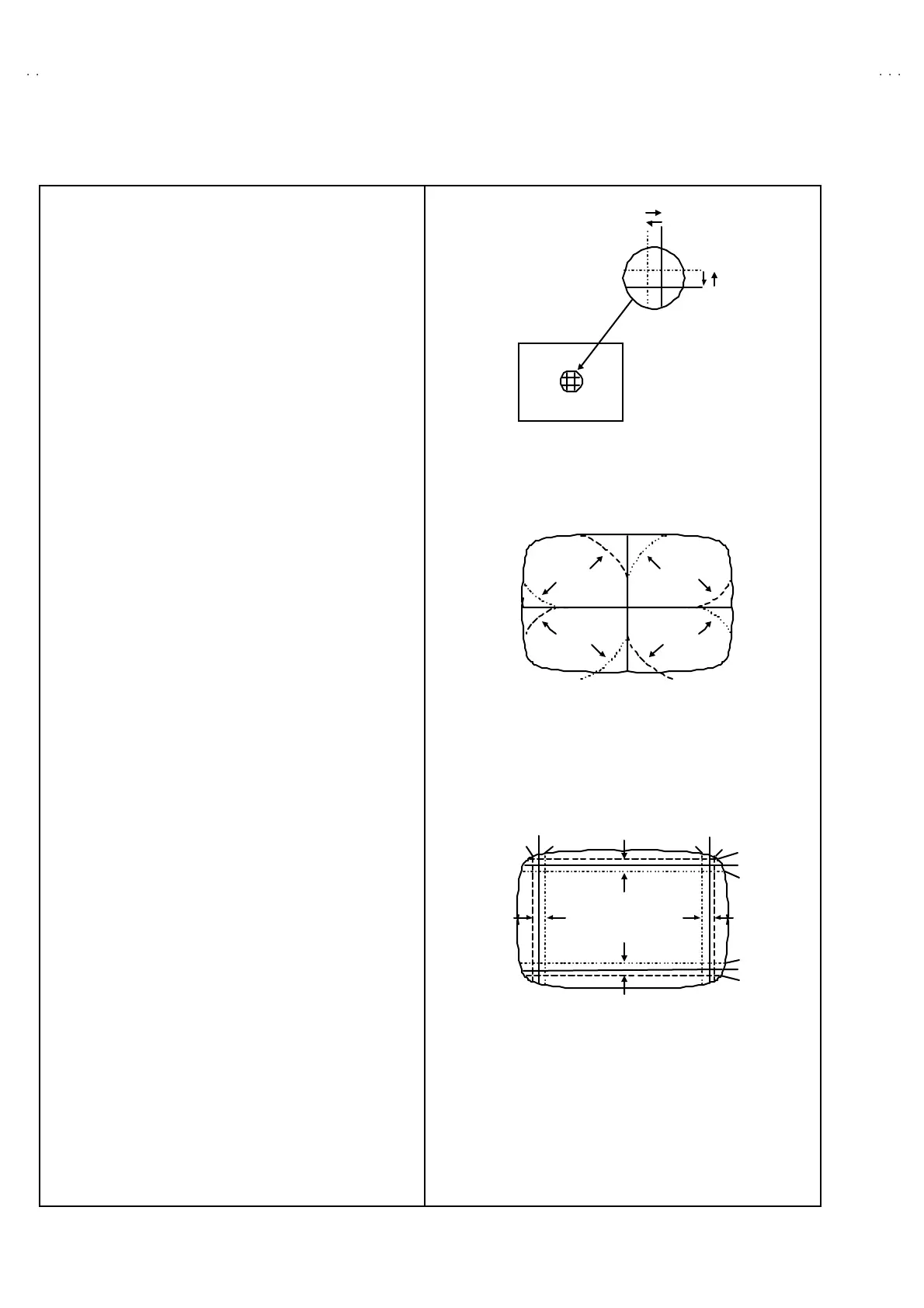
STAT IC CONVERGENCE ADJUSTMENT
1. Inp ut a cr oss hat ch sig nal.
2. Usin g 4 -po le con verge nce magn ets , ove rla p t he re d a nd blu e
lin es in th e cen ter of th e screen ( Fig. 1) a nd tu rn the m to
mag ent a (r ed/ blue ).
3. Usin g 6 -pole con verge nce magn ets, over lap the
mag ent a(re d/b lue) a nd g r een lines in t he cen ter of the screen
an d t urn t hem t o whit e.
4. Rep eat 2 and 3 ab ove, an d ma ke best c on ve r ge nce.
DYNAMIC CONVERGENCE ADJUST MENT
1. Move th e d ef lec tion yok e u p an d d own and o ver lap th e lin es in
the periphery. (Fig. 2 )
2. M ove th e def lection yoke left to righ t a nd over lap t he lin es in the
p erip hery. (Fig. 3)
3. Rep eat 1 and 2 ab ove, an d ma ke best c on ve r ge nce.
●
After adjustment, fix the wedge at the original position.
Fast en t he r eta iner scr ew of the d ef lection yoke .
Fix the 6 magn ets with g lu e.
(F RONT VIEW )
GREEN
(F RONT VIEW )
BLUERED
BLUE
GREEN
RED
RED
GREEN
BLUE
GREEN REDBLUE
GREEN
(F RONT VIEW )
BLUE
RED
BLUE
GREEN
RED
RED
GREEN
BLUE
GREEN
RED
BLUE
Fig.3
Fig.2
Fig.1



 To Next Page