No.52024
V-21F
V-21FR3
V-21FMG3B
31
REPLACEMENT OF CHIP COMPONENT
!
CAUT IONS
1. Avoid heating for more than 3 seconds.
2. Do n ot ru b t he elect ro des an d t he resist parts of th e p att er n.
3. W hen removing a c hip part, melt th e s older ad equ ate ly.
4. Do n ot r euse a ch ip p art afte r re mo ving it .
!
SOLDERING IRON
1. Use a hig h ins ulatio n s oldering iron with a t hin po inted e nd of it .
2. A 3 0 w s oldering iron is rec omm end ed for easily removing p ar ts.
! REPLACEMENT STEPS
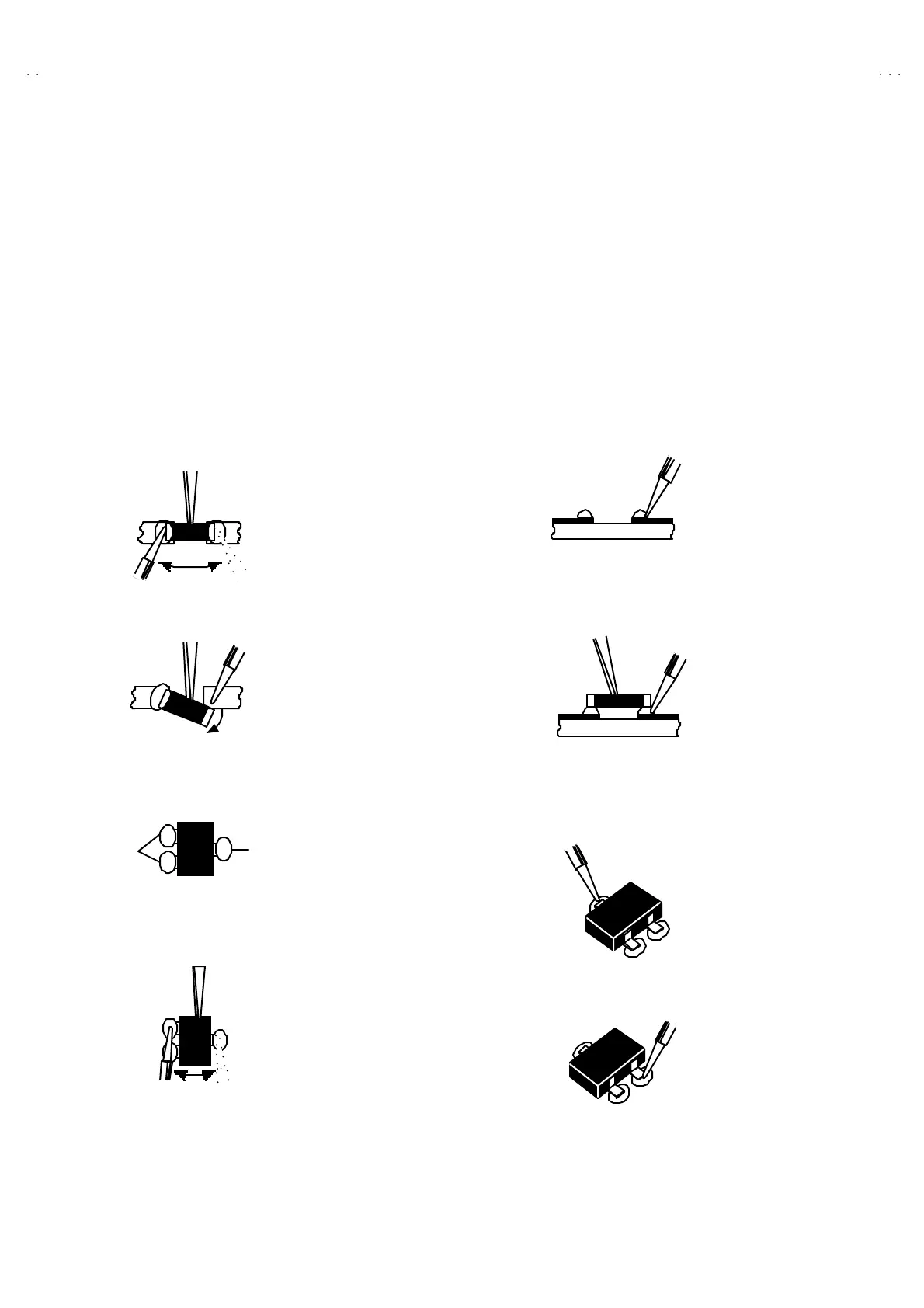
1. How to remove Chip parts
$
$$
$ Resi st ors, ca pa citors , etc
(1) As sh own in t he f ig ure, push th e pa rt with twee zer s and
alte rnat ely melt the solde r at each en d.
(2) Sh if t with tweeze rs an d remo ve the ch ip p art.
$
$$
$ Transistors, diodes , va riabl e r es ist or s, et c
(1) Ap ply e xt ra so lder to ea ch le ad .
(2) As sh own in t he f ig ure, push th e pa rt with twee zer s and
alte rnat ely melt th e sold er a t each le ad . S hift an d r em ove t he
chip part.
Note : A fter re moving t he part , remove remaining so lder fro m the
pattern.
2. How to install Chip parts
$
$$
$
Resi stors, ca pacitors , etc
(1) Apply solder to th e pattern as indic ated in the fig ure.
(2) Grasp t he ch ip p art with tweezer s and plac e it on th e s old er.
The n h ea t an d melt th e so lder a t both en ds of t he chip part.
$
$$
$ Trans istors, diodes , va riabl e r es ist or s, et c
(1) Apply solder to th e pattern as indic ated in the fig ure.
(2) Grasp the ch ip p art wit h t we eze rs an d p lace it on th e so lder.
(3) First solder lead
A
as indica ted in t he figure.
(4) The n so lder le ads B and C.
SOLDE R SOLDE R
A
B
C
A
B
C



 To Next Page