EasyManua.ls Logo

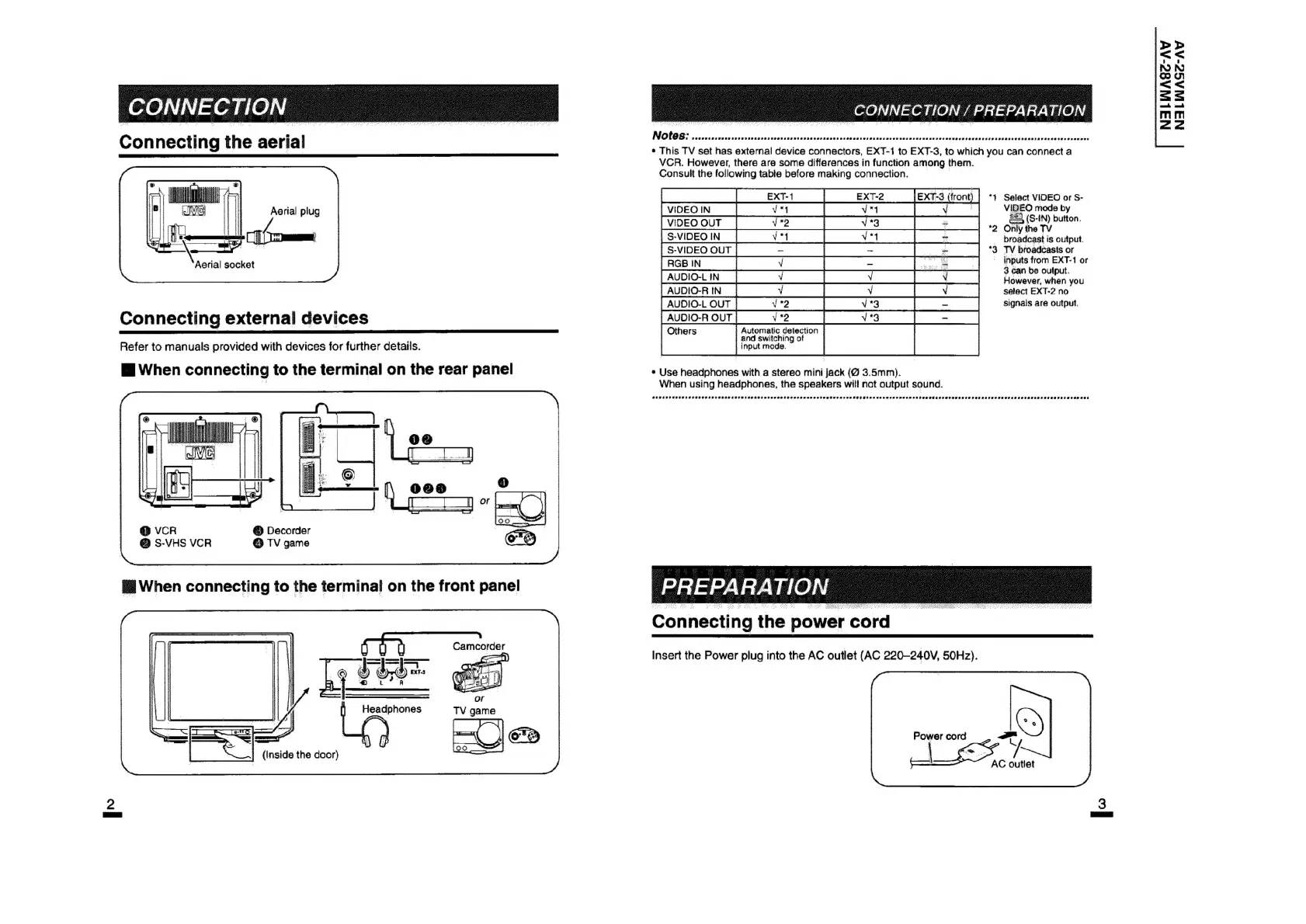
JVC AV-25VM1EN - Connecting External Devices; Connecting the Power Cord

JVC AV-25VM1EN
12 pages
Print Icon
To Next Page IconTo Next Page
To Previous Page IconTo Previous Page
Loading...
|
7
7
|
7
Notes:
es
evrers
|
iaeasseeaniiunia
ROCHA
akesssevaessesesesaeseseeese
a
Pecresseseosseseesesetarervaets@istosrans
Con
necting
the
aerial
*
This
TV
set
has
external
device
connectors,
EXT-1
to
EXT-3,
to
which
you
can
connect
a
VCR.
However,
there
are
some
differences
in
function
among
them.
Consult
the
following
table
before
making
connection.
>>
oS
NN
reome)
<<
ss
ah
ooh
mM
(Ti
zz
:
EX:
2
(front)
|
*1
Select
VIDEO
or
S-
VIBrO
mo
by
*
ulton,
VIDEO
OUT
ae
es
a
a
*2
Only
the
TV
|
S-VIDEO
IN
SEE
EERE
EEE
broadcast
is
output.
S-VIDEO
OUT
a
_
"3
TV
broadcasts
or
ROBIN
|
re
fit
om
EXT
AUDIO-LIN
[VN
owever,
when
you
AUDIO-RIN,
[Vs
setect
EXT-2
no
AUDIOLOUT|
v2
|
_v3_
|=]
_sianats
are
output
Connecting
external
devices
AUDIO-ROUT]
V2
T=
: ,
Automatic
detection
|
:
:
:
i}
and
switching
of
Refer
to
manuals
provided
with
devices
for
further
details.
input
mode.
Mi
When
con
necting
to
the
terminal
on
the
rear
panel
*
Use
headphones
with
a
stereo
mnldeek
(@
3.5mm).
When
using
headphones,
the
speakers
will
not
output
sound.
Aerial
plug
Aerial
socket
@
Decorder
@
TV
game
Connecting
the
power
cord
_
Insert
the
Power
plug
into
the
AC
outlet
(AC
220-240V,
50Hz).
Headphones
Power
cord
|
(Inside
the
door)
AC
outlet

Other manuals for JVC AV-25VM1EN

Related product manuals