EasyManua.ls Logo

JVC AV-25VM1EN - Inserting Batteries into the Remote Control; Turning Your TV ON;OFF

JVC AV-25VM1EN
12 pages
Print Icon
To Next Page IconTo Next Page
To Previous Page IconTo Previous Page
Loading...
€
(Zp60S°ON)
Inserting
batteries
into
the
remote
control
_
Correctly
insert
2
batteries
observing
the
€}
and
&
polarities
from
the
&
end.
ACRE
OURS
oo
occodrevaicids
cavaduccdiccccdeaccxcacveees
*
Follow
the
cautions
printed
on
the
batteries.
¢
Use
AAA/ROS
dry
cell
batteries.
*
Battery
life
is
approximately
6
months
to
1
year
depending
on
the
frequency
of
use.
*
If
the
remote
control
operates
erratically,
replace
the
baiteries.
FASC
SPST
OSS
H
CPST
PPS
PHRPSSAS
PSPS
BTC
RT
OP
ORES
C
PSC
Sesevscdscssas
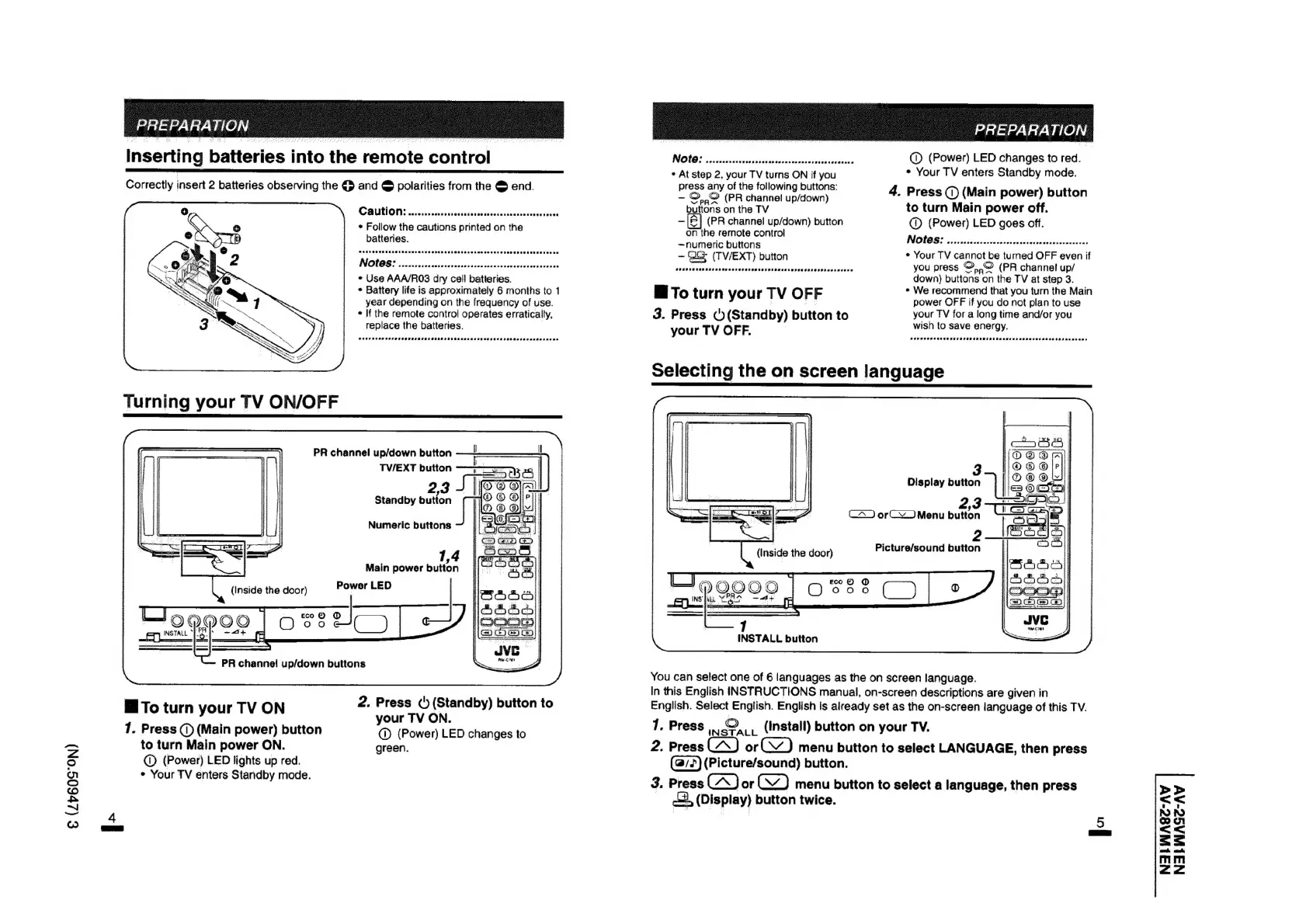
Turning
your
TV
ON/OFF
PR
channel
up/down
button
TV/EXT
button
Standby
button
Numeric
buttons
J
Main
power
button
(Inside
the
door)
Power
LED
®
aie
jJ
O98
>
¢
é
PR
channel
up/down
buttons
To
turn
your
TV
ON
2.
Press
()
(Standby)
button
to
|
|
your
TV
ON.
1.
Press
()
(Main
power)
button
@
(Power)
LED
changes
to
to
turn
Main
power
ON.
green.
@
(Power)
LED
lights
up
red.
*
Your
TV
enters
Standby
mode.
NOG?
ccssiccisiestchecctsioeasucete
Maun
civcdis
@
(Power)
LED
changes
to
red.
«
At
step
2,
your
TV
turns
ON
if
you
*
Your
TV
enters
Standby
mode.
press
any
of
the
following
buttons:
‘
~
©.,©
(PR
channel
up/down)
4.
Press
(1)
(Main
power)
button
to
turn
Main
power
off.
buttons
on
the
TV
—
|]
(PR
channel
up/down)
button
@
(Power)
LED
goes
off.
on
the
remote
control
srimene
buttons
INGIOG
5
5
icsssiececovrsarcteesvereanniaucapsavaceny
is
(TV/EXT)
button
¢
Your
TV
cannot
be
turned
OFF
even
if
aiiata
veuspviasay
devasabeuaauessesucareaseivantctsieed
you
press
©,,,©
(PR
channel
up/
down)
buttons
on
the
TV
at
step
3.
¢
We
recommend
that
you
turn
the
Main
ai
To
turn
your
TV
OFF
power
OFF
if
you
do
not
plan
to
use
3.
Press
()(Standby)
button
to
eed
TV
for
a
long
time
and/or
you
your
TV
OFF.
wisn
to
save
energy.
FRPP
PEPE
RCCTFEP
CT
CR
IOS
eee
eres
seseeseoeeeeenasaws
3
Display
button
2,3
orc.)
Menu
button
1
INSTALL
button
You
can
select
one
of
6
languages
as
the
on
screen
language.
In
this
English
INSTRUCTIONS
manual,
on-screen
descriptions
are
given
in
English.
Select
English.
English
is
already
set
as
the
on-screen
language
of
this
TV.
1.
Press
,,
©,
(Install)
button
on
your
TV.
2.
Press
or)
menu
button
to
select
LANGUAGE,
then
press
(@/2)
(Picture/sound)
button.
3.
Press
or
menu
button
to
select
a
language,
then
press
2,
(Display)
button
twice.
>>
tan
RD
©
1
<<
=5s
wma;
mahi
mm
<2