EasyManua.ls Logo

JVC AV-25VM1EN - Page 4

JVC AV-25VM1EN
12 pages
Print Icon
To Next Page IconTo Next Page
To Previous Page IconTo Previous Page
Loading...
|
PREPARATION
:
Presetting
PR
ehennels
5
(Programmed
channels):
To
watch
TV,
you
must
first
set
the
broadcast
channels
to
the
PR
channels
on
your
TV.
You
can
set
up
to
100
channels
you
want
to
watch.
(PRO1
to
99,
PROO(AV)).
There
are
two
ways
of
setting
PR
channels,
automatic
setting
and
manual
setting.
¢
After
you
have
set
the
PR
channels,
the
PR
channels
can
be
edited.
For
details,
see
page
14.
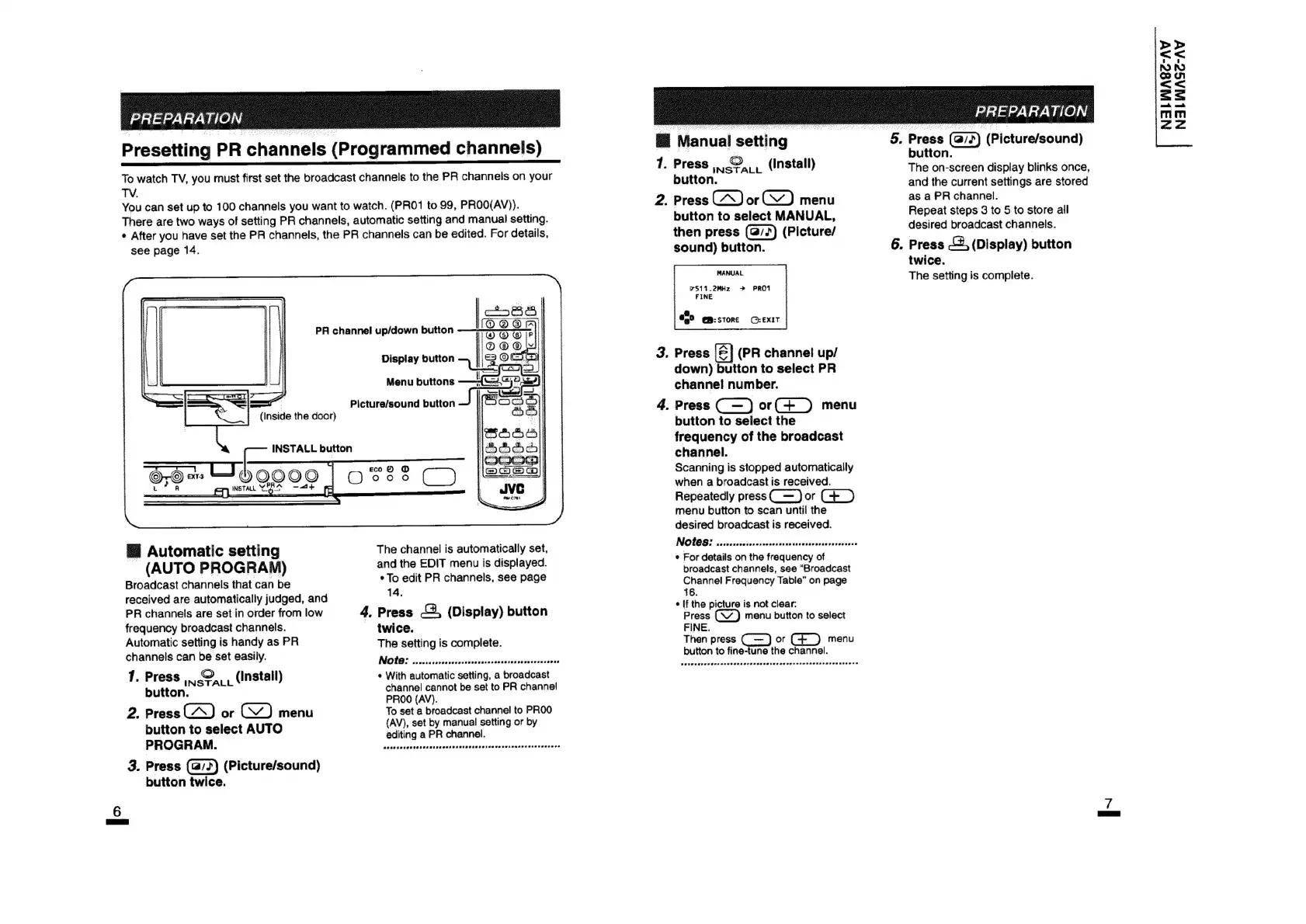
PRA
channel
up/down
button
Display
button
Menu
buttons
Picture/sound
button
|
(Inside
the
door)
The
channel
is
automatically
set,
and
the
EDIT
menu
is
displayed.
*
To
edit
PR
channels,
see
page
™
Automatic
setting
(AUTO
PROGRAM)
Broadcast
channels
that
can
be
received
are
automatically
judged,
and
14.
PR
channels
are
set
in
order
from
low
4,
Press
&,
(Display)
button
frequency
broadcast
channels.
twice.
|
Automatic
setting
is
handy
as
PR
The
setting
is
complete.
channels
can
pe
easily.
NOLC!
crcessssreccoonssecscssenccencescecvenserecss
1.
Press
(Install)
¢
With
automatic
setting,
a
broadcast
button.
INSTALL
channel
cannot
be
set
to
PR
channe!}
PROO
(AV).
2.
Press
or
menu
To
set
a
broadcast
channel
to
PROO
(AV),
set
by
manual
setting
or
by
button
to
select
AUTO
editing
a
PR
channel.
PROGRAM.
tassstnttssnrsnsnsnernnerneerrnesunteant
3.
Press
(Picture/sound)
button
twice.
@
Manual
——
7.
2.
Press
Pe)
aL.
(install)
button.
Press
or
menu
button
to
select
MANUAL,
then
press
(Picture/
sound)
button.
MANUAL
7511_.2MHz
>
PRO1
FINE
a
€,°
@m:sTORE
(©:EXIT
Press
(PR
channel
up/
down)
button
to
select
PR
channel
number.
Press
(
—
)
or(+_)
menu
button
to
select
the
frequency
of
the
broadcast
channel.
Scanning
is
stopped
automatically
when
a
broadcast
is
received.
Repeatedly
press(_—
)
or
(+_)
menu
button
to
scan
until
the
desired
broadcast
is
received.
INOTOS
vccisscccscceucckasadevsesczesuncsanasscte
¢
For
details
on
the
frequency
of
broadcast
channels,
see
“Broadcast
Channel
Frequency
Table”
on
page
16.
¢
[f
the
picture
is
not
clear:
Press
menu
button
to
select
FINE.
Then
press
or
(_)
menu
button
to
fine-tune
the
channel.
5,
Press
(@7?)
(Picture/sound)
button.
The
on-screen
display
blinks
once,
and
the
current
settings
are
stored
as
a
PR
channel.
Repeat
steps
3
to
5
to
store
all
desired
broadcast
channels.
Press
,
(Display)
button
twice.
The
setting
is
complete.
>
<<
NO
AS
cou
<<
=s
anh,
omh
Tl
Zaz