ENGLISH - 11 -
7. Follow the operating procedure Downloading the data
to VCR on page 5 to transmit the revised programme
table data to the VCR.
If you do not want to transmit, press PICTURE button
to exit the menu.
Note:
You can only use this item if you have a decoder connected
to a T-V LINK compatible VCR to EXT-2 terminal. Setting this
item to ON by mistake causes the picture/sound of a TV
channel you are currently viewing to disappear.
If this item has been set to ON but the TV channel cannot
be unscrambled, check the following:
Has the decoder been connected to the VCR properly ac-
cording to the VCR and Decoder instruction manuals?
Can the TV channel be unscrambled with a decoder?
Do you need to change the VCR settings in order to con-
nect the decoder? Confirm that the VCR is set properly by
rechecking the VCR instruction manual.
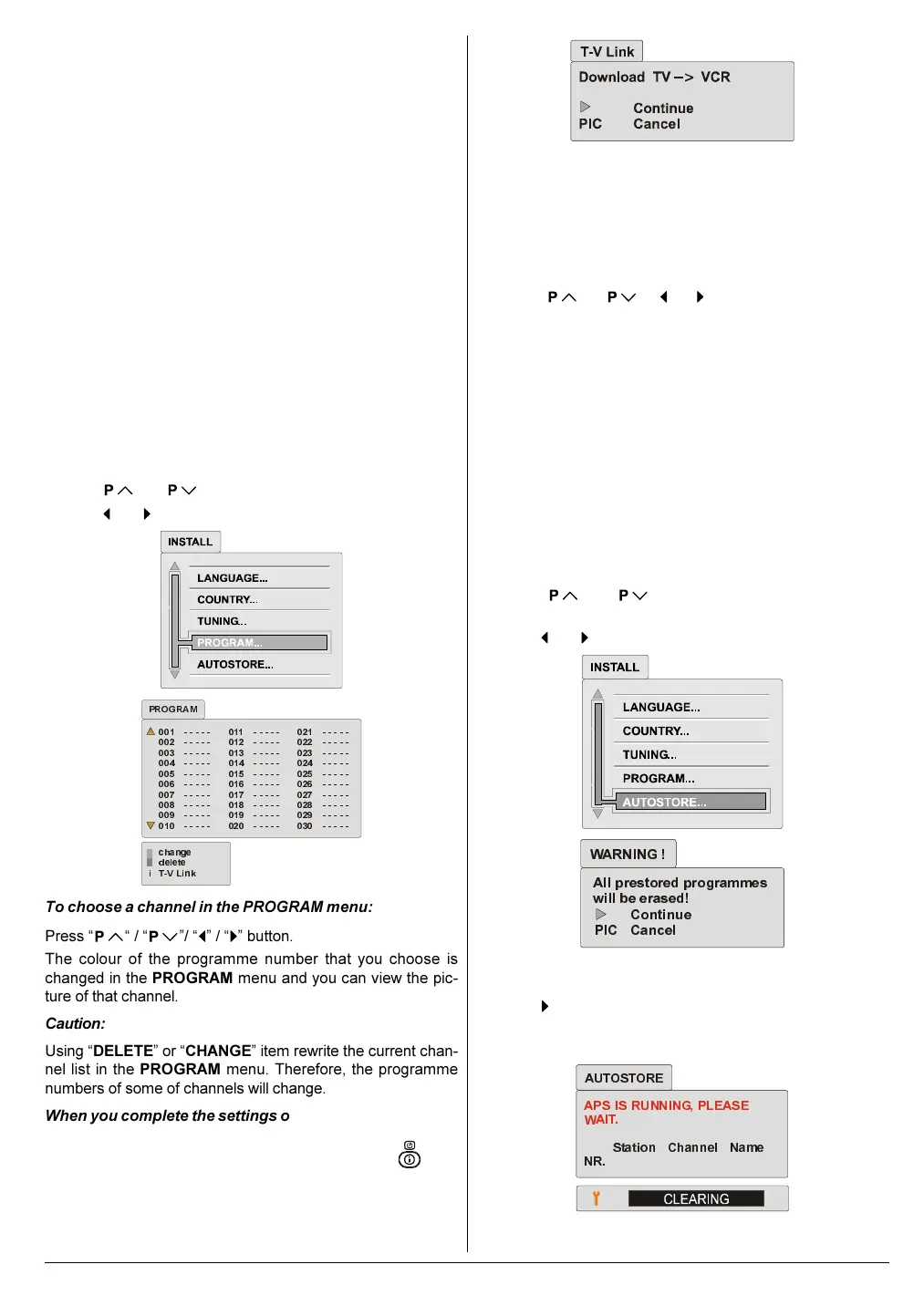
Program Menu:
You can use the PROGRAM menu to change a programme
number, delete a channel.
Press
or button to select PROGRAM item.
Press
or button to enter the PROGRAM menu.
FKDQJH
GHOHWH
79/LQN
352*5$0
L
To choose a channel in the PROGRAM menu:
Press
/ / / button.
The colour of the programme number that you choose is
changed in the PROGRAM menu and you can view the pic-
ture of that channel.
Caution:
Using DELETE or CHANGE item rewrite the current chan-
nel list in the PROGRAM menu. Therefore, the programme
numbers of some of channels will change.
When you complete the settings of PROGRAM menu:
If you have a T-V LINK compatible VCR, press the
but-
ton to display the T-V LINK menu. Then follow the operating
procedure Downloading the data to VCR on page 5 to
transmit the Programme table data to the VCR.
If you do not have a T-V LINK compatible VCR, press PIC-
TURE button to exit the menu.
To change a programme number (CHANGE):
1. Select a channel that you want to change its programme
number.
2. Press Blue button to enter the CHANGE mode.
3. Press
/ / / button to select the pro-
gramme number that you want to change the programme
number of the selected channel to.
4. Press Blue button. Two channels of the selected prog-
ramme numbers will be exchanged.
To delete a channel (DELETE):
1. Select a channel that you want to delete.
2. Press Red button to delete it.
Autostore Menu:
The AUTOSTORE function automatically programmes the re-
ceived channels in your TV's programme numbers.
Before use this function, please confirm that the LAN-
GUAGE and COUNTRY setting are correct.
1. Press
or button to select AUTOSTORE
item.
2. Press
or button to enter the AUTOSTORE menu.
$OO
SUHVWRUHG
SURJUDPPHV
ZLOOEHHUDVHG
&RQWLQ XH
3,& &DQFHO
:$51,1*
A warning message All prestored programmes will be
erased! appears in a message box.
3. Press
button to start the AUTOSTORE function.
To cancel the AUTOSTORE function, press the PIC-
TURE button.
$36
,6
5811,1*
3/($6(
:$,7
6WDWLRQ
&KDQQHO
1DPH
15
$8726725(
01-ENG-2835-AK52-1512UK-16-9-(AV-28GH1&BUF&SUF).p65 21.05.2003, 15:0211


 To Next Page