ENGLISH - 12 -
$36
,6
5811,1*
3/($6(
:$,7
6WDWLRQ
&KDQQHO
1DPH
15 & &
$8726725(
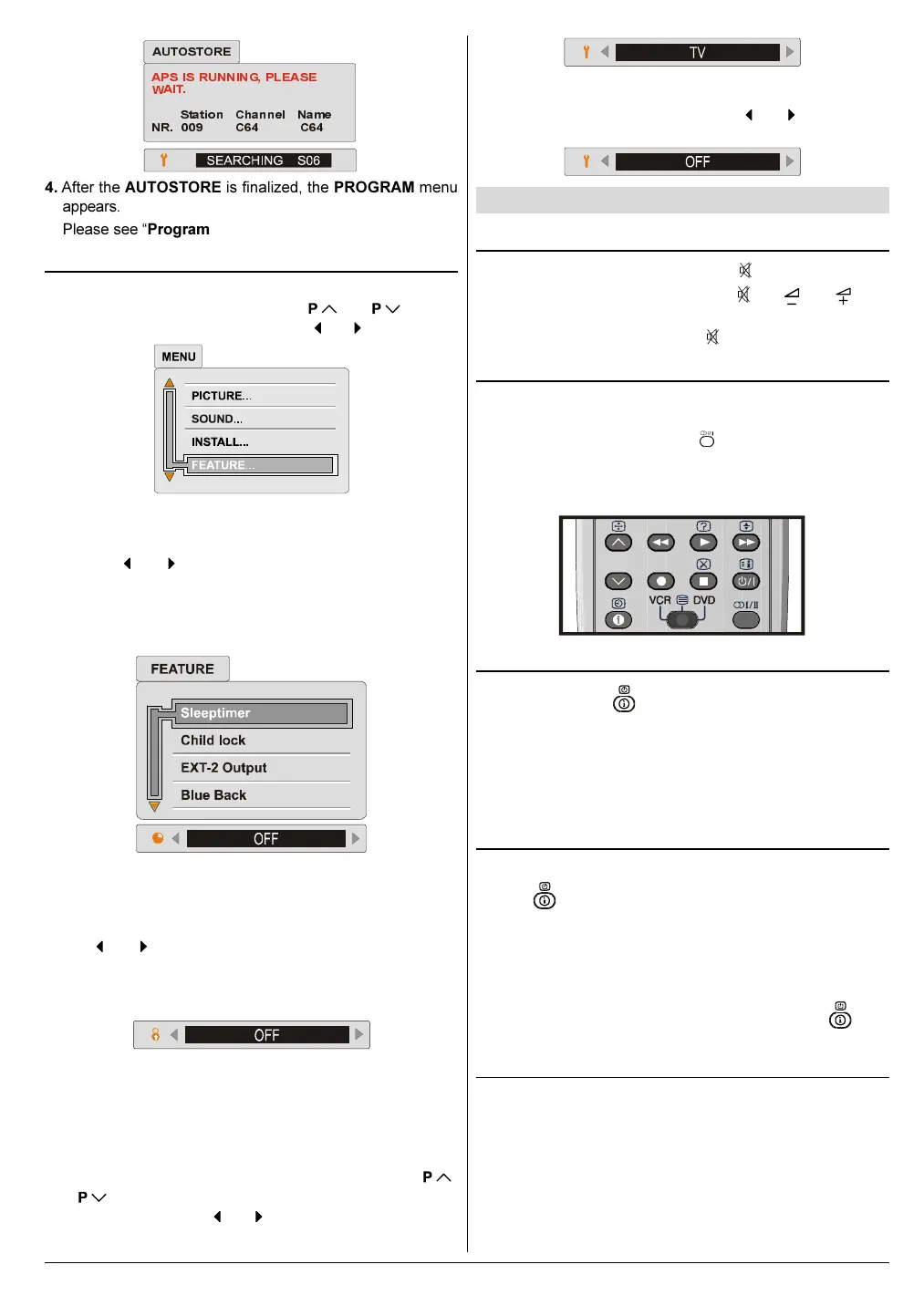
4. After the AUTOSTORE is finalized, the PROGRAM menu
appears.
Please see Program Menu on above section.
Feature Menu
Press MENU button, now you are in main menu. In the
main menu, select FEATURE, using
or button.
Then enter the feature menu pressing
or button.
Sleep timer:
The sleep timer is used to turn the TV off after a defined peri-
od. Press
or button to choose a period of time after
selecting this item. The timer can be programmed between
Off and 120 minutes in steps of 10 minutes. One minute be-
fore the "Sleep timer" function turns the TV off, the remain-
ing time will be displayed.
Child lock:
You can disable the control panel buttons (except the POW-
ER button) with this item.
Press
or button to change the setting to ON or OFF
after selecting this item.
When you set this item to ON, the TV can be operated only
by using the remote control handset.
Warning: If Child Lock item is set to ON, the TV can not be
operated by VCR.
Setting External Source Output:
You can use this menu to select the internal or external
source that will be output at EXT.2 (EXT-2) terminal.
In the FEATURE menu select EXT-2 Output using
or
button. Then select the source you want to be out-
put at EXT-2 pressing
or button (one of the sources:
TV, EXT-1, EXT-3 or EXT-4 (Front AV).
Blue Background During No-Signal:
The Blue Back feature can be set by or button to ei-
ther On or Off.
Other Features
Sound Mute
To cut off the sound of the TV press button. The sound
will be cut off. To cancel mute, press
or or but-
ton. The volume level will be the same as the level before
mute if you cancel mute pressing
button again.
Stereo / Bilingual
If the TV channel you are watching broadcasts in two lan-
guages (e.g. Eurosport), you can select the dubbed or the
original language, pressing the
button.
When the stereo broadcast is received poorly, you can
change from stereo to mono sound so that you can hear the
broadcast more clearly and easily.
Information on Screen
First pressing the button displays the current status
Programme number, Station name and Sound sta-
tus.
Pressing this button again displays the current time.
Pressing this button once more remove the on-screen dis-
play.
To Display the Time
While watching a TV programme with Teletext transmission
press
button twice. The current time information, cap-
tured from Teletext will be displayed at the upper left corner
of the screen.
If the programme being watched does not have Teletext
transmission, no time information will be displayed.
The time information will disappear after pressing
but-
ton again.
Picture
You can change Picture Mode settings by pressing PIC-
TURE button when no menu appears.
Recalling Factory settings.:
You can re-set the current PICTURE menu settings (except
Noise Reduction and Colour Temp settings) to the default
settings.
01-ENG-2835-AK52-1512UK-16-9-(AV-28GH1&BUF&SUF).p65 21.05.2003, 15:0212


 To Next Page