PR ID
AV
02
03
04
05
06
07
08
09
PR LIST
01
BBC1
SURROUND
3D CINEMA SOUND
MID
BASS BOOST MID
SURROUND
3D CINEMA SOUND
MID
BASS BOOST
MID
IMPORTANT! PREPARE USE
SETTINGS
TROUBLE?
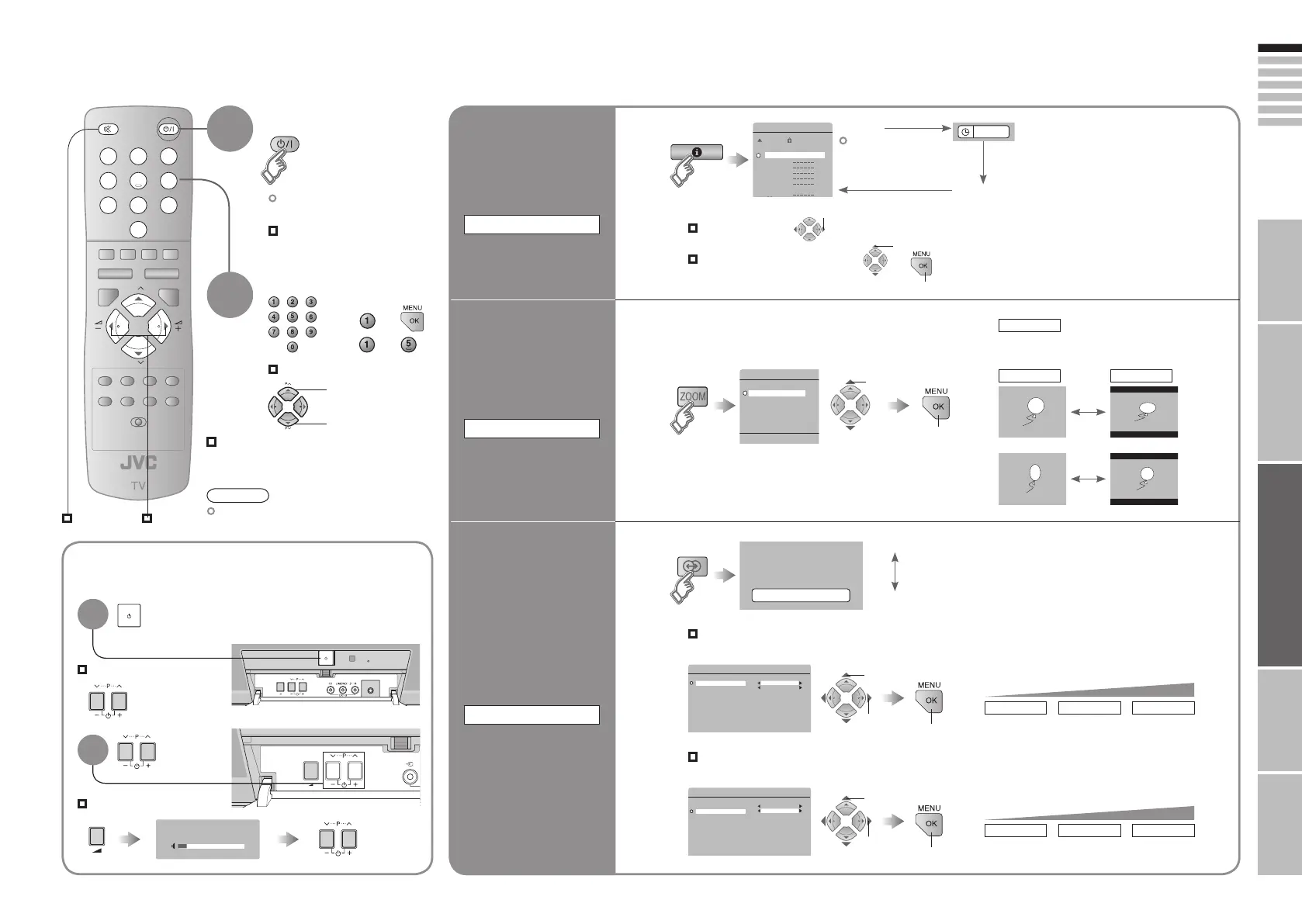
Select a channel
up
down
Turn on from standby
1
The power lamp on the TV
dims slightly.
2
INFORMATION
Display the
Current time
Watching TV
Mute
Note
To completely turn off the TV, unplug the AC
plug.
Press again to turn the screen off
and put the TV into standby mode.
Move up or down a channel
Switch between stereo / mono /
bilingual broadcasting
“STEREO / t·u” ( P. 26)
Volume
ZOOM
Change the aspect
ratio
3D CINEMA SOUND
Enjoy ambient
sound
“PR LIST”
(No indication)
OFF
: Turns off “3D CINEMA SOUND”
select
Select a page
Channels
registered in
“Initial settings” will
appear here.
Select and view a channel
Basic operations using the TV buttons
Power on
Volume
Change
the channel
1 select
Turn on from standby
2
1
Time (in case of having viewed teletext)
1 select
ON
: For “3D CINEMA SOUND”
Adjust the ambience level
“MENU” “SOUND” “3D CINEMA SOUND”
Emphasize the bass sound
“MENU” “SOUND” “3D CINEMA SOUND”
LOW MID HIGH
level
1 select “SURROUND”
2 select
LOW MID HIGH
level
1 select “BASS BOOST”
2 select
2 view
2 set
3 set
3 set
REGULAR 16:9
Power on
“Basic operations using the TV
buttons”
AUTO
The aspect ratio will turn to the ratio obtained
from the information the TV received.
E.g.
1 :
15 :
17-18 3/1/2006 1:23:42 PM









 To Next Page