IMPORTANT! PREPARE USE
SETTINGS
TROUBLE?
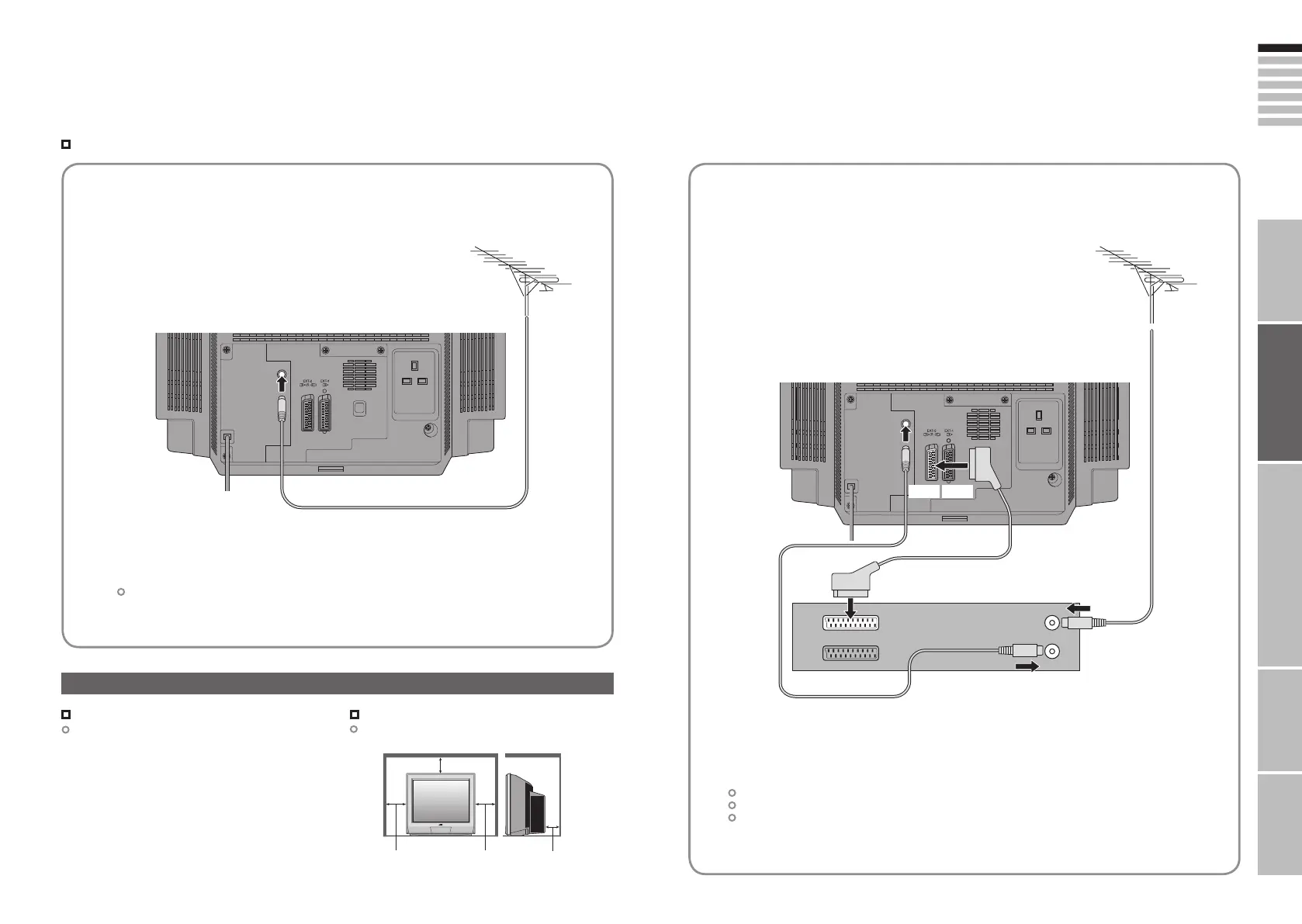
Connect the aerial
Basic connections
Connect a VCR / DVD recorder
AERIAL
VCR / DVD recorder
EXT-2
After all the connections have been made, insert the plug into an AC outlet.
Connect “T-V LINK” compatible recording device to “EXT-2”.
“T-V LINK” “What is “T-V LINK”?” (P. 9)
After all the connections have been made, insert the plug into an AC outlet.
AERIAL
EXT-1
Power requirements
Connect the power cord only to a 220-240V, 50Hz
AC outlet.
Installation requirements
To avoid overheating, ensure the unit has ample
room.
Please read the user manuals of each device carefully before setup.
It is necessary to connect an aerial to watch TV.
Connect with other devices “Connecting external devices” (P. 13)
Care when setting
150mm
100mm 100mm 150mm
7-8 3/1/2006 1:23:22 PM






 To Next Page