Just the way
you like it
MENU
PICTURE
SOUND
SET UP
FEATURES
PICTURE
PICTURE MODE
STANDARD
CONTRAST
FEATURES2
COLOUR TEMP.
HUE
COLOUR
SHARP
BRIGHT1
COOL
PICTURE
PICTURE MODE
STANDARD
COOL
CONTRAST
FEATURES
COLOUR TEMP.
HUE
COLOUR
SHARP
BRIGHT
IMPORTANT! PREPARE USE
SETTINGS
TROUBLE?
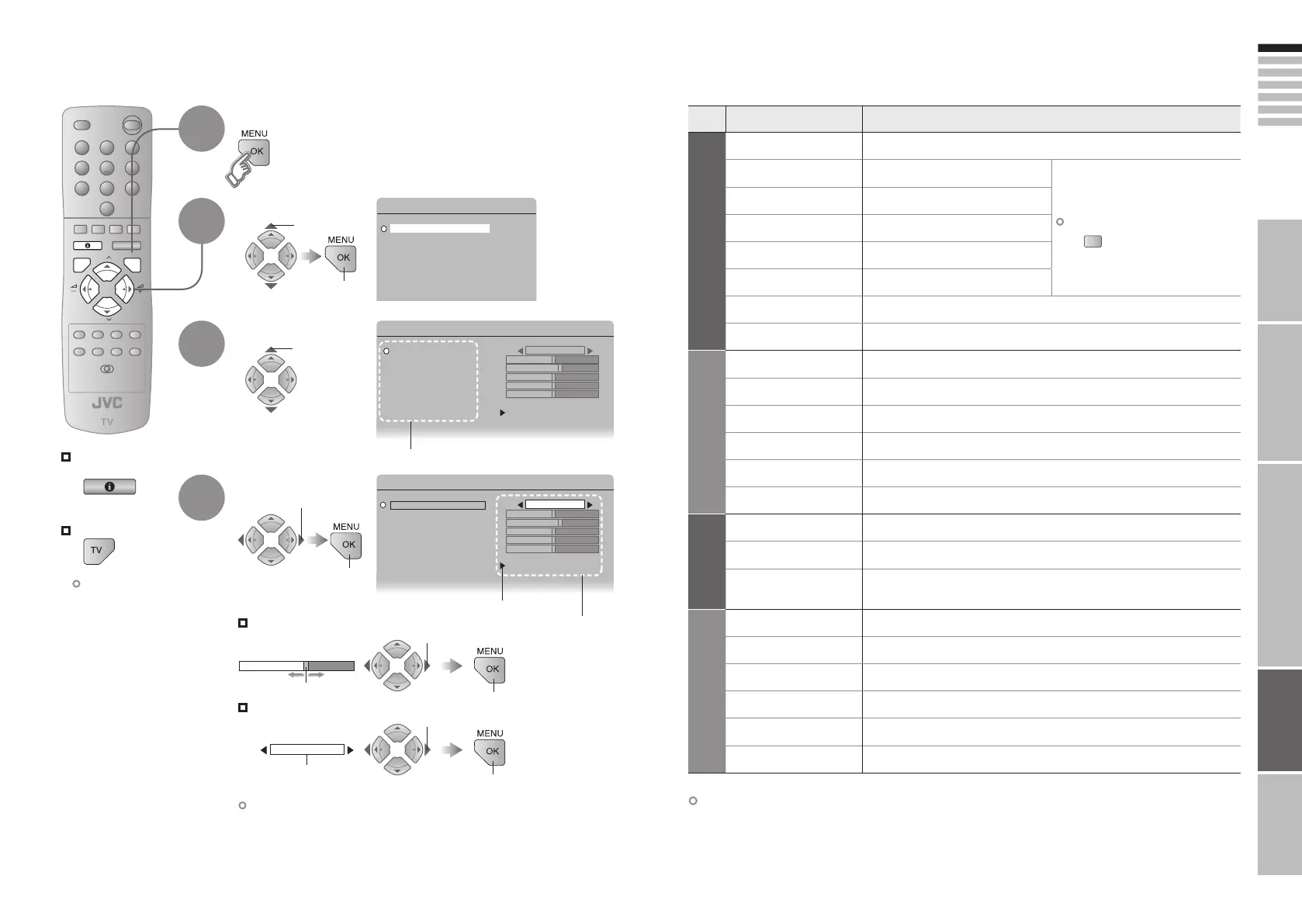
Display the menu
Select a menu
Select an item
Adjust / Configure
Move
The item will change.
Items
Sub-menu
Adjustments / Configurations
Customising your TV
To the previous
screen
Exit
1
The menu disappears
after one minute of
inactivity.
When adjusting
with the sliding-bar
2
3
4
When selecting
from presets
select
1 adjust /
select
1 adjust
1 select
Some items have a
sub-menu.
Other settings · Change the aspect ratio “ZOOM” (P. 17)
· Turn on “3D CINEMA SOUND” “3D CINEMA SOUND” (P. 17)
Menu Item Adjustments / Configurations
PICTURE
PICTURE MODE
Picture mode (BRIGHT / STANDARD / SOFT)
CONTRAST
Contrast (Lower Higher)
To reset to default settings
BRIGHT
Brightness (Darker Brighter)
SHARP
Sharpness (Softer Sharper)
COLOUR
Colour (Lighter Deeper)
HUE
Tint (Reddish Greenish)
COLOUR TEMP.
Colour temperature (WARM / NORMAL / COOL)
FEATURES
Finer picture adjustments (P. 27)
SOUND
STEREO / t · u
Mode / Language (s : STEREO / v : MONO / t : SUB1 / u : SUB2)
BASS
Low tones (Weaker Stronger)
TREBLE
High tones (Weaker Stronger)
BALANCE
Speaker balance (Left Stronger Right Stronger)
HYPER SOUND
Ambient sound (ON / OFF)
3D CINEMA SOUND
Finer sound adjustments (P. 18)
FEATURES
SLEEP TIMER
Timer for turning off the TV (P. 24)
CHILD LOCK
Stops children from watching specific channels (P. 24)
BLUE BACK
Displays a blue screen and mute the sound
when the signal is weak or absent (ON / OFF)
SET UP
AUTO PROGRAM
Select a country, it automatically registers channels (P. 10, !)
EDIT / MANUAL
Change registered channels or add new ones (P. 11)
LANGUAGE
Select a language for on-screen menus (P. 10, Ÿ)
PICTURE TILT
Picture tilt (Tilt Left Tilt Right)
DECODER(EXT-2)
For when connected to VCR with “T-V LINK” (ON / OFF)
EXT SETTING
For use with video players and other devices (P. 22)
1 select
2 set
2 set
2 set
2 next
(Blue)
25-26 3/1/2006 1:24:14 PM







 To Next Page