The JVC C-P5U is a VHS cassette adapter designed to enable compact video cassettes, specifically those marked with the MISC symbol, to be recorded and played back on any video recorder carrying the VHS mark. This adapter facilitates the use of smaller format cassettes in standard VHS VCRs, expanding their compatibility.
Function Description:
The primary function of the C-P5U is to house a compact video cassette and present it in a form factor compatible with standard VHS video recorders. Tape loading and unloading within the adapter are performed automatically, powered by a single "AA" or "R6" size battery. When a compact cassette is inserted, the adapter automatically loads the tape, and a safety catch retracts to indicate completion. For removal, pushing the sliding latch initiates automatic tape unloading, and the compartment door opens, with the safety catch protruding to confirm the tape has been unloaded. The compact cassette can then be manually removed.
Important Technical Specifications:
- Type: VHS cassette adapter
- Dimensions: 188 (W) x 25 (H) x 104 (D) mm (7-7/16" x 1" x 4-1/8")
- Weight: 210 g (0.5 lb.)
- Accessory: "AA"/"R6" size battery × 1
Usage Features:
- Automatic Tape Loading/Unloading: The adapter features an automatic mechanism for loading and unloading the compact video cassette, simplifying the process for the user. This is powered by a single "AA" battery.
- Safety Catch Indicator: A retractable safety catch visually indicates when tape loading is completed, ensuring the adapter is ready for insertion into a VCR. Conversely, its protrusion signals that the tape has been unloaded and is safe for removal.
- Compact Cassette Compatibility: Specifically designed for compact video cassettes marked with the MISC symbol, allowing them to be used with standard VHS recorders.
- Battery Operation: Requires one "AA" or "R6" size battery for its automatic functions. Users are cautioned to use only these specified battery types to prevent leakage or explosion.
- Slack Prevention: Before inserting a compact cassette, users are advised to check for and remove any slack in the video tape by turning a gear in the direction of an arrow to prevent tape damage.
- Safety Tab Consideration: MISC compact video cassettes are equipped with a safety tab to prevent accidental erasure. If this tab is removed, recording cannot be performed. To record on such a cassette, the slot must be resealed with cellophane tape.
- Operational Noise: The manual notes that slight mechanical noise during loading or unloading is normal and does not indicate a defect.
- Special-Effects Playback: During special-effects playback (e.g., slow motion, still frame), the picture may vibrate or noise bars may appear on the screen.
Maintenance Features:
- Battery Replacement: If tape loading takes a long time, it indicates low battery power, and the battery should be changed. The battery compartment cover slides upward for easy access.
- Troubleshooting Jammed Cassettes (Mechanical Difficulty):
- Initial Steps: For a jammed cassette, the bottom plate (secured by eight screws) must be removed. The connect plate and lock arm (retaining the supply side guide pole) are then removed to free the tape on the supply side. The supply reel should be turned clockwise to absorb tape slack. The cassette arm, cassette spring, miss-protector, and tension spring can then be removed together.
- Further Steps: If the cassette remains jammed, the take-up lever assembly and guide plate are shifted, and loading gear-3 and the take-up lock arm assembly (retaining the take-up side guide pole) are removed to free the tape on the take-up side. The supply reel is again turned clockwise to absorb slack. Lever-4 is slid to the left, and the adapter open button is operated to allow the cassette to be removed downward.
- Troubleshooting Jammed Cassettes (Electrical Difficulty): If the fault is electrical, the adapter open button is slid to the right. A jeweler's screwdriver is then inserted to turn a specific gear counter-clockwise, which manually unloads the tape, allowing the cassette to be removed downward.
- Battery Removal Precaution: When reassembling the cassette adapter after troubleshooting, it is crucial to remove the battery first.
- General Precautions:
- Avoid loading the adapter into a recorder if the safety catch is protruding, as this indicates incomplete tape loading and could cause damage.
- The adapter is precision-manufactured; avoid violent vibrations, shocks, dropping, disassembling, or modifying it to prevent malfunctions.
- Do not repeatedly load and unload the adapter into a recorder without allowing the tape to run, as this can slacken and damage the tape.
- The adapter cannot be loaded upside down.
- Avoid touching the tape when inserting a compact cassette.
- Always remove the cassette from the adapter after use.
- Protect the cassette from direct sunlight, heaters, strong magnetic fields (e.g., near TVs or speakers), extreme humidity, and dusty places.
- During tape loading and unloading, avoid touching the reels for safety and tape protection.
The service manual also highlights a distinction between "new type" and "old type" cassette adapters, noting that the new type does not have a serial number plate or an emergency hole, unlike the old type. This information is crucial for proper identification and servicing.

 Need help?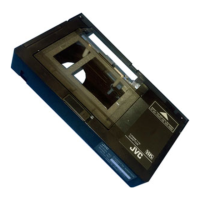

 To Next Page
 General