EasyManua.ls Logo

JVC C-P5U - 1.2.2 Electrical Difficulty

JVC C-P5U
6 pages
Print Icon
To Next Page IconTo Next Page
To Previous Page IconTo Previous Page
Loading...
C-5PU
|
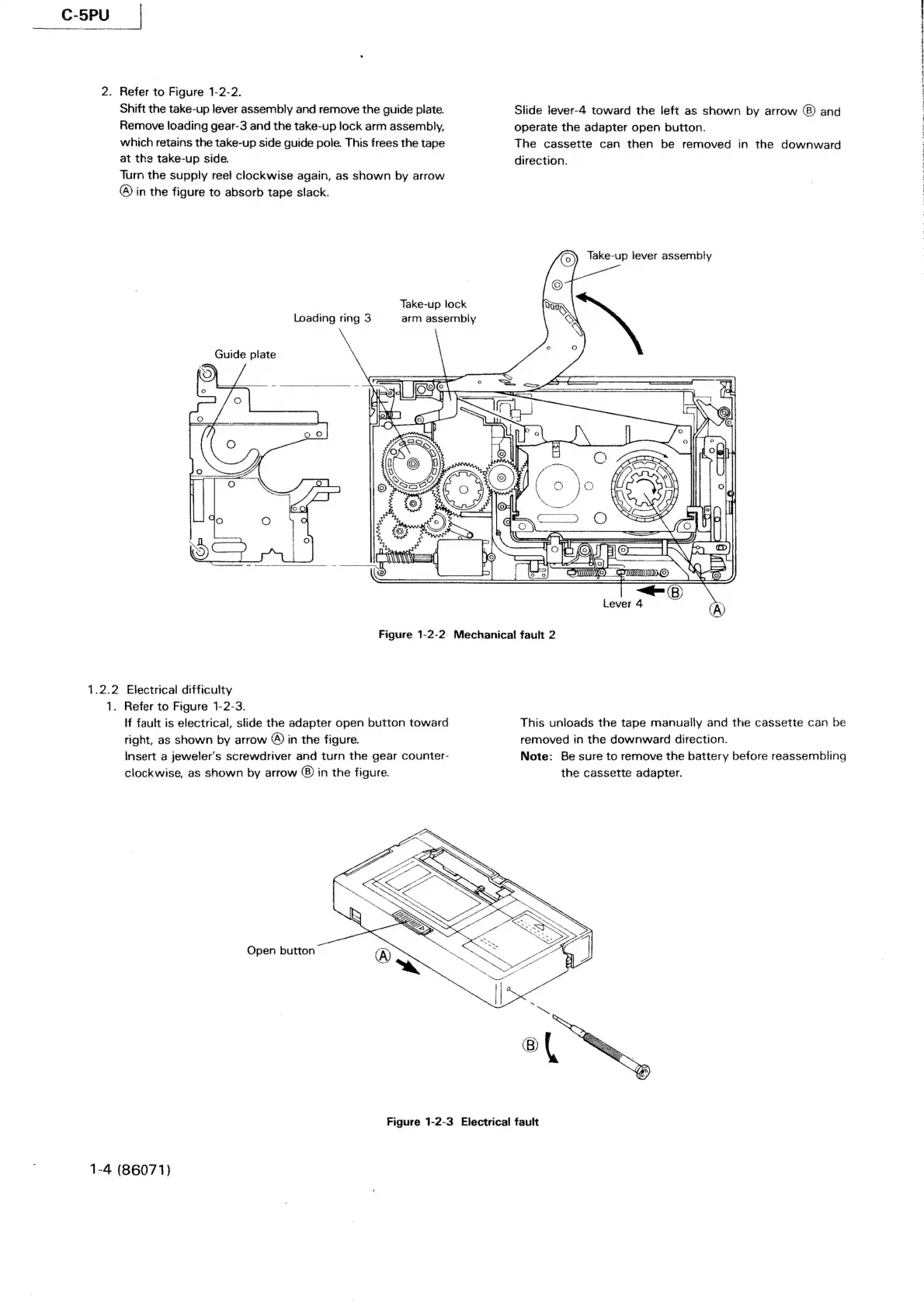
2.
Refer
to
Figure
1-2-2.
Shift
the
take-up
lever
assembly
and
remove
the
guide
plate.
Remove
loading
gear-3
and
the
take-up
lock
arm
assembly,
which
retains
the
take-up
side
guide
pole.
This
frees
the
tape
at
the
take-up
side.
Turn
the
supply
reel
clockwise
again,
as
shown
by
arrow
@)
in
the
figure
to
absorb
tape
slack.
Take-up
lock
Loading
ring
3
arm
assembly
Guide
plate
slide
lever-4
toward
the
left
as
shown
by
arrow
and
operate
the
adapter
open
button.
The
cassette
can
then
be
removed
in
the
downward
direction.
(0)
Take-up
lever
assembly
j
Cif
A]
Q————
AL
ati
Smame
WE
in
Lever
4
A
Figure
1-2-2
Mechanical
fault
2
1.2.2
Electrical
difficulty
1.
Refer
to
Figure
1-2-3.
If
fault
is
electrical,
slide
the
adapter
open
button
toward
right,
as
shown
by
arrow
®)
in
the
figure.
Insert
a
jeweler’s
screwdriver
and
turn
the
gear
counter-
clockwise,
as
shown
by
arrow
©)
in
the
figure.
Open
button
This
unloads
the
tape
manually
and
the
cassette
can
be
removed
in
the
downward
direction.
Note:
Be
sure
to
remove
the
battery
before
reassembling
the
cassette
adapter.
Figure
1-2-3
Electrical
fault
1-4
(86071)
ny
TEN
Ape
ae
tal
A
FO
IN
AR
ado)
i
ORpasTi