EasyManua.ls Logo

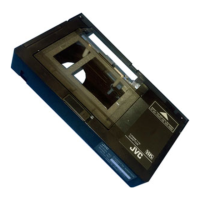
JVC C-P5U - Installing the Battery; Inserting a Compact Video Cassette; Specifications; Removing the Compact Video Cassette

JVC C-P5U
6 pages
Print Icon
To Next Page IconTo Next Page
To Previous Page IconTo Previous Page
Loading...
C-5PU
JVC
VICTOR
COMPANY
OF
JAPAN,
LIMITED
INSTRUCTIONS
MANUEL
D'INSTRUCTIONS
BEDIENUNGSANLEITUNG
MANUAL
DE
INSTRUCCIONES
.
GEBRUIKSAANWIJZING
%
Printed
in
Japan
FEB?
Vg
PU30425-902
Thank
you
for
purchasing
the
JVC
C-P5U
VHS
Cassette
Adapter.
This
adapter
enables
a
compact
video
cassette
carrying
the
mark
to
be
re-
corded
and
played
back
on
any
video
recorder
carrying
the
mark.
Tape
loading
inside
the
adapter
is
performed
automatically
by
battery
power.
To
avoid
problems
and
obtain
the
best
results,
please
read
this
instruction
booklet
care-
fully
before
use.
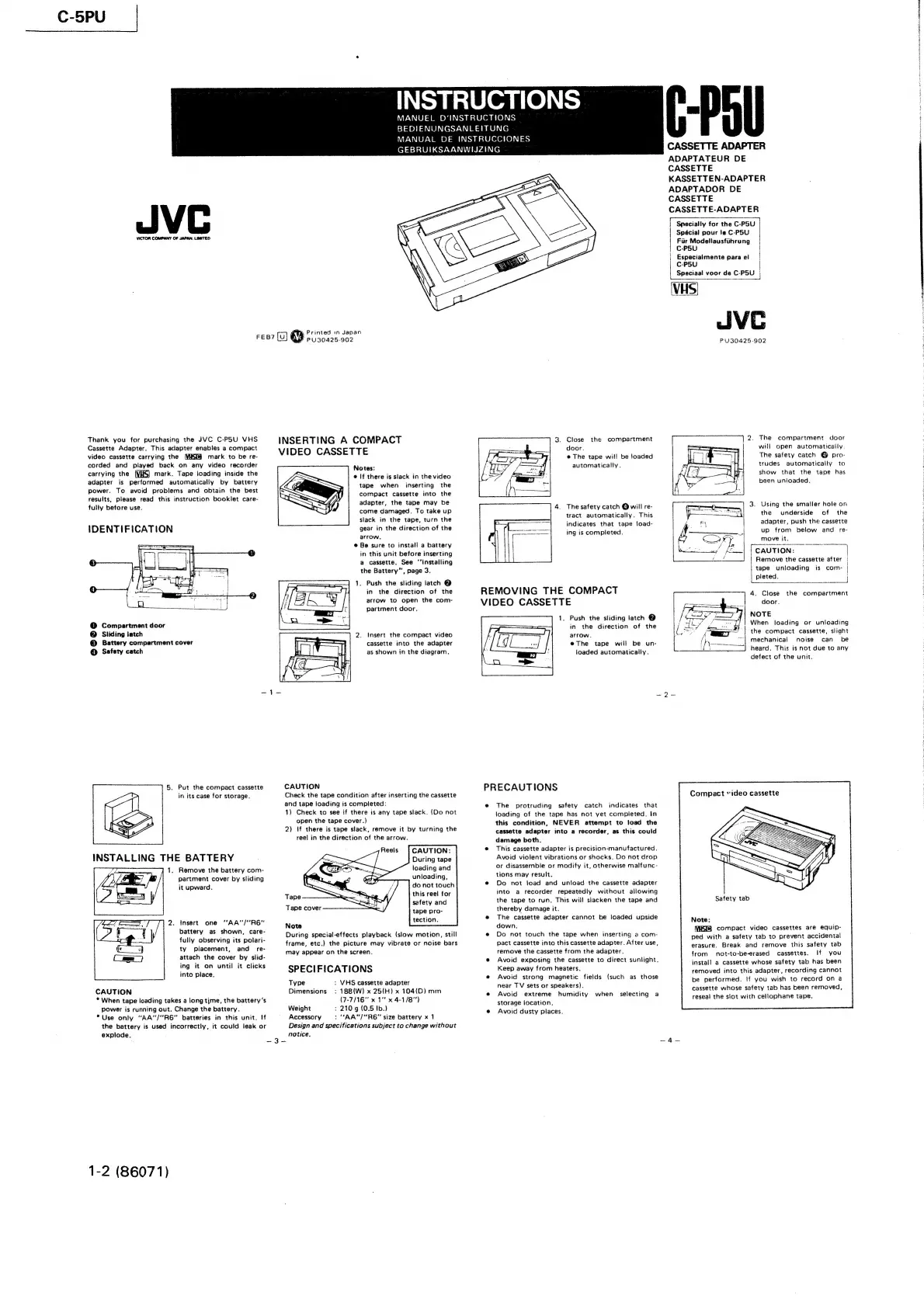
IDENTIFICATION
@
Compartment
door
@
Sliding
latch
©
Battery
compartment
cover
@
Safety
catch
5.
Put
the
compact
cassette
in
its
case
for
storage.
INSTALLING
THE
BATTERY
1.
Remove
the
battery
com-
partment
cover
by
sliding
it
upward.
2.
Insert
one
“AA'/“R6"
battery
as
shown,
care-
fully
observing
its
polari-
ty
placement,
and
re-
attach
the
cover
by
slid-
ing
it
on
until
it
clicks
into
place.
CAUTION
,
*
When
tape
loading
takes
a
long
time,
the
battery's
power
is
running
out.
Change
the
battery.
*Use
only
“AA'/“R6”
batteries
in
this
unit.
If
the
battery
is
used
incorrectly,
it
could
leak
or
explode.
1-2
(86071)
INSERTING
A
COMPACT
VIDEO
CASSETTE
Notes:
@
If
there
is
slack
in
the
video
tape
when
inserting
the
compact
cassette
into
the
adapter,
the
tape
may
be.
come
damaged.
To
take
up
slack
in
the
tape,
turn
the
gear
in
the
direction
of
the
arrow.
@
Be
sure
to
install
a
battery
in
this
unit
before
inserting
a
cassette.
See
‘installing
the
Battery”,
page
3.
1.
Push
the
sliding
latch
@
in
the
direction
of
the
arrow
to
open
the
com-
partment
door.
2.
Insert
the
compact
video
cassette
into
the
adapter
as
shown
in
the
diagram.
CAUTION
Check
the
tape
condition
after
inserting
the
cassette
and
tape
loading
is
completed:
1)
Check
to
see
if
there
is
any
tape
slack.
(Do
not
open
the
tape
cover.)
2)
If
there
is
tape
slack,
remove
it
by
turning
the
reel
in
the
direction
of
the
arrow.
CAUTION:
During
tape
loading
and
unloading,
do
not
touch
this
reel
for
safety
and
tape
pro-
tection.
Tape
Tape
cover
Note
During
special-effects
playback
(slow
motion,
still
frame,
etc.)
the
picture
may
vibrate
or
noise
bars
may
appear
on
the
screen.
SPECIFICATIONS
Type
:
VHS
cassette
adapter
Dimensions
:
188{W)
x
25{H)
x
104(D)
mm
(7-7/16"
x
1°'
x
4-1/8")
Weight
:
210g
(0.5
Ib.)
Accessory
:
“AA"/"R6"
size
battery
x
1
Design
and
specifications
subject
to
change
without
notice,
Close
the
compartment
door.
@
The
tape
will
be
loaded
automatically.
4.
The
safety
catch
Q
will
re-
tract
automatically.
This
indicates
that
tape
load-
ing
is
completed.
REMOVING
THE
COMPACT
VIDEO
CASSETTE
arrow.
loaded
automatically.
PRECAUTIONS
e
The
protruding
safety
catch
indicates
that
loading
of
the
tape
has
not
yet
completed,
In
this
condition,
NEVER
attempt
to
toad
the
cassette
adapter
into
a
recorder,
as
this
could
damage
both.
e
This
cassette
adapter
is
precision-manufactured.
Avoid
violent
vibrations
or
shocks.
Do
not
drop
or
disassemble
or
modify
it,
otherwise
malfunc-
tions
may
result.
®
Do
not
Joad
and
unload
the
cassette
adapter
into
a
recorder
repeatediy
without
allowing
the
tape
to
run.
This
will
slacken
the
tape
and
thereby
damage
it.
@
The
cassette
adapter
cannot
be
loaded
upside
down.
e@
Do
not
touch
the
tape
when
inserting
a
com-
pact
cassette
into
this
cassette
adapter.
After
use,
remove
the
cassette
from
the
adapter.
e@
Avoid
exposing
the
cassette
to
direct
sunlight.
Keep
away
from
heaters.
#
Avoid
strong
magnetic
fields
(such
as
those
near
TV
sets
or
speakers).
®
Avoid
extreme
humidity
when
selecting
a
storage
location,
e
Avoid
dusty
places.
C-Pol
1.
Push
the
sliding
latch
@
in
the
direction
of
the
@eThe
tape
will
be
un-
CASSETTE
ADAPTER
ADAPTATEUR
DE
CASSETTE
KASSETTEN-ADAPTER
ADAPTADOR
DE
CASSETTE
CASSETTE-ADAPTER
Specially
for
the
C-PSU
Spécial
pour
je
C-P5U
|
Fir
Modsliausfithrung
|
C-P5U
Especialmente
para
ei
C-P5U
|
Speciaal
voor
de
C-P5U
VHS
JIVE
PU30425-902
.
The
compartment
door
will
open
automatically.
The
safety
catch
@
pro-
trudes
automatically
to
show
that
the
tape
has
been
unloaded.
.
Using
the
smailer
hole
on
the
underside
of
the
adapter,
push
the
cassette
up
from
below
and
re-
move
it,
CAUTION:
\
Remove
the
cassette
after
|
tape
unloading
is
corm-
pleted.
i
4.
Close
the
compartment
door.
NOTE
When
loading
or
unloading
the
compact
cassette,
slight
mechanical
noise
can
be
heard.
This
is
not
due
to
any
defect
of
the
unit.
Compact
“ideo
cassette
Safety
tab
Note:
(MiKI8
compact
video
cassettes
are
equip-
ped
with
a
safety
tab
to
prevent
accidental
erasure.
Break
and
remove
this
safety
tab
from
not-to-be-erased
cassettes.
If
you
install
a
cassette
whose
safety
tab
has
been
removed
into
this
adapter,
recording
cannot
be
performed.
If
you
wish
to
record
on
a
cassette
whose
safety
tab has
been
removed,
reseal
the
slot
with
cellophane
tape.
fedonauictntatnndesin
aie
Bibb
8,
oR
q
3
4
bys
eel
A
ee
oie,