English
38
7 Locating a desired chapter—Chapter Search
When playing back a disc, you can search for the chapter/track
number to play.
& During playback
1
Press ON SCREEN twice.
The on-screen bar with pull-down menu appears on the TV.
2
Press cursor 3 / 2 repeatedly to select (highlight)
on the pull-down menu.
3
Press ENTER.
The pop-up window appears under the pull-down menu.
4
Press the number buttons (0 – 9) to enter the
desired chapter/track number.
You can select up to the 99th chapter.
Ex.: To select chapter/track number 8, press 8.
To select chapter/track number 10, press 1, then 0.
To select chapter/track number 37, press 3, then 7.
To correct a misentry
Press the number buttons until the desired number shown in the
pop-up window.
5
Press ENTER.
The unit starts playback from the selected chapter.
To turn off the on-screen bar
Press ON SCREEN.
OFF
1/3
1/3 1/3
TIME
CHAP.
CHAPTER _
DVD-VIDEO
TITLE 14DISC 3
TOTAL 1:25:58
CHAP 23
8.5Mbps
OFF
1/3
1/3 1/3
TIME
CHAP.
DVD-VIDEO
TITLE 14
DISC 3
TOTAL 1:25:58
CHAP 23
8.5Mbps
OFF
1/3
1/3 1/3
TIME
CHAP.
DVD-VIDEO
TITLE 14
DISC 3
TOTAL 1:25:58
CHAP 23
8.5Mbps
OFF
1/3
1/3 1/3
TIME
CHAP.
DVD-VIDEO
TITLE 14
DISC 3
TOTAL 1:25:58
CHAP 23
8.5Mbps
OFF
1/3
1/3 1/3
TIME
CHAP.
DVD-VIDEO
TITLE 14DISC 3
TOTAL 1:25:58
CHAP 23
8.5Mbps
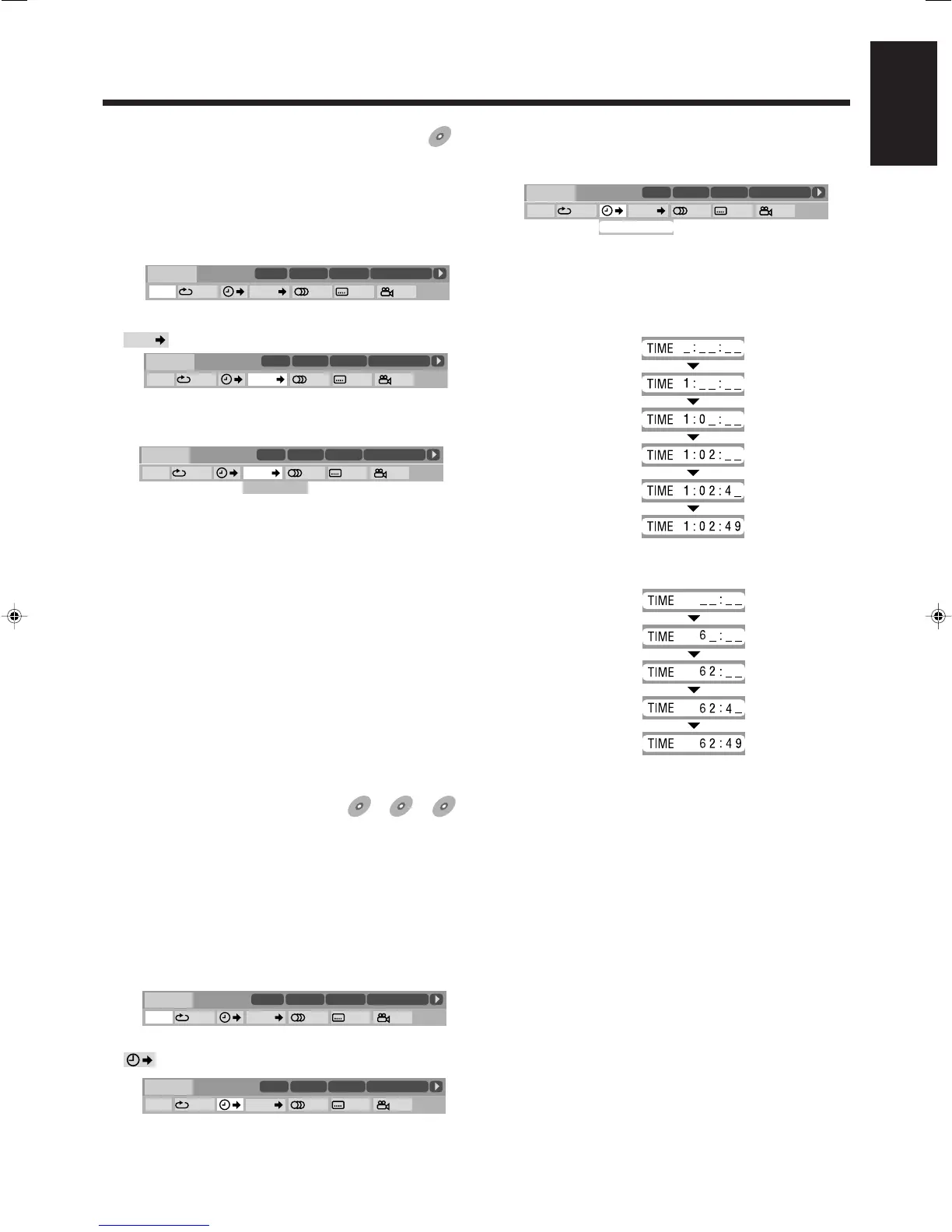
7 Locating a desired
position—Time Search
You can start playback at your desired position by specifying the
elapsed playing time from the disc.
• Time Search may not work for some DVDs.
& For DVD/VCD: During playback
For CD: During playback or while stopped
1
Press ON SCREEN twice.
The on-screen bar with pull-down menu appears on the TV.
Ex.: When playing a DVD
2
Press cursor 3 / 2 repeatedly to select (highlight)
on the pull-down menu.
3
Press ENTER.
The pop-up window appears under the pull-down menu.
4
Use the number buttons (0 – 9) to enter the time.
You can specify the time in hours/minutes/seconds for DVD,
and in minutes/seconds for VCD/CD.
Ex.: To play back from a point of 1 (hours): 02 (minutes): 49
(seconds) from the beginning for DVD.
Press 1
Press 0
Press 2
Press 4
Press 9
Ex.: To play back from a point of 62 (minutes): 49 (seconds)
from the beginning for CD or VCD.
Press 6
Press 2
Press 4
Press 9
To correct a misentry
Pressing cursor 2 erases the last entry.
Press cursor 2 repeatedly until the wrong number is erased,
then press the number buttons to enter the correct number(s)
again.
5
Press ENTER.
The unit starts playback from the specified time.
To turn off the on-screen bar
Press ON SCREEN.
OFF
1/3
1/3 1/3
TIME
CHAP.
DVD-VIDEO
TITLE 14DISC 3
TOTAL 1:25:58
CHAP 23
8.5Mbps
TIME _ : _ _ : _ _
38-43HX-Z77&55[U]ff.p65 03.8.29, 11:04 AM38


 To Next Page
 Loading...