ENGLISH
13
Getting Started
Preparation
Basic Operation
Troubleshooting
Settings
Others
CAUTION
●
Do not close lens cover when projecting. Otherwise
it will cause malfunction
,
heat and re.
■
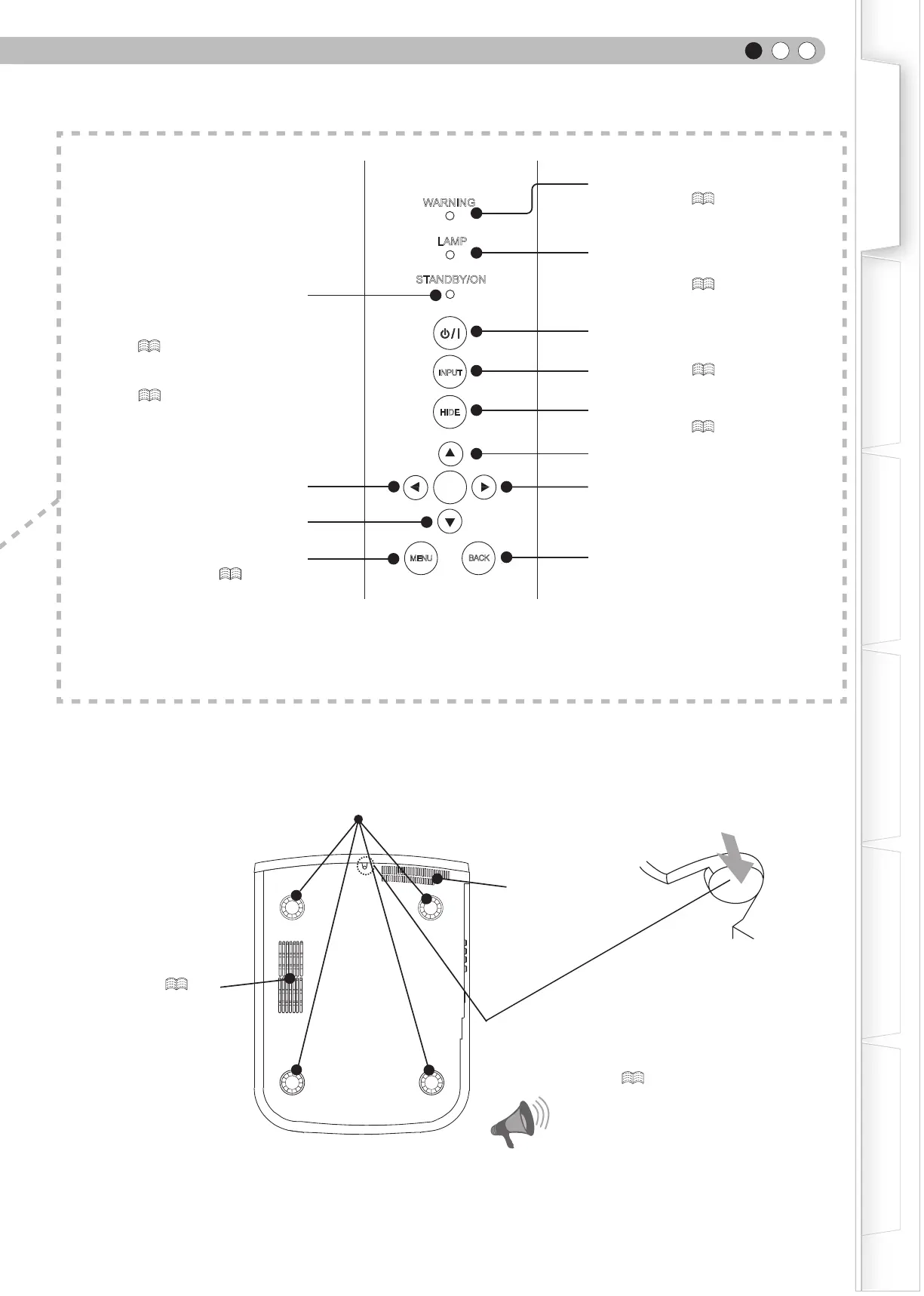
Bottom Surface
Feet: The height (0 to 5 mm) can be adjusted by turning the foot.
Air inlets
Air inlets/Filter (
P51
)
Light on (Red): Warning mode
(
P47
)
Light on/Blinking (Orange):
Lamp warning
(
P47
)
Light on (Red):
Standby mode
Light on (Green):
During projection
Blinking (Green):
Image is temporarily hidden
(
P25
)
Blinking (Red):
Cool Down mode
(
P25
)
To turn on/off the power
To switch input (
P24
)
To hide the image temporarily
(
P25
)
Right button
Left button
Down button
To display the menu
(
P30
)
To return to the previous menu
Up button
WARNING
LAMP
STANDBY/ON
INPUT
HIDE
MENU
BACK
OK
Manual button for lens cover:
Press and hold the button to open the lens cover.
As this is used for maintenance, it is not necessary to
use it at normal times. (
P56
)



 To Next Page