EasyManua.ls Logo

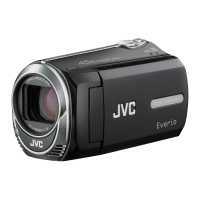
JVC Everio GZ-MS100 - User Manual

JVC Everio GZ-MS100
80 pages
Print Icon
To Next Page IconTo Next Page
Loading...
FRANÇAISENGLISH
MEMORY CAMCORDER
CAMÉSCOPE À MÉMOIRE
INSTRUCTIONS
MANUEL D’UTILISATION
GZ-MS100
Dear Customer
Thank you for purchasing this memory
camcorder. Before use, please read
the safety information and precautions
contained in pages 4 and 5 to ensure
safe use of this product.
For Future Reference:
Enter the Model No. (located on the
bottom of the camcorder) and Serial
No. (located on the battery pack
mount of the camcorder) below.
Model No.
Serial No.
Cher client,
Merci pour avoir acheté ce
caméscope à mémoire. Avant
son utilisation, prière de lire les
informations de sécurité et les
précautions des pages 4 et 5 pour
assurer une utilisation sûre de votre
appareil.
Pour une référence ultérieure:
Entrer le numéro de modèle (situé au
dessous du caméscope) et le numéro
de série (situé sur le logement de la
batterie) ci-dessous.
N° du modèle
N° de série
FREN
LYT1921-001A
U

Table of Contents

Other manuals for JVC Everio GZ-MS100

Questions and Answers

  • A
    Aaron FletcherAug 17, 2025
    How to fix JVC Camcorder when no power is supplied?
    • A
      Amy VelazquezAug 17, 2025
      If your JVC Camcorder isn't getting power, try these steps: * Ensure the AC adapter is securely connected. * Detach and reattach the battery pack firmly. * Replace the discharged battery with a fully charged one.
  • T
    Tara MillerAug 20, 2025
    Why JVC Everio GZ-MS100 Camcorder power does not turn on or battery drains quickly?
    • A
      Andrew RogersAug 20, 2025
      If your JVC Camcorder won't turn on, or the battery life is very short, make sure to use the camcorder under appropriate operating temperatures. Also, the battery may be worn out, and you might need to purchase a new one.
  • M
    Mary ProctorAug 22, 2025
    Why JVC Everio GZ-MS100 power/charge lamp does not light during charging?
    • M
      Mrs. Mia SpencerAug 23, 2025
      If the power/charge lamp on your JVC Camcorder doesn't light during charging, it could be due to extremely high or low temperatures. Charge it in a place with a temperature of 10°C to 35°C (50°F to 95°F). Also, when the battery is already fully charged, the lamp does not light. Check the remaining battery power.
  • J
    Jillian PinedaAug 25, 2025
    What to do if JVC Everio GZ-MS100 recording cannot be performed?
    • A
      Andrew LongAug 26, 2025
      If you cannot record with your JVC Camcorder, it might be because the SD card is full. Try deleting unnecessary files or replacing the SD card.
  • K
    kennethwilliamsAug 27, 2025
    How to fix JVC Everio GZ-MS100 Camcorder if focus is not adjusted automatically?
    • J
      Jennifer ThorntonAug 27, 2025
      If the focus on your JVC Camcorder isn't adjusting automatically, try these steps: 1. Set [FOCUS] to [AUTO]. 2. Clean the lens and check the focus again.
  • J
    Jason CameronAug 30, 2025
    What to do if the SD card cannot be removed from JVC Everio GZ-MS100?
    • M
      marywrightAug 30, 2025
      If the SD card is stuck in your JVC Camcorder, push the SD card in a few more times to release it.
  • D
    dawnjohnstonSep 1, 2025
    Why is JVC Everio GZ-MS100 Camcorder data processing too slow?
    • E
      Elijah BenjaminSep 1, 2025
      If your JVC Camcorder is processing data slowly, especially after powering on or changing modes, it might be due to a large number of still images (approximately 1,000 or more) stored on the SD card. Copy the stored files to other devices and then delete them from the SD card.
  • R
    Rachel ToddSep 4, 2025
    Why digital zoom does not work on JVC Camcorder?
    • M
      Michelle MartinSep 4, 2025
      If digital zoom is not working on your JVC Camcorder, change the settings in [ZOOM]. Also, digital zoom is not available in the still image recording mode.
  • F
    frubioSep 6, 2025
    How to display date/time during recording on JVC Everio GZ-MS100?
    • J
      James HoweSep 6, 2025
      If the date/time does not appear during recording on your JVC Camcorder, touch the DISP button once.
  • E
    Elizabeth NolanSep 9, 2025
    What to do if [CREATE DVD] screen is displayed on JVC Everio GZ-MS100 Camcorder?
    • V
      Victoria Martinez MDSep 9, 2025
      If the [CREATE DVD] screen is displayed on your JVC Camcorder and no other operations can be performed, it may be because another operation is being attempted while a DVD burner that is turned on is connected. Turn off the camcorder connected to the DVD burner, or disconnect the USB cable.

Summary

Easy Start Guide - Core Operations

Preparation

Steps to prepare the camcorder for use.

Video Recording

Select video mode and start recording.

Playback

Select playback mode and view files.

Initial Setup and Operations

Date;Time Setting and Operation Start

Set date/time, start recording, and select playback files.

Safety Precautions

General Safety Warnings

Covers electrical, fire, environmental, and handling risks.

Included Accessories

Camcorder Components

Lists AC Adapter, Battery Pack, Cables, and Software.

LCD Monitor Indicators

Recording Mode Indicators

Explains indicators shown during recording.

Playback Indicators

Playback Mode Indicators

Explains indicators shown during playback.

JVC Everio GZ-MS100 Specifications

General IconGeneral
BrandJVC
ModelEverio GZ-MS100
CategoryCamcorder
LanguageEnglish

Related product manuals